Witchbrook
Aggiornata
Versione corrente
Offerta da

Vista tutta la passione dimostrata nel giocare a Witchbrook, le tue mani non dovrebbero essere limitate al minuscolo schermo di un telefono. Gioca come un professionista e ottieni il pieno controllo del gioco con tastiera e mouse. MEmu ti offre tutto ciò che ti aspetti. Scarica e gioca a Witchbrook su PC. Gioca quanto vuoi, niente più limitazioni di batteria, dati mobili e chiamate inquietanti. Il nuovissimo MEmu 9 è la scelta migliore per giocare a Witchbrook su PC. Realizzato sulla base della nostra esperienza, lo squisito sistema di mappatura dei tasti preimpostati rende Witchbrook un vero e proprio gioco per PC. MEmu è un gestore multi-instanza che permette di giocare con 2 o più account sullo stesso dispositivo. E la cosa più importante, il nostro esclusivo motore di emulazione può liberare tutto il potenziale del tuo PC, rendendo tutto fluido.
Mostra altro
Scarica Witchbrook su PC con MEmu Android Emulator. Divertiti giocando sul grande schermo. Witchbrook is an enchanting life simulation game being developed by Chucklefish, the studio known for publishing beloved titles like Stardew Valley.
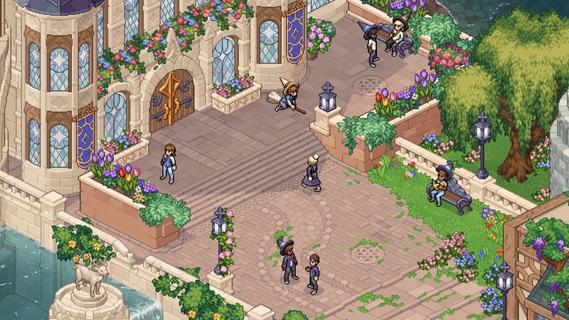

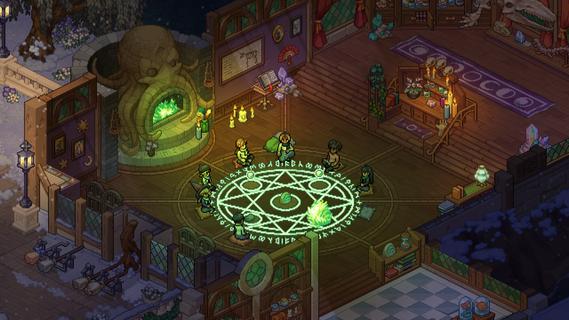
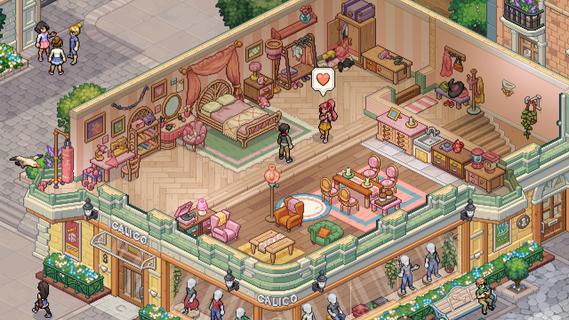
Witchbrook is an enchanting life simulation game being developed by Chucklefish, the studio known for publishing beloved titles like Stardew Valley. This charming pixel art adventure invites players to step into the shoes of a young witch-in-training at Witchbrook College in the picturesque seaside town of Mossport. The game combines magical education with social simulation, allowing players to craft their own unique journey through witch school. As a student, you'll attend various classes in subjects like potions, charms, and magical creatures, complete assignments, and gradually improve your magical abilities. The spell-casting system lets players combine magical elements to create different effects, with more powerful and complex spells becoming available as you progress. Beyond academics, Witchbrook offers a rich social experience. Players can form meaningful relationships with classmates, teachers, and townspeople, each with their own distinct personalities and storylines. The game features dialogue choices that affect relationships, potentially leading to romantic partnerships. Social events such as dances and festivals provide opportunities to strengthen these bonds. The sandbox elements of Witchbrook allow for extensive exploration of Mossport and its surroundings. Players can engage in a variety of activities including fishing, brewing potions, growing magical crops, foraging for strange mushrooms, and participating in broom races. The game world changes with the seasons, offering unique quests, ingredients, and magical phenomena throughout the year. Character customization plays a significant role, with players able to choose their witch's appearance and magical specialties. As you progress, you'll earn experience points and level up different magical disciplines like potion-making, spellcasting, or herbology, each with its own progression tree and unlockable abilities. The ultimate goal is to graduate from Witchbrook College and earn your witching permit by completing main quests from professors and passing certification exams. However, the journey is just as important as the destination, with the game emphasizing player choice and open-ended gameplay. While initially designed as a single-player experience, the developers have mentioned they're working on adding multiplayer functionality, potentially allowing up to four players to share in the magical adventure. With its cozy aesthetic, deep gameplay systems, and focus on both magical education and social relationships, Witchbrook promises to deliver a spellbinding experience for fans of life simulation games when it eventually releases.
Mostra altro

1. Scarica il programma di installazione di MEmu e completa l'installazione

2. Avvia il Memu e apri il Google Play sulla homepage

3. Cerca Witchbrook in Google Play
Install
4. Scarica e installa Witchbrook
5. Al termine dell'installazione, fai clic sull'icona per avviar

6. Divertiti giocando a Witchbrook su PC con MEmu
MEmu App Player è il miglior emulatore Android gratuito, utilizzato da 50 milioni di persone per ottenere un'esperienza di gioco Android superba. La tecnilogia di virtualizzazione MEmu ti permette di giocare a migliaia di giochi Android con semplicità sul tuo computer, anche i giochi con la grafica più esigente.
Schermo più grande con una grafica migliore; Lunga durata, senza limitazione di batteria o dati mobili.
Supporto completo per mappa di tastiera per un controllo preciso di tastiera e mouse o gamepad.
Multipli account di gioco o attività su un singolo PC contemporaneamente con il gestore di multi istanza.
Play Witchbrook on PC by following steps: