Witchbrook
Bijgewerkt
Huidige Versie
Aangeboden door

Met al je passie voor het spelen van Witchbrook, zouden je handen niet beperkt moeten zijn tot een klein scherm van je telefoon. Speel als een professional en krijg volledige controle over je spel met toetsenbord en muis. MEmu biedt je alles wat je verwacht. Download en speel Witchbrook op PC. Speel zo lang als je wilt, geen beperkingen meer van batterij, mobiele data en storende oproepen. De gloednieuwe MEmu 9 is de beste keuze om Witchbrook op PC te spelen. Voorbereid met onze expertise, maakt het uitmuntende vooraf ingestelde keymapping systeem van Witchbrook een echt PC-spel. MEmu multi-instance manager maakt het spelen van 2 of meer accounts op hetzelfde apparaat mogelijk. En het belangrijkste, onze exclusieve emulatie-engine kan het volledige potentieel van je PC benutten, waardoor alles soepel verloopt.
Meer tonen
Download Witchbrook on PC with MEmu Android Emulator. Enjoy playing on big screen. Witchbrook is an enchanting life simulation game being developed by Chucklefish, the studio known for publishing beloved titles like Stardew Valley.
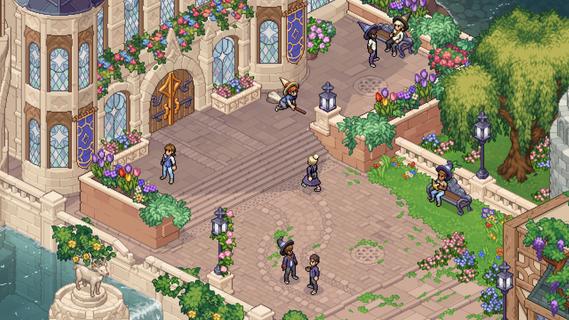

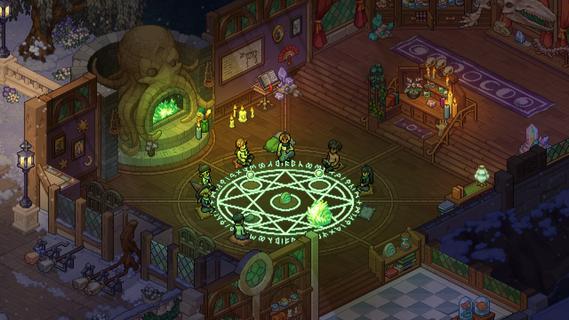
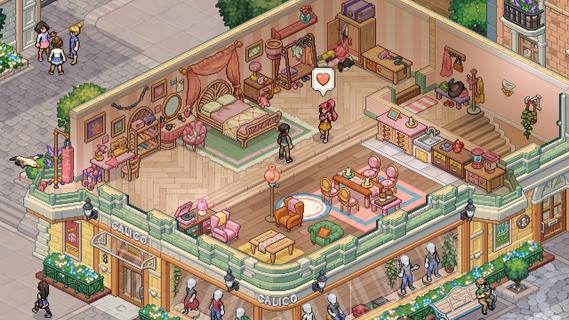
Witchbrook is an enchanting life simulation game being developed by Chucklefish, the studio known for publishing beloved titles like Stardew Valley. This charming pixel art adventure invites players to step into the shoes of a young witch-in-training at Witchbrook College in the picturesque seaside town of Mossport. The game combines magical education with social simulation, allowing players to craft their own unique journey through witch school. As a student, you'll attend various classes in subjects like potions, charms, and magical creatures, complete assignments, and gradually improve your magical abilities. The spell-casting system lets players combine magical elements to create different effects, with more powerful and complex spells becoming available as you progress. Beyond academics, Witchbrook offers a rich social experience. Players can form meaningful relationships with classmates, teachers, and townspeople, each with their own distinct personalities and storylines. The game features dialogue choices that affect relationships, potentially leading to romantic partnerships. Social events such as dances and festivals provide opportunities to strengthen these bonds. The sandbox elements of Witchbrook allow for extensive exploration of Mossport and its surroundings. Players can engage in a variety of activities including fishing, brewing potions, growing magical crops, foraging for strange mushrooms, and participating in broom races. The game world changes with the seasons, offering unique quests, ingredients, and magical phenomena throughout the year. Character customization plays a significant role, with players able to choose their witch's appearance and magical specialties. As you progress, you'll earn experience points and level up different magical disciplines like potion-making, spellcasting, or herbology, each with its own progression tree and unlockable abilities. The ultimate goal is to graduate from Witchbrook College and earn your witching permit by completing main quests from professors and passing certification exams. However, the journey is just as important as the destination, with the game emphasizing player choice and open-ended gameplay. While initially designed as a single-player experience, the developers have mentioned they're working on adding multiplayer functionality, potentially allowing up to four players to share in the magical adventure. With its cozy aesthetic, deep gameplay systems, and focus on both magical education and social relationships, Witchbrook promises to deliver a spellbinding experience for fans of life simulation games when it eventually releases.
Meer tonen

1. Download de MEmu-installatie en voltooi de setup

2. Start MEmu en open vervolgens Google Play op het bureaublad

3. Zoek Witchbrook in Google Play
Install
4. Download en installeer Witchbrook
5. Klik op het icoon om te starten na het voltooien van de installatie

6. Geniet van het spelen van Witchbrook op PC met MEmu
MEmu Play is de beste Android Emulator en 100 miljoen mensen genieten al van de superieure Android-game-ervaring. De virtualisatietechnologie van MEmu stelt je in staat om duizenden Android-spellen soepel op je PC te spelen, zelfs de meest grafisch intensieve.
Groter scherm met betere graphics; Lange duur, zonder beperking van batterij of mobiele data.
Volledige Keymapping-ondersteuning voor nauwkeurige besturing van toetsenbord en muis of gamepad.
Meerdere game-accounts of taken op één PC tegelijk met Multi-Instance manager.
Speel Witchbrook op PC door de volgende stappen te volgen: