Witchbrook
Zaktualizowano
Aktualna wersja
Sprzedawca

Przy całej swojej pasji do grania w Witchbrook, twoje ręce nie powinny być ograniczone na małym ekranie telefonu. Graj jak zawodowiec i uzyskaj pełną kontrolę nad grą za pomocą klawiatury i myszy. MEmu oferuje ci wszystko, czego oczekujesz. Pobierz i graj Witchbrook na PC. Graj tak długo, jak chcesz, bez ograniczeń baterii, danych komórkowych i niepokojących połączeń. Zupełnie nowy MEmu 9 to najlepszy wybór do grania w Witchbrook na PC. Przygotowany dzięki naszej wiedzy, znakomity, wstępnie ustawiony system mapowania klawiszy sprawia, że Witchbrook jest prawdziwą grą na PC. Zakodowany naszą absorpcją, menedżer wielu instancji umożliwia granie na 2 lub więcej kontach na tym samym urządzeniu. A co najważniejsze, nasz emulator może uwolnić pełny potencjał twojego komputera, sprawić, że wszystko będzie płynne. Dbamy nie tylko o to, jak grasz, ale także o cały proces czerpania radości z grania.
Pokaż więcej
Ciesz się wspaniałym doświadczeniem podczas grania w Witchbrook na komputerze z aplikacją MEMU App Player. Jest to potężny darmowy emulator Androida pozwalający grać w tysiące gier na Androida. Witchbrook is an enchanting life simulation game being developed by Chucklefish, the studio known for publishing beloved titles like Stardew Valley.
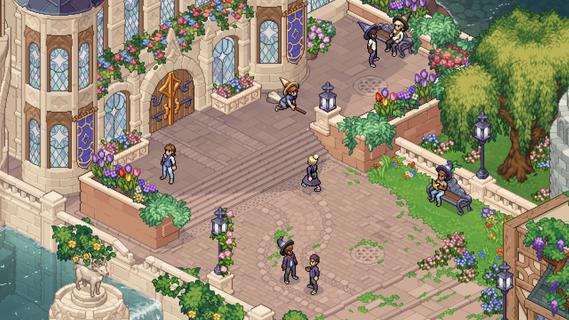

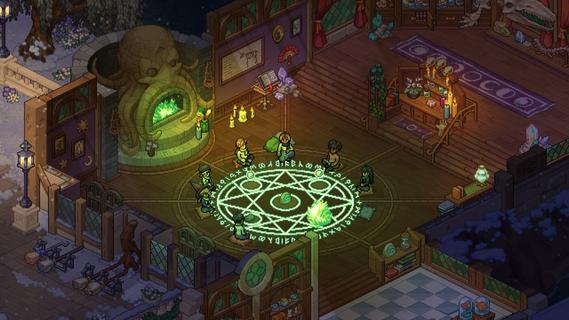
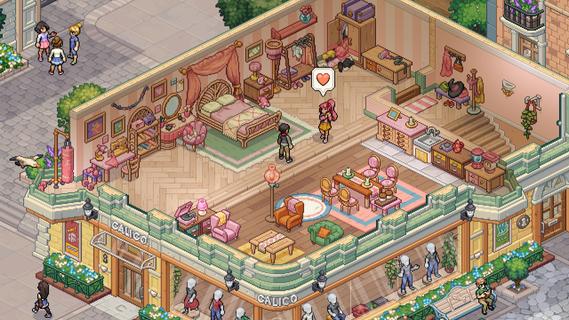
Witchbrook is an enchanting life simulation game being developed by Chucklefish, the studio known for publishing beloved titles like Stardew Valley. This charming pixel art adventure invites players to step into the shoes of a young witch-in-training at Witchbrook College in the picturesque seaside town of Mossport. The game combines magical education with social simulation, allowing players to craft their own unique journey through witch school. As a student, you'll attend various classes in subjects like potions, charms, and magical creatures, complete assignments, and gradually improve your magical abilities. The spell-casting system lets players combine magical elements to create different effects, with more powerful and complex spells becoming available as you progress. Beyond academics, Witchbrook offers a rich social experience. Players can form meaningful relationships with classmates, teachers, and townspeople, each with their own distinct personalities and storylines. The game features dialogue choices that affect relationships, potentially leading to romantic partnerships. Social events such as dances and festivals provide opportunities to strengthen these bonds. The sandbox elements of Witchbrook allow for extensive exploration of Mossport and its surroundings. Players can engage in a variety of activities including fishing, brewing potions, growing magical crops, foraging for strange mushrooms, and participating in broom races. The game world changes with the seasons, offering unique quests, ingredients, and magical phenomena throughout the year. Character customization plays a significant role, with players able to choose their witch's appearance and magical specialties. As you progress, you'll earn experience points and level up different magical disciplines like potion-making, spellcasting, or herbology, each with its own progression tree and unlockable abilities. The ultimate goal is to graduate from Witchbrook College and earn your witching permit by completing main quests from professors and passing certification exams. However, the journey is just as important as the destination, with the game emphasizing player choice and open-ended gameplay. While initially designed as a single-player experience, the developers have mentioned they're working on adding multiplayer functionality, potentially allowing up to four players to share in the magical adventure. With its cozy aesthetic, deep gameplay systems, and focus on both magical education and social relationships, Witchbrook promises to deliver a spellbinding experience for fans of life simulation games when it eventually releases.
Pokaż więcej

1. Pobierz instalator MEmu i zakończ instalację

2. Uruchom MEmu, a następnie otwórz Google Play na pulpicie

3. Wyszukaj Witchbrook w Google Play
Install
4. Pobierz i zainstaluj Witchbrook
5. Po zakończeniu instalacji kliknij ikonę, aby rozpocząć

6. Ciesz się grą Witchbrook na PC z MEmu
MEmu Play to najlepszy emulator Androida, a 100 milionów ludzi już korzysta z jego i dosta doskonałe wrażenia z gier na Androida. Technologia wirtualizacji MEmu umożliwia płynne granie w tysiące gier Androida na komputerze, nawet tych najbardziej wymagających grafiki.
Większy ekran z lepszą grafiką; Długi czas, bez ograniczeń baterii lub danych mobilnych.
Pełna obsługa mapowania klawiszy dla precyzyjnego sterowania klawiaturą i myszą lub gamepadem.
Wiele kont gier lub zadań na jednym komputerze jednocześnie z menedżerem wielu instancji.
Play Witchbrook on PC by following steps: