Baby Monitor PC

Scarica Baby Monitor su PC

Baby Monitor PC

Baby Monitor

  • Aggiornata

  • Versione corrente

    11.16

  • Offerta da

    Baby Monitor PC

Caratteristiche di Baby Monitor su PC

Non devi più preoccuparti dei sovraccarichi durante l'utilizzo di Baby Monitor sul tuo cellulare, liberati dal piccolo schermo e goditi dell'App su uno schermo molto più grande. D'ora in poi, sperimenta la tua App a schermo intero con tastiera e mouse. MEmu ti offre tutte le sorprendenti funzioni che ti aspettavi: installazione rapida e impostazione semplice, controlli intuitivi, niente più limitazioni di batteria, dati mobili e chiamate fastidiose. Il MEmu 9 nuovo di zecca è la prima scelta per utilizzare Baby Monitor sul tuo computer. Codificato con il nostro assorbimento, il gestore multi-istanza consente di aprire 2 o più account contemporaneamente. E soprattutto, il nostro esclusivo motore di emulazione può sbloccare il pieno potenziale del tuo PC, rendendo tutto liscio e piacevole.

Mostra altro

Screenshot & video del PC Baby Monitor

Scarica Baby Monitor su PC con MEmu Android Emulator. Divertiti giocando sul grande schermo. Baby Monitor helping you in listening your baby when you are away.
Informazioni del gioco

Baby Monitor helping you in listening your baby when you are away.
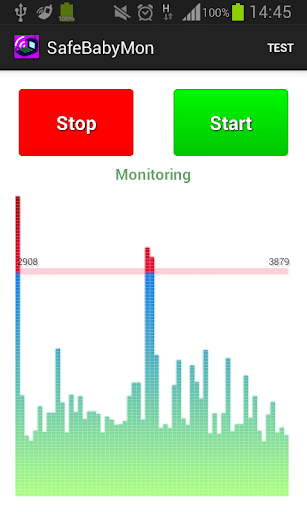


Baby Monitor detects if baby cries and notifies you via regular call.


How to use

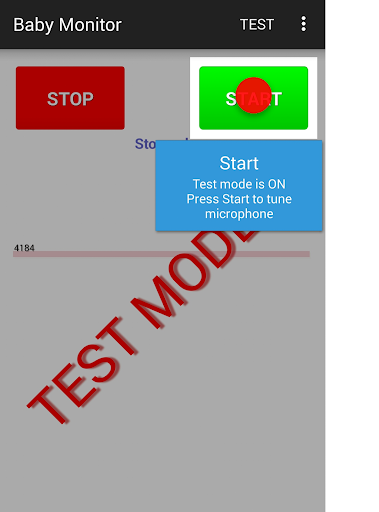
Turn on Test mode - use menu Test.
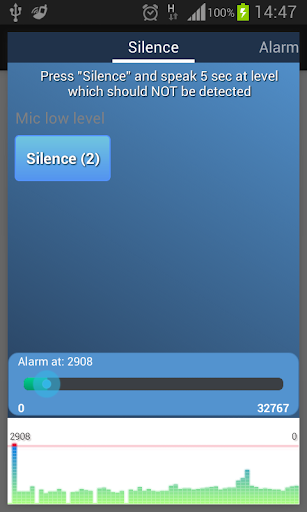
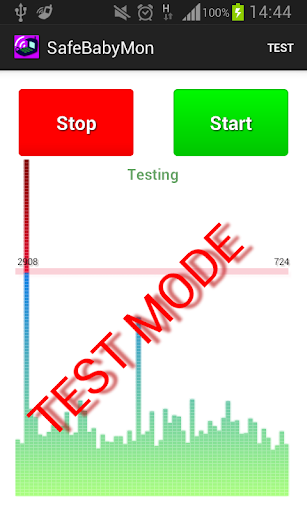
Press START button - you should see noise bars at the bottom.
Pay attention to horizontal red line - that is the alarm level.
BabyMonitor notifies you if the noise bars crossed that line several times.
Move that horizontal red line up and down to change the alarm level.
Turn off Test mode - use menu Test again.
Specify phone numbers for notification - use menu Settings, Call phones.
Put the phone on a distance to the baby, position a microphone in the direction of the child, press START button and you can leave the room.

Key features
- No ads
- You can specify multiple contacts for calls
- Continuous monitoring
- Regular call if battery is getting low
- Customized microphone sensitivity
- Microphone calibration wizard
- Silent incoming calls so as not to wake the baby
- Low battery consumption
- Runs in the background, even when the device screen is off
- Delay before start gives you time to leave the room
- Auto recovery from temporary problems of mobile network
- You can specify SIM slot number (may not work on some models)
- You can send child phone mic level to the parent phone. Install baby monitor on two phones. In the child's phone settings, check 'Experimental', check 'Enable Internet data sending', check 'This is the child phone', click on 'This phone id' and send copied Id to the parent phone using any messenger. Click the main Start button to start monitoring.
In the parent phone settings, check 'Experimental', check 'Enable Internet data sending', check 'This is the parent phone', click on 'Child phone id' and paste child phone Id from messenger. Click the main Start button to start getting data from the child phone.
You can use several parent phones.

Tips
- Baby Monitor does not require Wi-Fi network or mobile data
- You can use any kind of phone to get Baby Monitor regular calls
- Make sure that
- The selected microphone level will trigger an alarm at a distance from the child, but will not trigger on any background noises
- The phone has a good battery level or charging
- Mobile network signal is good and stable
- You do not need to choose SIM card or anything else manually when you are doing a normal call
- BabyMonitor is still running after 30 min of phone sleep mode and background activity for BabyMonitor is allowed in phone settings
- It is better to put and test phone within 2 meters
- It is better to make sure that you get the alarm calls several times
- It is better to not leave baby alone for a long time, Baby Monitor can not replace a real nanny. This application is designed to help you with your babysitting. It is not a substitute for real human care.

If you like the BabyMonitor application, please review it on Google Play.
Please feel free to contact us at faebir.sbm@gmail.com if you have any questions, feedback, ideas or issues.
You can visit http://faebir.weebly.com for additional information.

Mostra altro

Come scaricare Baby Monitor su PC

  • Baby Monitor PC

    1. Scarica il programma di installazione di MEmu e completa l'installazione

  • Baby Monitor PC

    2. Avvia il Memu e apri il Google Play sulla homepage

  • Baby Monitor PC

    3. Cerca Baby Monitor in Google Play

  • Baby Monitor PC Install

    4. Scarica e installa Baby Monitor

  • Baby Monitor PC

    5. Al termine dell'installazione, fai clic sull'icona per avviar

  • Baby Monitor PC
    Baby Monitor PC Baby Monitor PC

    6. Divertiti giocando a Baby Monitor su PC con MEmu

Perché Usare MEmu per Baby Monitor

MEmu App Player è il miglior emulatore Android gratuito, utilizzato da 50 milioni di persone per ottenere un'esperienza di gioco Android superba. La tecnilogia di virtualizzazione MEmu ti permette di giocare a migliaia di giochi Android con semplicità sul tuo computer, anche i giochi con la grafica più esigente.

  • Schermo più grande con una grafica migliore; Lunga durata, senza limitazione di batteria o dati mobili.

  • Supporto completo per mappa di tastiera per un controllo preciso di tastiera e mouse o gamepad.

  • Multipli account di gioco o attività su un singolo PC contemporaneamente con il gestore di multi istanza.

Pronto per giocare?

argomenti più seguiti

Baby Monitor - FAQs

  • Come si usa Baby Monitor su PC?

    Use Baby Monitor on PC by following steps:

    • Download MEmu, then install and launch it
    • Login to Google Play Store, install the app
    • Enjoy using the app on PC with MEmu
  • Quali sono i requisiti minimi di sistema per eseguire Baby Monitor su PC?
    • Intel or AMD Processor
    • Microsoft Windows 7 and above
    • 2GB of memory
    • 5GB of free disk space
    • Hardware Virtualization Technology

Le Migliori App