Baby Monitor PC

Pobierz Baby Monitor na PC

Baby Monitor PC

Baby Monitor

  • Zaktualizowano

  • Aktualna wersja

    11.16

  • Sprzedawca

    Baby Monitor PC

Funkcje Baby Monitor na PC

Przestań martwić się nadmiernymi opłatami podczas korzystania z Baby Monitor na telefonie komórkowym, uwolnij się od małego ekranu i ciesz się korzystaniem z aplikacji na znacznie większym wyświetlaczu. Od teraz korzystaj z aplikacji na pełnym ekranie za pomocą klawiatury i myszy. MEmu oferuje wszystkie zaskakujące funkcje, których się spodziewałeś: szybką instalację i łatwą konfigurację, intuicyjne sterowanie, koniec z ograniczeniami baterii, danych mobilnych i niepokojących połączeń. Zupełnie nowy MEmu 9 to najlepszy wybór do używania Baby Monitor na twoim komputerze. Zakodowany przez naszą absorpcję, menedżer wielu instancji umożliwia otwarcie 2 lub więcej kont w tym samym czasie. A co najważniejsze, nasz ekskluzywny emulator może uwolnić pełny potencjał twojego komputera, sprawić, że wszystko będzie płynne i przyjemne.

Pokaż więcej

Zrzuty ekranu i wideo z Baby Monitor PC

Ciesz się wspaniałym doświadczeniem podczas grania w Baby Monitor na komputerze z aplikacją MEMU App Player. Jest to potężny darmowy emulator Androida pozwalający grać w tysiące gier na Androida. Baby Monitor helping you in listening your baby when you are away.
Informacje o aplikacji

Baby Monitor helping you in listening your baby when you are away.
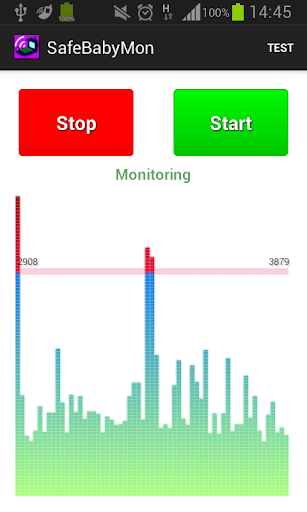


Baby Monitor detects if baby cries and notifies you via regular call.


How to use

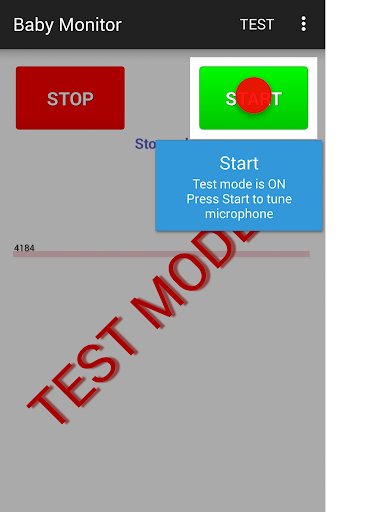
Turn on Test mode - use menu Test.
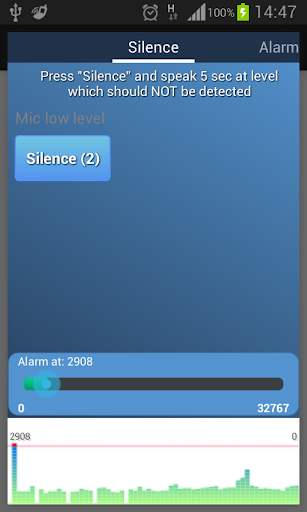
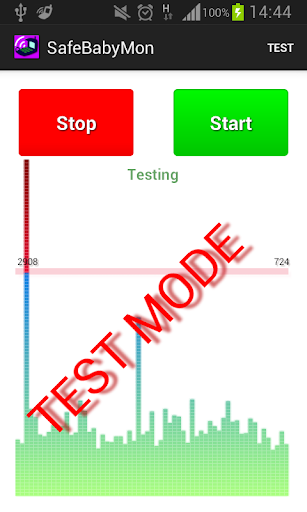
Press START button - you should see noise bars at the bottom.
Pay attention to horizontal red line - that is the alarm level.
BabyMonitor notifies you if the noise bars crossed that line several times.
Move that horizontal red line up and down to change the alarm level.
Turn off Test mode - use menu Test again.
Specify phone numbers for notification - use menu Settings, Call phones.
Put the phone on a distance to the baby, position a microphone in the direction of the child, press START button and you can leave the room.

Key features
- No ads
- You can specify multiple contacts for calls
- Continuous monitoring
- Regular call if battery is getting low
- Customized microphone sensitivity
- Microphone calibration wizard
- Silent incoming calls so as not to wake the baby
- Low battery consumption
- Runs in the background, even when the device screen is off
- Delay before start gives you time to leave the room
- Auto recovery from temporary problems of mobile network
- You can specify SIM slot number (may not work on some models)
- You can send child phone mic level to the parent phone. Install baby monitor on two phones. In the child's phone settings, check 'Experimental', check 'Enable Internet data sending', check 'This is the child phone', click on 'This phone id' and send copied Id to the parent phone using any messenger. Click the main Start button to start monitoring.
In the parent phone settings, check 'Experimental', check 'Enable Internet data sending', check 'This is the parent phone', click on 'Child phone id' and paste child phone Id from messenger. Click the main Start button to start getting data from the child phone.
You can use several parent phones.

Tips
- Baby Monitor does not require Wi-Fi network or mobile data
- You can use any kind of phone to get Baby Monitor regular calls
- Make sure that
- The selected microphone level will trigger an alarm at a distance from the child, but will not trigger on any background noises
- The phone has a good battery level or charging
- Mobile network signal is good and stable
- You do not need to choose SIM card or anything else manually when you are doing a normal call
- BabyMonitor is still running after 30 min of phone sleep mode and background activity for BabyMonitor is allowed in phone settings
- It is better to put and test phone within 2 meters
- It is better to make sure that you get the alarm calls several times
- It is better to not leave baby alone for a long time, Baby Monitor can not replace a real nanny. This application is designed to help you with your babysitting. It is not a substitute for real human care.

If you like the BabyMonitor application, please review it on Google Play.
Please feel free to contact us at faebir.sbm@gmail.com if you have any questions, feedback, ideas or issues.
You can visit http://faebir.weebly.com for additional information.

Pokaż więcej

Jak pobrać Baby Monitor na PC

  • Baby Monitor PC

    1. Pobierz instalator MEmu i zakończ instalację

  • Baby Monitor PC

    2. Uruchom MEmu, a następnie otwórz Google Play na pulpicie

  • Baby Monitor PC

    3. Wyszukaj Baby Monitor w Google Play

  • Baby Monitor PC Install

    4. Pobierz i zainstaluj Baby Monitor

  • Baby Monitor PC

    5. Po zakończeniu instalacji kliknij ikonę, aby rozpocząć

  • Baby Monitor PC
    Baby Monitor PC Baby Monitor PC

    6. Użyj MEmu, aby doświadczyć Baby Monitor na swoim komputerze

Dlaczego warto używać MEmu do korzystania z Baby Monitor

MEmu Play to najlepszy emulator Androida, z którego korzysta ponad 100 milionów użytkowników, ciesząc się wyjątkowym doświadczeniem aplikacji na Androida. Technologia wirtualizacji MEmu pozwala na płynne uruchamianie tysięcy aplikacji Androida na komputerze, nawet tych najbardziej wymagających.

  • Większy ekran z lepszą grafiką; Długi czas, bez ograniczeń baterii lub danych mobilnych.

  • Pełna obsługa mapowania klawiszy dla precyzyjnego sterowania klawiaturą i myszą lub gamepadem.

  • Wiele kont gier lub zadań na jednym komputerze jednocześnie z menedżerem wielu instancji.

Gotowy, żeby tego doświadczyć?

Gorące tematy

Baby Monitor - FAQs

  • Jak korzystać z Baby Monitor na PC?

    Use Baby Monitor on PC by following steps:

    • Download MEmu, then install and launch it
    • Login to Google Play Store, install the app
    • Enjoy using the app on PC with MEmu
  • Jakie są minimalne wymagania systemowe, aby uruchomić Baby Monitor na PC?
    • Intel or AMD Processor
    • Microsoft Windows 7 and above
    • 2GB of memory
    • 5GB of free disk space
    • Hardware Virtualization Technology

Najlepsze aplikacje