Baby Monitor PC

ดาวน์โหลด Baby Monitor บน PC

Baby Monitor PC
  • อัปเดตเมื่อ

  • เวอร์ชันปัจจุบัน

    11.16

  • ให้บริการโดย

    Baby Monitor PC

คุณสมบัติของ Baby Monitor บน PC

เมื่อใช้ Baby Monitor บนโทรศัพท์ของคุณไม่ต้องกังวลกับการชาร์จไฟมากเกินไปปลดปล่อยตัวคุณเองจากหน้าจอขนาดเล็กและสนุกกับการใช้แอพนี้บนหน้าจอขนาดใหญ่ จากนี้ไปรับประสบการณ์เต็มหน้าจอของแอปพลิเคชันของคุณด้วยคีย์บอร์ดและเมาส์ MEmu มีคุณสมบัติที่น่าแปลกใจที่คุณคาดหวัง: การติดตั้งที่รวดเร็วและการตั้งค่าที่ง่ายควบคุมได้ง่ายไม่ จำกัด แบตเตอรี่ข้อมูลมือถือและการโทรที่รบกวน MEmu 9 ใหม่ล่าสุดเป็นตัวเลือกที่ดีที่สุดสำหรับการใช้ Meitu – โปรแกรมแก้ไขภาพแนวธรรมชาติ บนคอมพิวเตอร์ของคุณ ด้วยรหัสการดูดซึมของเราผู้จัดการหลายอินสแตนซ์ทำให้สามารถเปิดบัญชี 2 บัญชีขึ้นไปในเวลาเดียวกันได้ และที่สำคัญที่สุดเอ็นจิ้นจำลองพิเศษของเราสามารถปลดปล่อยศักยภาพของPCของคุณและทำให้ทุกอย่างราบรื่นและสนุกสนาน

แสดงเพิ่มเติม

สกรีนช็อตและ & วีดีโอของ Baby Monitor บน PC

ดาวน์โหลด Baby Monitor บน PC ด้วย MEmu Android Emulator สนุกกับการเล่นบนหน้าจอขนาดใหญ่ Baby Monitor helping you in listening your baby when you are away.
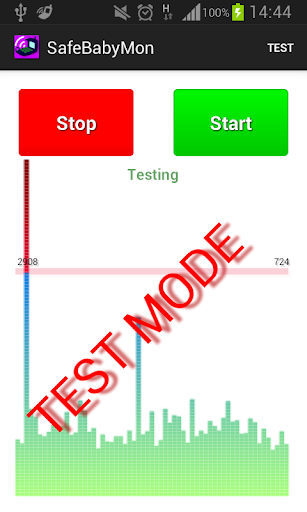
ข้อมูลการสมัคร

Baby Monitor helping you in listening your baby when you are away.
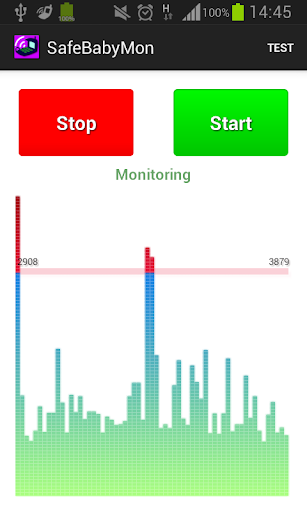


Baby Monitor detects if baby cries and notifies you via regular call.


How to use

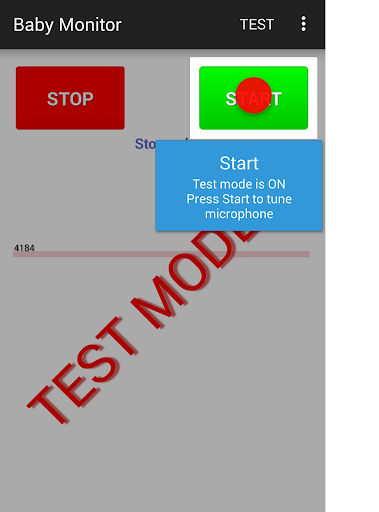
Turn on Test mode - use menu Test.
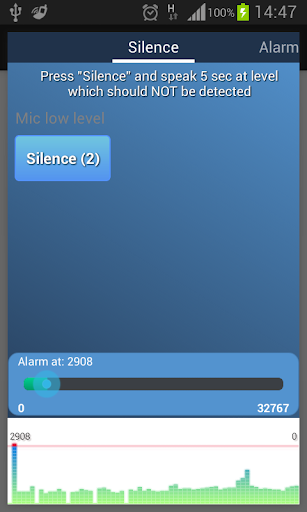
Press START button - you should see noise bars at the bottom.
Pay attention to horizontal red line - that is the alarm level.
BabyMonitor notifies you if the noise bars crossed that line several times.
Move that horizontal red line up and down to change the alarm level.
Turn off Test mode - use menu Test again.
Specify phone numbers for notification - use menu Settings, Call phones.
Put the phone on a distance to the baby, position a microphone in the direction of the child, press START button and you can leave the room.

Key features
- No ads
- You can specify multiple contacts for calls
- Continuous monitoring
- Regular call if battery is getting low
- Customized microphone sensitivity
- Microphone calibration wizard
- Silent incoming calls so as not to wake the baby
- Low battery consumption
- Runs in the background, even when the device screen is off
- Delay before start gives you time to leave the room
- Auto recovery from temporary problems of mobile network
- You can specify SIM slot number (may not work on some models)
- You can send child phone mic level to the parent phone. Install baby monitor on two phones. In the child's phone settings, check 'Experimental', check 'Enable Internet data sending', check 'This is the child phone', click on 'This phone id' and send copied Id to the parent phone using any messenger. Click the main Start button to start monitoring.
In the parent phone settings, check 'Experimental', check 'Enable Internet data sending', check 'This is the parent phone', click on 'Child phone id' and paste child phone Id from messenger. Click the main Start button to start getting data from the child phone.
You can use several parent phones.

Tips
- Baby Monitor does not require Wi-Fi network or mobile data
- You can use any kind of phone to get Baby Monitor regular calls
- Make sure that
- The selected microphone level will trigger an alarm at a distance from the child, but will not trigger on any background noises
- The phone has a good battery level or charging
- Mobile network signal is good and stable
- You do not need to choose SIM card or anything else manually when you are doing a normal call
- BabyMonitor is still running after 30 min of phone sleep mode and background activity for BabyMonitor is allowed in phone settings
- It is better to put and test phone within 2 meters
- It is better to make sure that you get the alarm calls several times
- It is better to not leave baby alone for a long time, Baby Monitor can not replace a real nanny. This application is designed to help you with your babysitting. It is not a substitute for real human care.

If you like the BabyMonitor application, please review it on Google Play.
Please feel free to contact us at faebir.sbm@gmail.com if you have any questions, feedback, ideas or issues.
You can visit http://faebir.weebly.com for additional information.

แสดงเพิ่มเติม

ดาวน์โหลด Baby Monitor บน PC

  • Baby Monitor PC

    1. ดาวน์โหลดตัวติดตั้ง MEmu และสิ้นสุดการติดตั้ง

  • Baby Monitor PC

    2. เริ่ม MEmu จากนั้นเปิด Google Play บนหน้าแรก

  • Baby Monitor PC

    3. ค้นหา Baby Monitor ใน Google Play

  • Baby Monitor PC Install

    4. ดาวน์โหลดและติดตั้ง Baby Monitor

  • Baby Monitor PC

    5. เมื่อติดตั้งเสร็จให้คลิกที่ไอคอนเพื่อเริ่มใช้งาน

  • Baby Monitor PC
    Baby Monitor PC Baby Monitor PC

    6. ใช้ MEmu เพื่อสัมผัสประสบการณ์ Baby Monitor บนคอมพิวเตอร์ของคุณ

ทำไมถึงควรใช้ Memu สำหรับ Baby Monitor

MEmu Play คือโปรแกรมจำลอง Android ที่ดีที่สุด มีผู้ใช้มากกว่า 50 ล้านคน มอบประสบการณ์การใช้งานแอป Android ขั้นสุดยอดให้กับคุณ เทคโนโลยีจำลองเสมือนของ MEmu ช่วยให้คุณรันแอป Android หลายพันแอปบนคอมพิวเตอร์ได้อย่างราบรื่น แม้แอปที่กินทรัพยากรเครื่องสูงที่สุด

  • จอใหญ่และกราฟฟิกสวยกว่า; เล่นได้นาน, ไม่ต้องใช้แบตเตอรี่โทรศัพท์หรือเน็ตโทรศัพท์.

  • ระบบปรับแต่งปุ่มคีย์บอร์ดและเม้าส์ตามที่คุณเลือก

  • เล่นมากกว่าหนึ่งเกมบน PC ในเวลาเดียวกันด้วยระบบหลายจอหรือ Multi-Instance manager.

พร้อมที่จะเริ่มสัมผัสประสบการณ์นี้หรือยัง?

หัวข้อร้อน

Baby Monitor - FAQs

  • วิธีการใช้ Baby Monitor บน PC?

    Use Baby Monitor on PC by following steps:

    • Download MEmu, then install and launch it
    • Login to Google Play Store, install the app
    • Enjoy using the app on PC with MEmu
  • ข้อกำหนดขั้นต่ำของระบบในการใช้งาน Baby Monitor บน PC มีอะไรบ้าง?
    • Intel or AMD Processor
    • Microsoft Windows 7 and above
    • 2GB of memory
    • 5GB of free disk space
    • Hardware Virtualization Technology

แอปที่นิยมเมื่อ