Baby Monitor PC

Unduh Baby Monitor di PC

Baby Monitor PC

Baby Monitor

  • Diupdate

  • Versi Saat Ini

    11.16

  • Ditawarkan Oleh

    Baby Monitor PC

Fitur Baby Monitor di PC

Hentilah khawatir tentang biaya berlebihan saat menggunakan Baby Monitor di ponsel Anda, bebaskan diri Anda dari layar kecil dan nikmati menggunakan aplikasi pada tampilan yang lebih besar. Mulai sekarang, dapatkan pengalaman full-screen di aplikasi Anda dengan keyboard dan mouse. MEmu menyediakan semua fitur mengejutkan yang Anda harapkan: cepat menginstal dan mudah menggunakan, kontrol intuitif, tidak ada lagi batasan baterai, data seluler dan panggilan yang mengganggu. MEmu 9 yang baru adalah pilihan terbaik untuk menggunakan Baby Monitor di komputer Anda. Bersandi dengan absorpsi kami, manajer multi-instance memungkinkan pembukaan 2 akun atau lebih pada saat yang bersamaan. Dan yang paling penting, mesin emulasi eksklusif kami dapat melepaskan potensi penuh PC Anda, menjadikan semuanya lancar dan menyenangkan.

Tampilkan Lebih banyak

Tangkapan layar & Vidio Baby Monitor PC

Unduh Baby Monitor di PC dengan Emulator Android MEmu. Nikmati permainan pada layar yang besar. Baby Monitor helping you in listening your baby when you are away.
Informasi Aplikasi

Baby Monitor helping you in listening your baby when you are away.


Baby Monitor detects if baby cries and notifies you via regular call.


How to use

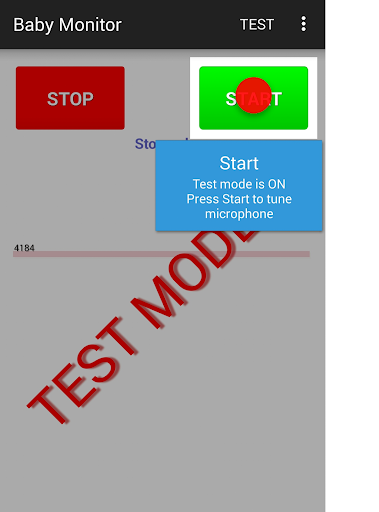
Turn on Test mode - use menu Test.
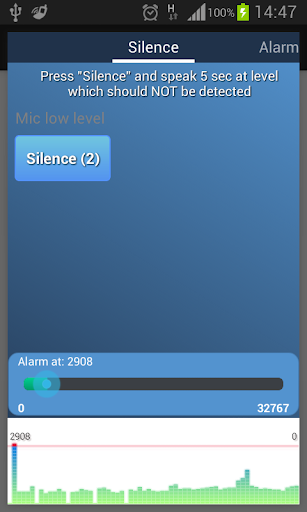
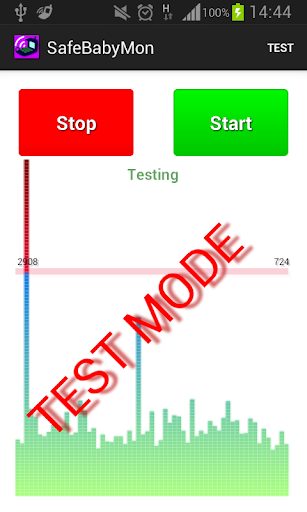
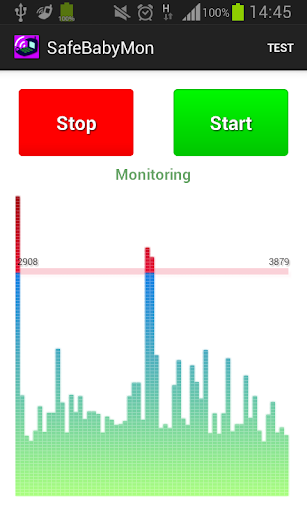
Press START button - you should see noise bars at the bottom.
Pay attention to horizontal red line - that is the alarm level.
BabyMonitor notifies you if the noise bars crossed that line several times.
Move that horizontal red line up and down to change the alarm level.
Turn off Test mode - use menu Test again.
Specify phone numbers for notification - use menu Settings, Call phones.
Put the phone on a distance to the baby, position a microphone in the direction of the child, press START button and you can leave the room.

Key features
- No ads
- You can specify multiple contacts for calls
- Continuous monitoring
- Regular call if battery is getting low
- Customized microphone sensitivity
- Microphone calibration wizard
- Silent incoming calls so as not to wake the baby
- Low battery consumption
- Runs in the background, even when the device screen is off
- Delay before start gives you time to leave the room
- Auto recovery from temporary problems of mobile network
- You can specify SIM slot number (may not work on some models)
- You can send child phone mic level to the parent phone. Install baby monitor on two phones. In the child's phone settings, check 'Experimental', check 'Enable Internet data sending', check 'This is the child phone', click on 'This phone id' and send copied Id to the parent phone using any messenger. Click the main Start button to start monitoring.
In the parent phone settings, check 'Experimental', check 'Enable Internet data sending', check 'This is the parent phone', click on 'Child phone id' and paste child phone Id from messenger. Click the main Start button to start getting data from the child phone.
You can use several parent phones.

Tips
- Baby Monitor does not require Wi-Fi network or mobile data
- You can use any kind of phone to get Baby Monitor regular calls
- Make sure that
- The selected microphone level will trigger an alarm at a distance from the child, but will not trigger on any background noises
- The phone has a good battery level or charging
- Mobile network signal is good and stable
- You do not need to choose SIM card or anything else manually when you are doing a normal call
- BabyMonitor is still running after 30 min of phone sleep mode and background activity for BabyMonitor is allowed in phone settings
- It is better to put and test phone within 2 meters
- It is better to make sure that you get the alarm calls several times
- It is better to not leave baby alone for a long time, Baby Monitor can not replace a real nanny. This application is designed to help you with your babysitting. It is not a substitute for real human care.

If you like the BabyMonitor application, please review it on Google Play.
Please feel free to contact us at faebir.sbm@gmail.com if you have any questions, feedback, ideas or issues.
You can visit http://faebir.weebly.com for additional information.

Tampilkan Lebih banyak

Unduh Baby Monitor di PC

  • Baby Monitor PC

    1. Unduh dan instal MEmu APP

  • Baby Monitor PC

    2. Menjalankan MEmu lalu buka Google Play di halaman

  • Baby Monitor PC

    3. Cari Baby Monitor di Google Play

  • Baby Monitor PC Install

    4. Unduh dan instal Baby Monitor

  • Baby Monitor PC

    5. Setelah insatl APP selesai,klik ikon untuk mulai

  • Baby Monitor PC
    Baby Monitor PC Baby Monitor PC

    6. Nikmati bermain Baby Monitor di PC dengan MEmu

Kenapa Memakai MEmu untuk Baby Monitor

MEmu Play adalah emulator Android gratis terbaik dan 50 Juta orang sudah menikmati pengalaman luar biasa dalam Aplikasi Android. Teknologi virtualisasi MEmu memberi kekuasaan untuk memainkan ribuan Aplikasi Android dengan lancar di PC anda, bahkan Aplikasi dengan grafis yang paling tinggi.

  • Layar lebih besar dengan grafis yang lebih baik; durasi panjang, tanpa batasan baterai atau data seluler.

  • Didukung penuh oleh Pemetaan tombol yang lengkap untuk keakuratan kontrol keyboard dan mouse maupun gamepad.

  • Membuka beberapa akun game atau tugas di waktu yang sama hanya pada satu PC, dengan Multi-Instance manager.

Siap untuk mulai menggunakannya?

topik panas

Baby Monitor - FAQs

  • Bagaimana cara memakai Baby Monitor pada PC?

    Use Baby Monitor on PC by following steps:

    • Download MEmu, then install and launch it
    • Login to Google Play Store, install the app
    • Enjoy using the app on PC with MEmu
  • Apa saja ketentuan minimal dari sistem untuk menjalankan Baby Monitor pada PC?
    • Intel or AMD Processor
    • Microsoft Windows 7 and above
    • 2GB of memory
    • 5GB of free disk space
    • Hardware Virtualization Technology

Aplikasi Teratas