Baby Monitor para PC

Baixar Baby Monitor no PC

Baby Monitor para PC
  • Atualizada

  • Versão atual

    11.16

  • Oferecido por

    Baby Monitor para PC

Características do Baby Monitor no PC

Pare de se preocupar com sobrecargas ao usar Baby Monitor no seu celular, liberte-se da pequena tela e aproveite o uso do aplicativo numa tela muito maior. A partir de agora, obtenha uma experiência em tela cheia do seu aplicativo com teclado e mouse. O MEmu oferece-lhe todos os recursos surpreendentes que você esperava: instalação rápida e configuração fácil, controles intuitivos, sem mais limitações de bateria, dados móveis e chamadas perturbadoras. O novíssimo MEmu 9 é a melhor opção para usar Baby Monitor no seu computador. Codificado com a nossa absorção, o gerenciador de multi-instâncias possibilita a abertura de 2 ou mais contas ao mesmo tempo. E o mais importante, nosso mecanismo de emulação exclusivo pode liberar todo o potencial do seu PC, tornando tudo suave e agradável.

Mostre mais

Capturas de tela & vídeo do Baby Monitor no PC

Download do Baby Monitor no PC com MEmu Android Emulador: Divirta-se jogando na tela grande. Baby Monitor helping you in listening your baby when you are away.
Informações sobre o software

Baby Monitor helping you in listening your baby when you are away.
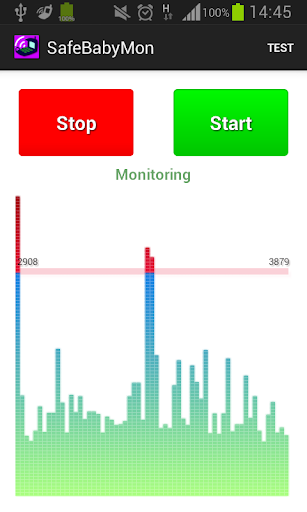


Baby Monitor detects if baby cries and notifies you via regular call.


How to use

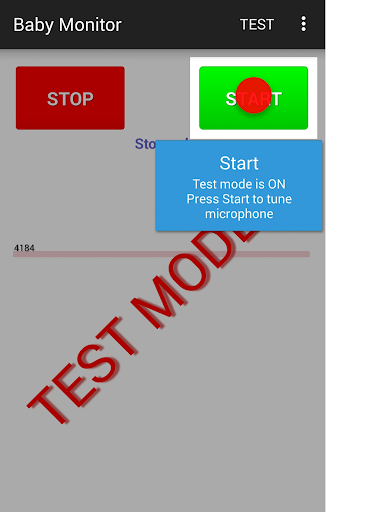
Turn on Test mode - use menu Test.
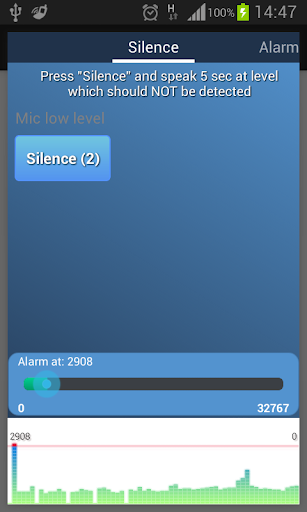
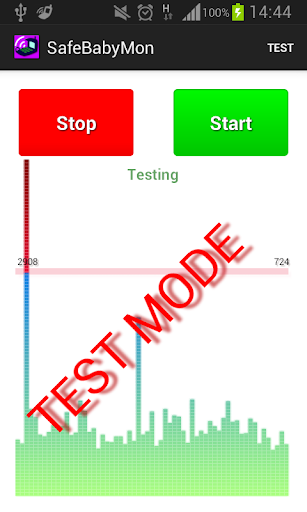
Press START button - you should see noise bars at the bottom.
Pay attention to horizontal red line - that is the alarm level.
BabyMonitor notifies you if the noise bars crossed that line several times.
Move that horizontal red line up and down to change the alarm level.
Turn off Test mode - use menu Test again.
Specify phone numbers for notification - use menu Settings, Call phones.
Put the phone on a distance to the baby, position a microphone in the direction of the child, press START button and you can leave the room.

Key features
- No ads
- You can specify multiple contacts for calls
- Continuous monitoring
- Regular call if battery is getting low
- Customized microphone sensitivity
- Microphone calibration wizard
- Silent incoming calls so as not to wake the baby
- Low battery consumption
- Runs in the background, even when the device screen is off
- Delay before start gives you time to leave the room
- Auto recovery from temporary problems of mobile network
- You can specify SIM slot number (may not work on some models)
- You can send child phone mic level to the parent phone. Install baby monitor on two phones. In the child's phone settings, check 'Experimental', check 'Enable Internet data sending', check 'This is the child phone', click on 'This phone id' and send copied Id to the parent phone using any messenger. Click the main Start button to start monitoring.
In the parent phone settings, check 'Experimental', check 'Enable Internet data sending', check 'This is the parent phone', click on 'Child phone id' and paste child phone Id from messenger. Click the main Start button to start getting data from the child phone.
You can use several parent phones.

Tips
- Baby Monitor does not require Wi-Fi network or mobile data
- You can use any kind of phone to get Baby Monitor regular calls
- Make sure that
- The selected microphone level will trigger an alarm at a distance from the child, but will not trigger on any background noises
- The phone has a good battery level or charging
- Mobile network signal is good and stable
- You do not need to choose SIM card or anything else manually when you are doing a normal call
- BabyMonitor is still running after 30 min of phone sleep mode and background activity for BabyMonitor is allowed in phone settings
- It is better to put and test phone within 2 meters
- It is better to make sure that you get the alarm calls several times
- It is better to not leave baby alone for a long time, Baby Monitor can not replace a real nanny. This application is designed to help you with your babysitting. It is not a substitute for real human care.

If you like the BabyMonitor application, please review it on Google Play.
Please feel free to contact us at faebir.sbm@gmail.com if you have any questions, feedback, ideas or issues.
You can visit http://faebir.weebly.com for additional information.

Mostre mais

Como Baixar Baby Monitor no PC

  • Baby Monitor para PC

    1. Faça o download do instalador do MEmu e conclua a instalação

  • Baby Monitor para PC

    2. Inicie o MEmu e depois abra o Google Play na página inicial

  • Baby Monitor para PC

    3. Pesquise Baby Monitor no Google Play

  • Baby Monitor para PC Install

    4. Baixe e Instale Baby Monitor

  • Baby Monitor para PC

    5. Na conclusão da instalação, clique no ícone para iniciar

  • Baby Monitor para PC
    Baby Monitor para PC Baby Monitor para PC

    6. º Experimente o Baby Monitor no PC com o MEmu.

Porquê escolher o MEmu para experimentar o Baby Monitor

O MEmu Play é o melhor emulador Android gratuito, com 50 milhões de utilizadores a desfrutar da sua experiência superior com aplicações Android. A tecnologia de virtualização do MEmu permite-lhe executar milhares de aplicações Android sem problemas no seu computador, mesmo as mais exigentes.

  • Tela maior com gráficos melhores; Longa duração e sem limitação de bateria ou dados móveis.

  • Suporte completo ao Mapaeamento de Teclas para controle preciso do teclado e mouse ou gamepad.

  • Várias contas de jogos ou tarefas em um único PC de uma só vez com o Gerenciador de várias instâncias.

Pronto para começar a usar?

tópicos quentes

Baby Monitor - FAQs

  • Como usar Baby Monitor no PC?

    Use Baby Monitor on PC by following steps:

    • Download MEmu, then install and launch it
    • Login to Google Play Store, install the app
    • Enjoy using the app on PC with MEmu
  • Quais são os requisitos mínimos do sistema para executar Baby Monitor no PC?
    • Intel or AMD Processor
    • Microsoft Windows 7 and above
    • 2GB of memory
    • 5GB of free disk space
    • Hardware Virtualization Technology

Aplicativos Principais