Blackwork Embroidery Creator
Aggiornata
Versione corrente
4.0.1
Offerta da

Non devi più preoccuparti dei sovraccarichi durante l'utilizzo di Blackwork Embroidery Creator sul tuo cellulare, liberati dal piccolo schermo e goditi dell'App su uno schermo molto più grande. D'ora in poi, sperimenta la tua App a schermo intero con tastiera e mouse. MEmu ti offre tutte le sorprendenti funzioni che ti aspettavi: installazione rapida e impostazione semplice, controlli intuitivi, niente più limitazioni di batteria, dati mobili e chiamate fastidiose. Il MEmu 9 nuovo di zecca è la prima scelta per utilizzare Blackwork Embroidery Creator sul tuo computer. Codificato con il nostro assorbimento, il gestore multi-istanza consente di aprire 2 o più account contemporaneamente. E soprattutto, il nostro esclusivo motore di emulazione può sbloccare il pieno potenziale del tuo PC, rendendo tutto liscio e piacevole.
Mostra altro
Scarica Blackwork Embroidery Creator su PC con MEmu Android Emulator. Divertiti giocando sul grande schermo. Blackwork Embroidery Creator for your mobile device.
Blackwork Embroidery Creator for your mobile device.
Comes with 3 free patterns. Download is free. To activate creation is $2.99
Create Blackwork Embroidery patterns on your mobile device.
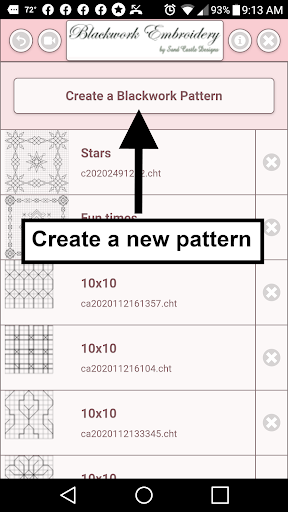
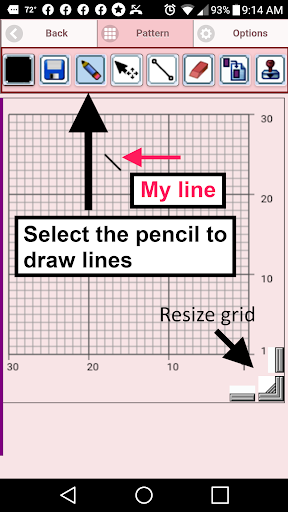
To create a Blackwork pattern, select "Create a Blackwork Pattern" button. The Blackwork Pattern Editor will appear. Using the pencil draw your pattern on the grid.
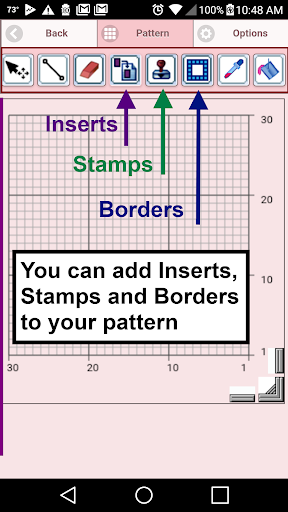
You can also select from over 200 stamps, inserts and borders to apply to your Blackwork pattern.
Features - buttons in button bar left to right
1. Color button - select any color
2. Save button - save your Blackwork pattern
3. Pencil button - draw stitches
4. Eraser button - erase stitches
5. Move button - move stitches
6. Resize button - resize a stitch
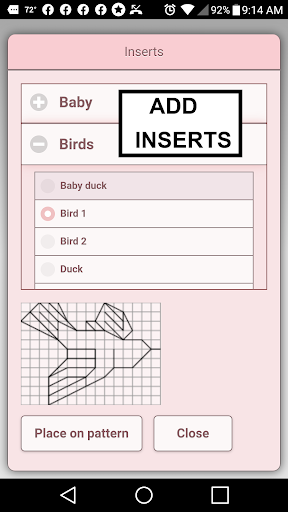
7. Inserts button - add pattern inserts to your pattern (like birds)
8. Stamps button - add little stamps (little designs) to add to your pattern
9. Borders button - add borders to your pattern. Borders automatically wrap around your pattern.
10. Dropper button - select a stitch color from your pattern to use for drawing more stitches
11. Bucket button - change the color of a stitch
12. Bucket All button - change the color of all stitches at once
13. Undo button - undo last things you did
14. Redo button - redo the things you undid
15. Selection button - select area of Blackwork pattern to cut or copy
16. Cut button - remove all stitches under the selected area. See item 15.
17. Copy button - copy all stitches under the selected area. See item 15.
18. Paste button - paste the cut or copied stitches. See item 15,16 and 17.
19. Rotate button - rotate selected area (see item 15) or whole pattern
20. Zoom in button - zoom in on your pattern
21. Zoom out button - zoom out on your pattern
22. Share button - share a picture of your Blackwork pattern using email, text etc.
23. Help button - learn how to use all the buttons
23. Resize bars - resize bars are displayed at the bottom right corner of your Blackwork pattern. Drag them to resize your Blackwork pattern.
Mostra altro

1. Scarica il programma di installazione di MEmu e completa l'installazione

2. Avvia il Memu e apri il Google Play sulla homepage

3. Cerca Blackwork Embroidery Creator in Google Play
Install
4. Scarica e installa Blackwork Embroidery Creator
5. Al termine dell'installazione, fai clic sull'icona per avviar

6. Divertiti giocando a Blackwork Embroidery Creator su PC con MEmu
MEmu App Player è il miglior emulatore Android gratuito, utilizzato da 50 milioni di persone per ottenere un'esperienza di gioco Android superba. La tecnilogia di virtualizzazione MEmu ti permette di giocare a migliaia di giochi Android con semplicità sul tuo computer, anche i giochi con la grafica più esigente.
Schermo più grande con una grafica migliore; Lunga durata, senza limitazione di batteria o dati mobili.
Supporto completo per mappa di tastiera per un controllo preciso di tastiera e mouse o gamepad.
Multipli account di gioco o attività su un singolo PC contemporaneamente con il gestore di multi istanza.
Use Blackwork Embroidery Creator on PC by following steps: