
Chathub Random Chat No Login
Aggiornata
Versione corrente
2.108
Offerta da

Non devi più preoccuparti dei sovraccarichi durante l'utilizzo di Chathub Random Chat No Login sul tuo cellulare, liberati dal piccolo schermo e goditi dell'App su uno schermo molto più grande. D'ora in poi, sperimenta la tua App a schermo intero con tastiera e mouse. MEmu ti offre tutte le sorprendenti funzioni che ti aspettavi: installazione rapida e impostazione semplice, controlli intuitivi, niente più limitazioni di batteria, dati mobili e chiamate fastidiose. Il MEmu 9 nuovo di zecca è la prima scelta per utilizzare Chathub Random Chat No Login sul tuo computer. Codificato con il nostro assorbimento, il gestore multi-istanza consente di aprire 2 o più account contemporaneamente. E soprattutto, il nostro esclusivo motore di emulazione può sbloccare il pieno potenziale del tuo PC, rendendo tutto liscio e piacevole.
Mostra altro
Scarica Chathub Random Chat No Login su PC con MEmu Android Emulator. Divertiti giocando sul grande schermo. Discover ChatHub - Your Ultimate Connection Destination.
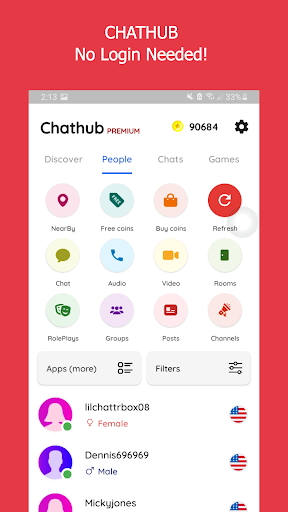
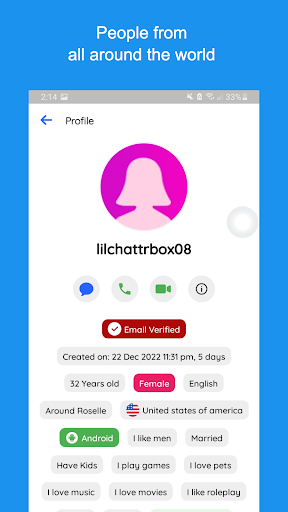
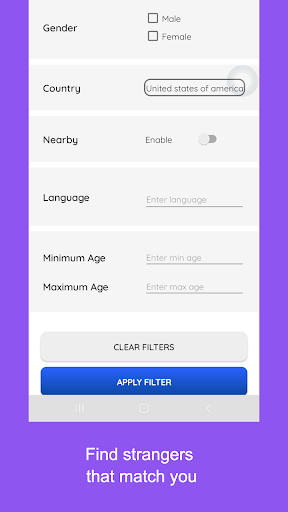
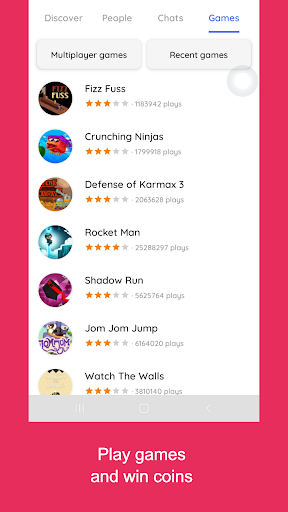
Discover ChatHub - Your Ultimate Connection Destination
Looking for thrilling connections and spontaneous chats? ChatHub is the answer! It's the latest vibrant platform designed for secure and anonymous interactions. Whether you seek meaningful connections, friendly chats, or new friends, ChatHub has you covered.
ChatHub - Where Connections Thrive
ChatHub is your ticket to engaging global conversations without the hassle of account creation. With just a tap, dive into one-on-one chats for an enjoyable and user-friendly experience.
At ChatHub, your privacy is paramount. Messages are auto-deleted, and no personal data is stored. We prioritize safety, requiring users to be over 18 and strictly prohibiting inappropriate content. Rest assured, we take action against violators.
ChatHub - Spark Authentic Conversations
ChatHub encourages genuine, free discussions without collecting personal data. Share images, audio, and videos confidently. Your privacy and conversation security are our priorities. Report any illegal activity through our reporting function.
ChatHub - Connect Globally
Connect with people globally or locally. Exchange media and engage in meaningful conversations with strangers. Our innovative random chat approach connects you with like-minded individuals.
ChatHub - Instant Connections
Experience instant connections worldwide without the need for login. Filter connections by location and language. Join a diverse community and enjoy seamless cam-to-cam chats through our Android app.
Join users from 200+ countries on ChatHub. Filter connections based on your preferences. Whether you seek friendly chats, flirting, or local dates, ChatHub has you covered.
Take advantage of features that will elevate your Chathub experience:
1. Talk with anyone for free, without any login required.
2. Know if your chat friend is chatting with someone else or only you.
3. Plenty of filters to find people that match your liking, age, gender, country, language, etc.
4. Send and receive pictures, make voice calls or video calls
5. Random chat, random voice call or random video call are 3 different features in app
6. Read roleplays or play a roleplay, join video channels or host a video channel
7. Create groups, ask questions or write posts/polls.
8. Find girls from your city or nearby
9. Safe for woman, no personal identification information is collected.
10. Meet new people and text them anonymously and make friends.
Craving something extra? Chathub Premium makes it even easier to chat with singles.
1. No advertisements
2. Send unlimited direct messages for free
3. Unlimited filters and refreshes
4. Create unlimited rooms, channels, groups or roleplays
5. Get free coins, voice and video calls
6. Themed messages will let everyone know you are a premium user and gets you more chats
7. Hide your calls and chats
Mostra altro

1. Scarica il programma di installazione di MEmu e completa l'installazione

2. Avvia il Memu e apri il Google Play sulla homepage

3. Cerca Chathub Random Chat No Login in Google Play
Install
4. Scarica e installa Chathub Random Chat No Login
5. Al termine dell'installazione, fai clic sull'icona per avviar

6. Divertiti giocando a Chathub Random Chat No Login su PC con MEmu
MEmu App Player è il miglior emulatore Android gratuito, utilizzato da 50 milioni di persone per ottenere un'esperienza di gioco Android superba. La tecnilogia di virtualizzazione MEmu ti permette di giocare a migliaia di giochi Android con semplicità sul tuo computer, anche i giochi con la grafica più esigente.
Schermo più grande con una grafica migliore; Lunga durata, senza limitazione di batteria o dati mobili.
Supporto completo per mappa di tastiera per un controllo preciso di tastiera e mouse o gamepad.
Multipli account di gioco o attività su un singolo PC contemporaneamente con il gestore di multi istanza.
Use Chathub Random Chat No Login on PC by following steps: