
Chathub Random Chat No Login
Zaktualizowano
Aktualna wersja
2.115
Sprzedawca

Przestań martwić się nadmiernymi opłatami podczas korzystania z Chathub Random Chat No Login na telefonie komórkowym, uwolnij się od małego ekranu i ciesz się korzystaniem z aplikacji na znacznie większym wyświetlaczu. Od teraz korzystaj z aplikacji na pełnym ekranie za pomocą klawiatury i myszy. MEmu oferuje wszystkie zaskakujące funkcje, których się spodziewałeś: szybką instalację i łatwą konfigurację, intuicyjne sterowanie, koniec z ograniczeniami baterii, danych mobilnych i niepokojących połączeń. Zupełnie nowy MEmu 9 to najlepszy wybór do używania Chathub Random Chat No Login na twoim komputerze. Zakodowany przez naszą absorpcję, menedżer wielu instancji umożliwia otwarcie 2 lub więcej kont w tym samym czasie. A co najważniejsze, nasz ekskluzywny emulator może uwolnić pełny potencjał twojego komputera, sprawić, że wszystko będzie płynne i przyjemne.
Pokaż więcej
Ciesz się wspaniałym doświadczeniem podczas grania w Chathub Random Chat No Login na komputerze z aplikacją MEMU App Player. Jest to potężny darmowy emulator Androida pozwalający grać w tysiące gier na Androida. Discover ChatHub - Your Ultimate Connection Destination.

Discover ChatHub - Your Ultimate Connection Destination
Looking for thrilling connections and spontaneous chats? ChatHub is the answer! It's the latest vibrant platform designed for secure and anonymous interactions. Whether you seek meaningful connections, friendly chats, or new friends, ChatHub has you covered.
ChatHub - Where Connections Thrive
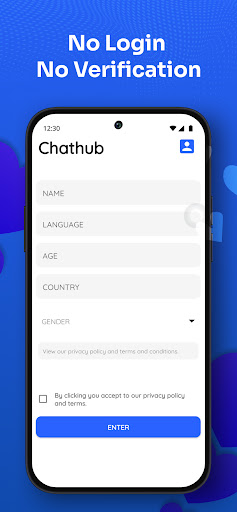
ChatHub is your ticket to engaging global conversations without the hassle of account creation. With just a tap, dive into one-on-one chats for an enjoyable and user-friendly experience.
At ChatHub, your privacy is paramount. Messages are auto-deleted, and no personal data is stored. We prioritize safety, requiring users to be over 18 and strictly prohibiting inappropriate content. Rest assured, we take action against violators.
ChatHub - Spark Authentic Conversations
ChatHub encourages genuine, free discussions without collecting personal data. Share images, audio, and videos confidently. Your privacy and conversation security are our priorities. Report any illegal activity through our reporting function.
ChatHub - Connect Globally
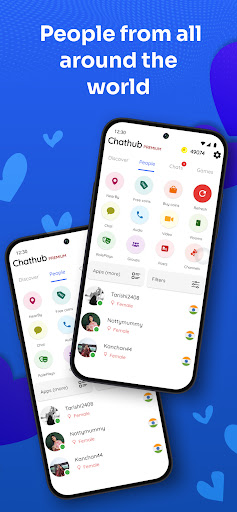
Connect with people globally or locally. Exchange media and engage in meaningful conversations with strangers. Our innovative random chat approach connects you with like-minded individuals.
ChatHub - Instant Connections
Experience instant connections worldwide without the need for login. Filter connections by location and language. Join a diverse community and enjoy seamless cam-to-cam chats through our Android app.
Join users from 200+ countries on ChatHub. Filter connections based on your preferences. Whether you seek friendly chats, flirting, or local dates, ChatHub has you covered.
Take advantage of features that will elevate your Chathub experience:
1. Talk with anyone for free, without any login required.
2. Know if your chat friend is chatting with someone else or only you.
3. Plenty of filters to find people that match your liking, age, gender, country, language, etc.
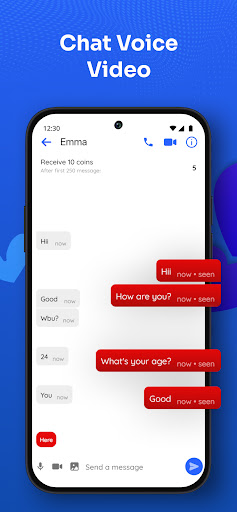
4. Send and receive pictures, make voice calls or video calls
5. Random chat, random voice call or random video call are 3 different features in app
6. Read roleplays or play a roleplay, join video channels or host a video channel
7. Create groups, ask questions or write posts/polls.
8. Find girls from your city or nearby
9. Safe for woman, no personal identification information is collected.
10. Meet new people and text them anonymously and make friends.
Craving something extra? Chathub Premium makes it even easier to chat with singles.
1. No advertisements
2. Send unlimited direct messages for free
3. Unlimited filters and refreshes
4. Create unlimited rooms, channels, groups or roleplays
5. Get free coins, voice and video calls
6. Themed messages will let everyone know you are a premium user and gets you more chats
7. Hide your calls and chats
Pokaż więcej

1. Pobierz instalator MEmu i zakończ instalację

2. Uruchom MEmu, a następnie otwórz Google Play na pulpicie

3. Wyszukaj Chathub Random Chat No Login w Google Play
Install
4. Pobierz i zainstaluj Chathub Random Chat No Login
5. Po zakończeniu instalacji kliknij ikonę, aby rozpocząć

6. Użyj MEmu, aby doświadczyć Chathub Random Chat No Login na swoim komputerze
MEmu Play to najlepszy emulator Androida, z którego korzysta ponad 100 milionów użytkowników, ciesząc się wyjątkowym doświadczeniem aplikacji na Androida. Technologia wirtualizacji MEmu pozwala na płynne uruchamianie tysięcy aplikacji Androida na komputerze, nawet tych najbardziej wymagających.
Większy ekran z lepszą grafiką; Długi czas, bez ograniczeń baterii lub danych mobilnych.
Pełna obsługa mapowania klawiszy dla precyzyjnego sterowania klawiaturą i myszą lub gamepadem.
Wiele kont gier lub zadań na jednym komputerze jednocześnie z menedżerem wielu instancji.
Use Chathub Random Chat No Login on PC by following steps: