
Chathub Random Chat No Login
Diupdate
Versi Saat Ini
2.115
Ditawarkan Oleh

Hentilah khawatir tentang biaya berlebihan saat menggunakan Chathub Random Chat No Login di ponsel Anda, bebaskan diri Anda dari layar kecil dan nikmati menggunakan aplikasi pada tampilan yang lebih besar. Mulai sekarang, dapatkan pengalaman full-screen di aplikasi Anda dengan keyboard dan mouse. MEmu menyediakan semua fitur mengejutkan yang Anda harapkan: cepat menginstal dan mudah menggunakan, kontrol intuitif, tidak ada lagi batasan baterai, data seluler dan panggilan yang mengganggu. MEmu 9 yang baru adalah pilihan terbaik untuk menggunakan Chathub Random Chat No Login di komputer Anda. Bersandi dengan absorpsi kami, manajer multi-instance memungkinkan pembukaan 2 akun atau lebih pada saat yang bersamaan. Dan yang paling penting, mesin emulasi eksklusif kami dapat melepaskan potensi penuh PC Anda, menjadikan semuanya lancar dan menyenangkan.
Tampilkan Lebih banyak
Unduh Chathub Random Chat No Login di PC dengan Emulator Android MEmu. Nikmati permainan pada layar yang besar. Discover ChatHub - Your Ultimate Connection Destination.

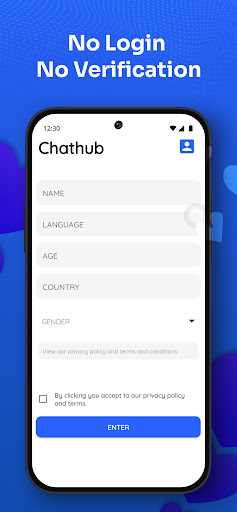
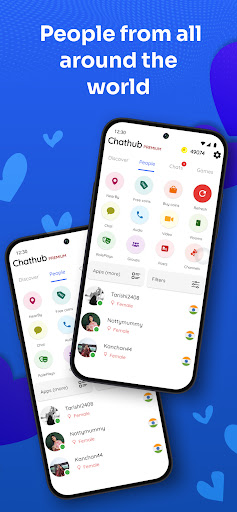
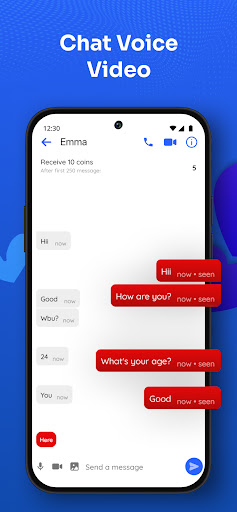
Discover ChatHub - Your Ultimate Connection Destination
Looking for thrilling connections and spontaneous chats? ChatHub is the answer! It's the latest vibrant platform designed for secure and anonymous interactions. Whether you seek meaningful connections, friendly chats, or new friends, ChatHub has you covered.
ChatHub - Where Connections Thrive
ChatHub is your ticket to engaging global conversations without the hassle of account creation. With just a tap, dive into one-on-one chats for an enjoyable and user-friendly experience.
At ChatHub, your privacy is paramount. Messages are auto-deleted, and no personal data is stored. We prioritize safety, requiring users to be over 18 and strictly prohibiting inappropriate content. Rest assured, we take action against violators.
ChatHub - Spark Authentic Conversations
ChatHub encourages genuine, free discussions without collecting personal data. Share images, audio, and videos confidently. Your privacy and conversation security are our priorities. Report any illegal activity through our reporting function.
ChatHub - Connect Globally
Connect with people globally or locally. Exchange media and engage in meaningful conversations with strangers. Our innovative random chat approach connects you with like-minded individuals.
ChatHub - Instant Connections
Experience instant connections worldwide without the need for login. Filter connections by location and language. Join a diverse community and enjoy seamless cam-to-cam chats through our Android app.
Join users from 200+ countries on ChatHub. Filter connections based on your preferences. Whether you seek friendly chats, flirting, or local dates, ChatHub has you covered.
Take advantage of features that will elevate your Chathub experience:
1. Talk with anyone for free, without any login required.
2. Know if your chat friend is chatting with someone else or only you.
3. Plenty of filters to find people that match your liking, age, gender, country, language, etc.
4. Send and receive pictures, make voice calls or video calls
5. Random chat, random voice call or random video call are 3 different features in app
6. Read roleplays or play a roleplay, join video channels or host a video channel
7. Create groups, ask questions or write posts/polls.
8. Find girls from your city or nearby
9. Safe for woman, no personal identification information is collected.
10. Meet new people and text them anonymously and make friends.
Craving something extra? Chathub Premium makes it even easier to chat with singles.
1. No advertisements
2. Send unlimited direct messages for free
3. Unlimited filters and refreshes
4. Create unlimited rooms, channels, groups or roleplays
5. Get free coins, voice and video calls
6. Themed messages will let everyone know you are a premium user and gets you more chats
7. Hide your calls and chats
Tampilkan Lebih banyak

1. Unduh dan instal MEmu APP

2. Menjalankan MEmu lalu buka Google Play di halaman

3. Cari Chathub Random Chat No Login di Google Play
Install
4. Unduh dan instal Chathub Random Chat No Login
5. Setelah insatl APP selesai,klik ikon untuk mulai

6. Nikmati bermain Chathub Random Chat No Login di PC dengan MEmu
MEmu Play adalah emulator Android gratis terbaik dan 50 Juta orang sudah menikmati pengalaman luar biasa dalam Aplikasi Android. Teknologi virtualisasi MEmu memberi kekuasaan untuk memainkan ribuan Aplikasi Android dengan lancar di PC anda, bahkan Aplikasi dengan grafis yang paling tinggi.
Layar lebih besar dengan grafis yang lebih baik; durasi panjang, tanpa batasan baterai atau data seluler.
Didukung penuh oleh Pemetaan tombol yang lengkap untuk keakuratan kontrol keyboard dan mouse maupun gamepad.
Membuka beberapa akun game atau tugas di waktu yang sama hanya pada satu PC, dengan Multi-Instance manager.
Use Chathub Random Chat No Login on PC by following steps: