BuiltWithScience+
Aggiornata
Versione corrente
3.15.8
Offerta da

Non devi più preoccuparti dei sovraccarichi durante l'utilizzo di BuiltWithScience+ sul tuo cellulare, liberati dal piccolo schermo e goditi dell'App su uno schermo molto più grande. D'ora in poi, sperimenta la tua App a schermo intero con tastiera e mouse. MEmu ti offre tutte le sorprendenti funzioni che ti aspettavi: installazione rapida e impostazione semplice, controlli intuitivi, niente più limitazioni di batteria, dati mobili e chiamate fastidiose. Il MEmu 9 nuovo di zecca è la prima scelta per utilizzare BuiltWithScience+ sul tuo computer. Codificato con il nostro assorbimento, il gestore multi-istanza consente di aprire 2 o più account contemporaneamente. E soprattutto, il nostro esclusivo motore di emulazione può sbloccare il pieno potenziale del tuo PC, rendendo tutto liscio e piacevole.
Mostra altro
Goditi un'esperienza straordinaria con BuiltWithScience+ su PC con MEmu Play. È un potente emulatore Android gratuito che ti offre migliaia di app Android per la versione desktop. Divertiti a connetterti con gli amici e a perfezionare il tuo lavoro con maggiore efficienza! Reach your goals faster with BWS+ all-in-one fitness coach.

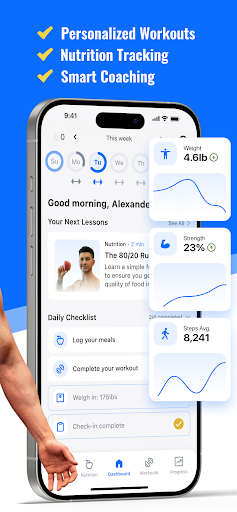
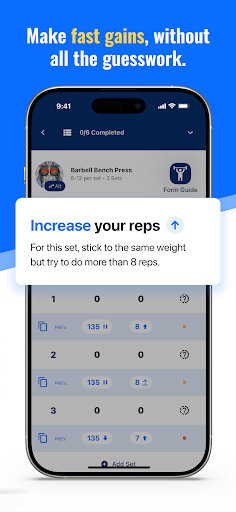
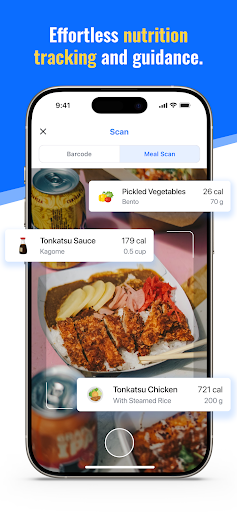
Reach your goals faster with BWS+ all-in-one fitness coach
Frustrated with cookie-cutter workout plans and confusing nutrition advice? BWS+ is your intelligent coach and complete fitness companion for achieving the body you've always wanted. The app integrates insights from leading fitness scientists, coaches, and dietitians, offering personalized advice based on your unique body and goals. It evolves with you, adapting your workouts and nutrition based on real-time feedback, encapsulating decades of experience into a dynamic coach that tailors itself to your needs.
The latest science, personalized to you
- Hyper-Personalized Workouts: Built with Science's advanced algorithm creates a workout plan specifically for your body, goals, and schedule. Whether you're hitting the gym or training at home, we've got you covered.
- Progressive Overload Guidance: Never plateau again. BWS+ tells you exactly how to adjust your weights and reps each session for continuous gains.
- Real-Time Diet Adjustments: As your body changes, so do your nutritional needs. Our app adapts your meal plan weekly, ensuring you're always on track.
All-in-One Fitness and Nutrition Solution
- 250+ In-Depth Exercise Tutorials: Master proper form with our detailed video guides, packed with science-based insights.
- AI-Powered Meal Scanner: Say goodbye to tedious calorie counting. Simply snap a photo of your meal, and our AI does the rest, accurately tracking your nutrition in seconds.
- Daily Knowledge Boosters: Unlock 200+ bite-sized lessons to build your fitness IQ and make informed decisions about your health.
One App is All You Need
- AI Fitness & Nutrition Assistant: Get personalized answers to your fitness and nutrition questions, as if you're talking directly to Jeremy Ethier.
- Muscle Group Prioritizer: Focus on specific muscles that need extra attention for balanced development.
- Recomp Detector: Track simultaneous fat loss and muscle gain with our advanced body composition analysis.
- Step Tracking and Daily Activity Goals: Seamlessly integrate with Apple Health and Google Fit to optimize your overall activity levels.
We've combined cutting-edge technology with years of scientific research to create an app that delivers real, lasting transformations. No more guesswork, no more wasted time in the gym. BWS+ provides the structure and guidance you need to finally achieve the body you deserve.
Download now and take the first step towards the best version of yourself!
Mostra altro

1. Scarica il programma di installazione di MEmu e completa l'installazione

2. Avvia il Memu e apri il Google Play sulla homepage

3. Cerca BuiltWithScience+ in Google Play
Install
4. Scarica e installa BuiltWithScience+
5. Al termine dell'installazione, fai clic sull'icona per avviar

6. Divertiti giocando a BuiltWithScience+ su PC con MEmu
MEmu App Player è il miglior emulatore Android gratuito, utilizzato da 50 milioni di persone per ottenere un'esperienza di gioco Android superba. La tecnilogia di virtualizzazione MEmu ti permette di giocare a migliaia di giochi Android con semplicità sul tuo computer, anche i giochi con la grafica più esigente.
Schermo più grande con una grafica migliore; Lunga durata, senza limitazione di batteria o dati mobili.
Supporto completo per mappa di tastiera per un controllo preciso di tastiera e mouse o gamepad.
Multipli account di gioco o attività su un singolo PC contemporaneamente con il gestore di multi istanza.
Use BuiltWithScience+ on PC by following steps: