
HomeByMe
Aggiornata
Versione corrente
1.17.1
Offerta da

Non devi più preoccuparti dei sovraccarichi durante l'utilizzo di HomeByMe sul tuo cellulare, liberati dal piccolo schermo e goditi dell'App su uno schermo molto più grande. D'ora in poi, sperimenta la tua App a schermo intero con tastiera e mouse. MEmu ti offre tutte le sorprendenti funzioni che ti aspettavi: installazione rapida e impostazione semplice, controlli intuitivi, niente più limitazioni di batteria, dati mobili e chiamate fastidiose. Il MEmu 9 nuovo di zecca è la prima scelta per utilizzare HomeByMe sul tuo computer. Codificato con il nostro assorbimento, il gestore multi-istanza consente di aprire 2 o più account contemporaneamente. E soprattutto, il nostro esclusivo motore di emulazione può sbloccare il pieno potenziale del tuo PC, rendendo tutto liscio e piacevole.
Mostra altro
Scarica HomeByMe su PC con MEmu Android Emulator. Divertiti giocando sul grande schermo. Find inspiration to furnish and decorate your home in 3D and take your project everywhere!
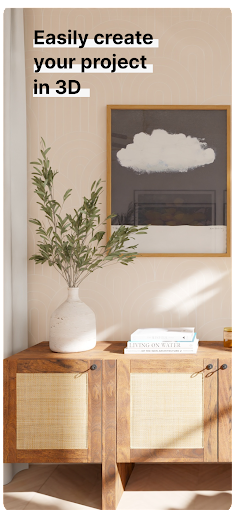
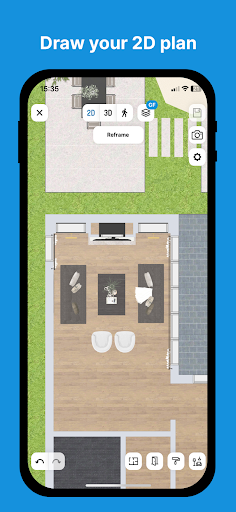
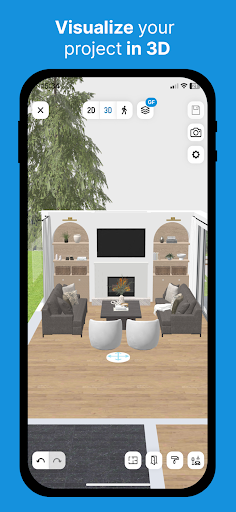
Find inspiration to furnish and decorate your home in 3D and take your project everywhere!
GET INSPIRATION FOR YOUR NEW DECOR
You’re not alone! Get inspired with images created by our community for your interior furniture and decorations. Our community has already designed more than 16 million projects and an HD image is created every 30 seconds, so you’re sure to find what you need to start your new decor project off right.
Browse the images created by our community in our inspiration gallery. Like an image? Select it and then duplicate all the elements of the image to start your own room. You can then fine-tune the layout by modifying some of the furniture or pieces to suit your style and personality.
As soon as you are satisfied with your creation, you can also create and share an image of your room to inspire other users.
DESIGN AND ENVISION YOUR FUTURE INTERIOR
Want to change the style of your living room? Update your kitchen layout? Create another room in your house or rethink the entire design of your apartment? HomeByMe is here to help.
HomeByMe is an interior design solution that helps you find inspiration for your home’s furniture and decorations.
Use it to imagine and visualize various decor and layout configurations for your home before making the final decision to purchase new items or rearrange your space.
Swipe through our catalog of more than 20,000 products from big-name brands and designers to find the right items for redecorating or rearranging your rooms one by one.[1]
The catalog features a variety of products available in 3D: furniture, lamps, wall and floor coverings, decorative objects and more so you can express your style and complete your decor.
Once you’ve made your selections, you can design your project using our 3D solution: create your room’s walls, doors and windows and add your favorite furniture. It’s the perfect way to see what your future interior could look like!
And if you wish, you can retrieve your consolidated project from your computer at any time.
GO MOBILE WITH YOUR HOME PROJECT!
Access your project 24/7 from anywhere.
While you’re working on your design project, you’ll need to share progress with your loved ones to get their opinions or ideas, present the project to professions to get their recommendations or see your shopping list or the dimensions of your project while you’re at the store so you can make the right purchases. That’s all possible now thanks to the HomeByMe app!
You can now see all the visuals and information related to your project whenever you want. There’s even an offline mode if you don’t have network coverage.
The HomeByMe app offers features that complement the desktop version. Try it today!
Mostra altro

1. Scarica il programma di installazione di MEmu e completa l'installazione

2. Avvia il Memu e apri il Google Play sulla homepage

3. Cerca HomeByMe in Google Play
Install
4. Scarica e installa HomeByMe
5. Al termine dell'installazione, fai clic sull'icona per avviar

6. Divertiti giocando a HomeByMe su PC con MEmu
MEmu App Player è il miglior emulatore Android gratuito, utilizzato da 50 milioni di persone per ottenere un'esperienza di gioco Android superba. La tecnilogia di virtualizzazione MEmu ti permette di giocare a migliaia di giochi Android con semplicità sul tuo computer, anche i giochi con la grafica più esigente.
Schermo più grande con una grafica migliore; Lunga durata, senza limitazione di batteria o dati mobili.
Supporto completo per mappa di tastiera per un controllo preciso di tastiera e mouse o gamepad.
Multipli account di gioco o attività su un singolo PC contemporaneamente con il gestore di multi istanza.
Use HomeByMe on PC by following steps: