Nebula: Cloud Gaming
Aggiornata
Versione corrente
1.6.1
Offerta da

Non devi più preoccuparti dei sovraccarichi durante l'utilizzo di Nebula: Cloud Gaming sul tuo cellulare, liberati dal piccolo schermo e goditi dell'App su uno schermo molto più grande. D'ora in poi, sperimenta la tua App a schermo intero con tastiera e mouse. MEmu ti offre tutte le sorprendenti funzioni che ti aspettavi: installazione rapida e impostazione semplice, controlli intuitivi, niente più limitazioni di batteria, dati mobili e chiamate fastidiose. Il MEmu 9 nuovo di zecca è la prima scelta per utilizzare Nebula: Cloud Gaming sul tuo computer. Codificato con il nostro assorbimento, il gestore multi-istanza consente di aprire 2 o più account contemporaneamente. E soprattutto, il nostro esclusivo motore di emulazione può sbloccare il pieno potenziale del tuo PC, rendendo tutto liscio e piacevole.
Mostra altro
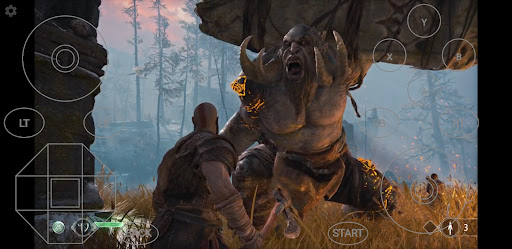
Goditi un'esperienza straordinaria con Nebula: Cloud Gaming su PC con MEmu Play. È un potente emulatore Android gratuito che ti offre migliaia di app Android per la versione desktop. Divertiti a connetterti con gli amici e a perfezionare il tuo lavoro con maggiore efficienza! "Play the Latest AAA Games on Your Android Device with Nebula – No Gaming PC Needed!
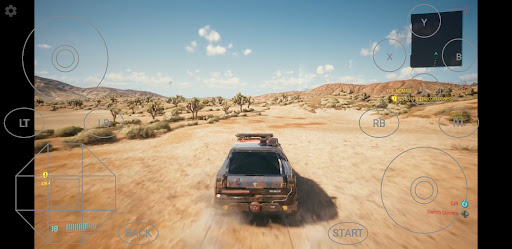
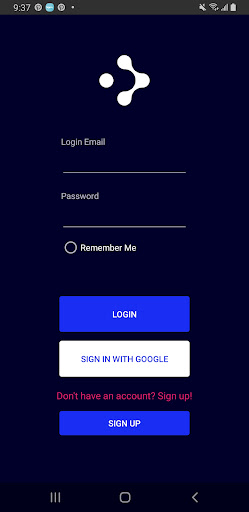
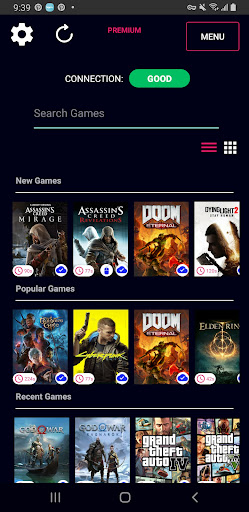
"Play the Latest AAA Games on Your Android Device with Nebula – No Gaming PC Needed!"
Nebula is your ultimate cloud gaming app, letting you play high-end PC and console-quality games straight from your Android device—no long installations or expensive hardware required. All games are included, and all you need is good internet.
Key Features:
Play AAA Games Anywhere: Enjoy the latest PC games on any Android device—smartphone, tablet, or even your Android TV.
Games Included: Access a wide range of titles without needing to buy or install them.
Free VPN for Optimized Gaming: Automatically connects to our secure Nebula VPN, ensuring smooth gameplay (currently available in Southeast Asia, connecting through Singapore, etc.).
Cloud Save: Pick up right where you left off every time with cloud saves, across any device.
Simple and User-Friendly: Easy setup, intuitive interface, and Bluetooth controller support.
How Does Nebula Work?
Nebula turns your Android device into a gaming powerhouse. Simply download our app, create an account, and select a game. Start playing instantly with just a tap! You can even connect your Bluetooth controller for a console-like experience.
All you need is good internet, and Nebula will handle the rest, securely connecting you to our gaming servers using the built-in Nebula VPN.
Nebula VPN: What You Need to Know
Nebula’s VPN feature is built using the WireGuard protocol and integrates with Android’s VpnService framework to create a securely encrypted connection between your device and our servers. The VPN is active only when you're gaming on Nebula, automatically deactivating when you close the app or it runs in the background.
Is Nebula’s VPN Necessary?
We provide our premium VPN for free as an option to help improve network connections to our servers. Experiment with it to find the best configuration for a smooth gameplay experience. The VPN only manages connection and traffic to Nebula's game servers and nothing else - we do not collect or manage any of your traffic data outside of Nebula's gaming traffic and will never collect, manage or distribute your data.
Nebula VPN Features:
- Secure Gaming: Enjoy a private and protected gaming session with end-to-end encryption.
- Improved Performance: Optimize network routes and reduce latency for a smoother, faster gaming experience.
- Completely Free: Get all the benefits of a paid VPN at no extra cost!
Permissions Required:
To establish a VPN connection, Nebula will prompt you to grant network access when you switch it on. Once granted, the VPN will activate and securely connect you to our network.
For any questions about VpnService or our privacy practices, please reach out to us via the links below.
Minimum Requirements:
Minimum Internet Speed: 30 Mbps
Recommended Speed: 100 Mbps and above for the best experience.
Get Started in 3 Simple Steps:
Download the app and create an account at www.nebula.my.
Log in with your account and browse our game library.
Select a game and start playing instantly!
Flexible Pricing Plans
We offer a range of pricing options to suit every gamer’s needs. Check them out here: www.nebula.my/pricing.
Connect with Us:
Discord: Nebula - Gaming Platform
Instagram: @nebula_my
Contact Form: www.nebula.my/contact
Email: admin@nebula.my
Learn More:
Visit us at www.nebula.my for more information, or check out our Privacy Policy and Terms & Conditions:
Privacy Policy
Terms and Conditions
Note: WireGuard is a registered trademark of Jason A. Donenfeld.
Mostra altro

1. Scarica il programma di installazione di MEmu e completa l'installazione

2. Avvia il Memu e apri il Google Play sulla homepage

3. Cerca Nebula: Cloud Gaming in Google Play
Install
4. Scarica e installa Nebula: Cloud Gaming
5. Al termine dell'installazione, fai clic sull'icona per avviar

6. Divertiti giocando a Nebula: Cloud Gaming su PC con MEmu
MEmu App Player è il miglior emulatore Android gratuito, utilizzato da 50 milioni di persone per ottenere un'esperienza di gioco Android superba. La tecnilogia di virtualizzazione MEmu ti permette di giocare a migliaia di giochi Android con semplicità sul tuo computer, anche i giochi con la grafica più esigente.
Schermo più grande con una grafica migliore; Lunga durata, senza limitazione di batteria o dati mobili.
Supporto completo per mappa di tastiera per un controllo preciso di tastiera e mouse o gamepad.
Multipli account di gioco o attività su un singolo PC contemporaneamente con il gestore di multi istanza.
Use Nebula: Cloud Gaming on PC by following steps: