Nebula: Cloud Gaming
更新日
現在のバージョン
1.6.1
提供元

スマートフォンは不要!パソコンと同じようにキーボードとマウスで操作できます。MEmu Playは、あなたが待ち望んでいたすべての楽しみをお届けします。バッテリー残量や小さな画面を気にすることなく、Nebula: Cloud Gamingをご利用ください。最新のMEmu 9は、Nebula: Cloud GamingをPCで体験するのに最適です!完璧なキーマッピングシステムにより、PCのようなスムーズな操作性を実現します。マルチインスタンス機能により、複数のアプリケーションを同時に実行できます。独自の仮想化エンジンがPCのパフォーマンスを最大限に引き出します。アプリを使用するだけでなく、高品質な体験を得ることができます。
もっと見る
MEmu Playを使えば、PCでNebula: Cloud Gamingを快適に楽しめます。何千ものAndroidアプリをデスクトップ版で利用できる、パワフルな無料Androidエミュレーターです。友達とつながり、より効率的に作品を磨き上げましょう! "Play the Latest AAA Games on Your Android Device with Nebula – No Gaming PC Needed!
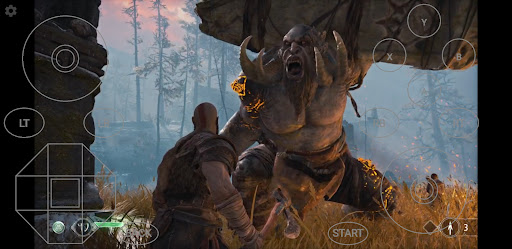
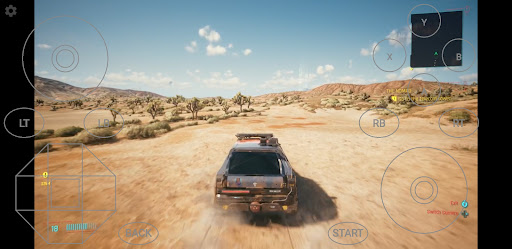
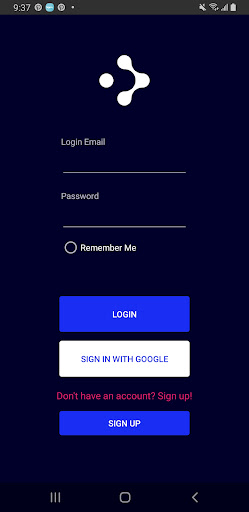
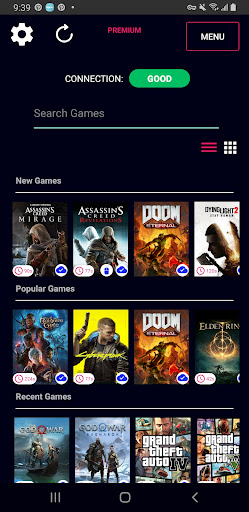
"Play the Latest AAA Games on Your Android Device with Nebula – No Gaming PC Needed!"
Nebula is your ultimate cloud gaming app, letting you play high-end PC and console-quality games straight from your Android device—no long installations or expensive hardware required. All games are included, and all you need is good internet.
Key Features:
Play AAA Games Anywhere: Enjoy the latest PC games on any Android device—smartphone, tablet, or even your Android TV.
Games Included: Access a wide range of titles without needing to buy or install them.
Free VPN for Optimized Gaming: Automatically connects to our secure Nebula VPN, ensuring smooth gameplay (currently available in Southeast Asia, connecting through Singapore, etc.).
Cloud Save: Pick up right where you left off every time with cloud saves, across any device.
Simple and User-Friendly: Easy setup, intuitive interface, and Bluetooth controller support.
How Does Nebula Work?
Nebula turns your Android device into a gaming powerhouse. Simply download our app, create an account, and select a game. Start playing instantly with just a tap! You can even connect your Bluetooth controller for a console-like experience.
All you need is good internet, and Nebula will handle the rest, securely connecting you to our gaming servers using the built-in Nebula VPN.
Nebula VPN: What You Need to Know
Nebula’s VPN feature is built using the WireGuard protocol and integrates with Android’s VpnService framework to create a securely encrypted connection between your device and our servers. The VPN is active only when you're gaming on Nebula, automatically deactivating when you close the app or it runs in the background.
Is Nebula’s VPN Necessary?
We provide our premium VPN for free as an option to help improve network connections to our servers. Experiment with it to find the best configuration for a smooth gameplay experience. The VPN only manages connection and traffic to Nebula's game servers and nothing else - we do not collect or manage any of your traffic data outside of Nebula's gaming traffic and will never collect, manage or distribute your data.
Nebula VPN Features:
- Secure Gaming: Enjoy a private and protected gaming session with end-to-end encryption.
- Improved Performance: Optimize network routes and reduce latency for a smoother, faster gaming experience.
- Completely Free: Get all the benefits of a paid VPN at no extra cost!
Permissions Required:
To establish a VPN connection, Nebula will prompt you to grant network access when you switch it on. Once granted, the VPN will activate and securely connect you to our network.
For any questions about VpnService or our privacy practices, please reach out to us via the links below.
Minimum Requirements:
Minimum Internet Speed: 30 Mbps
Recommended Speed: 100 Mbps and above for the best experience.
Get Started in 3 Simple Steps:
Download the app and create an account at www.nebula.my.
Log in with your account and browse our game library.
Select a game and start playing instantly!
Flexible Pricing Plans
We offer a range of pricing options to suit every gamer’s needs. Check them out here: www.nebula.my/pricing.
Connect with Us:
Discord: Nebula - Gaming Platform
Instagram: @nebula_my
Contact Form: www.nebula.my/contact
Email: admin@nebula.my
Learn More:
Visit us at www.nebula.my for more information, or check out our Privacy Policy and Terms & Conditions:
Privacy Policy
Terms and Conditions
Note: WireGuard is a registered trademark of Jason A. Donenfeld.
もっと見る

1. MEmuインストーラーをダウンロードしてセットアップを完了する

2. MEmuを起動し、デスクトップでのPlayストアを開く

3. PlayストアでNebula: Cloud Gamingを検索する
Install
4. Nebula: Cloud Gamingをダウンロードしてインストールする
5. インストールが完了したら、アイコンをクリックしてスタート

6. MEmuを使ってパソコンでNebula: Cloud Gamingを体験する
MEmu Playは現在、最高の無料Androidエミュレーターであり、5,000万人のユーザーが優れたAndroidアプリ体験を楽しんでいます。MEmuの仮想化テクノロジーにより、数千ものAndroidアプリをコンピューターでスムーズに実行できます。
大画面でより精細;無限の待機、電池とドラフィックの極限を超え
キーボード・マウス・コントローラーを全力でサポート、より快適
マルチインスタンスで複数のゲームを同時に実行
Use Nebula: Cloud Gaming on PC by following steps: