Buzze
更新日
現在のバージョン
2.2.2
提供元

スマートフォンは不要!パソコンと同じようにキーボードとマウスで操作できます。MEmu Playは、あなたが待ち望んでいたすべての楽しみをお届けします。バッテリー残量や小さな画面を気にすることなく、Buzzeをご利用ください。最新のMEmu 9は、BuzzeをPCで体験するのに最適です!完璧なキーマッピングシステムにより、PCのようなスムーズな操作性を実現します。マルチインスタンス機能により、複数のアプリケーションを同時に実行できます。独自の仮想化エンジンがPCのパフォーマンスを最大限に引き出します。アプリを使用するだけでなく、高品質な体験を得ることができます。
もっと見る
BuzzeをPCでダウンロード!大画面でより楽しむ。電源が落ちてしまうとか通信料が足りないとかの問題を心配する必要がなく、PCの大画面でより快適にゲームを楽しましょう! Buzze - EV Charging for Renters, Right at Home.
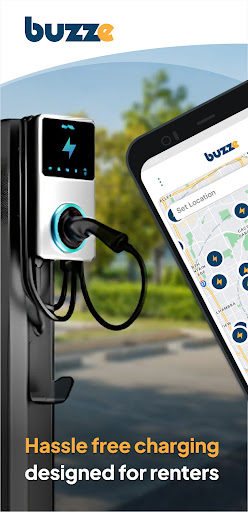
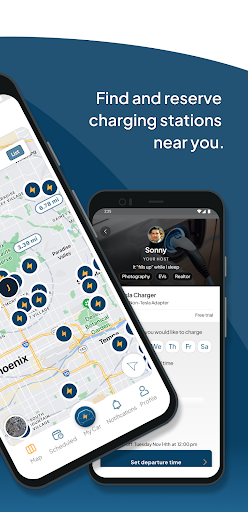
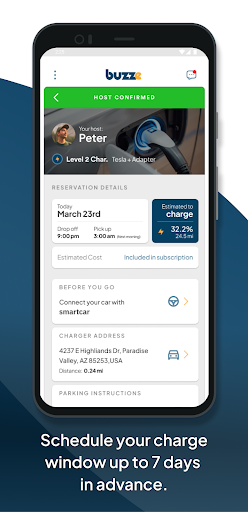
Buzze - EV Charging for Renters, Right at Home
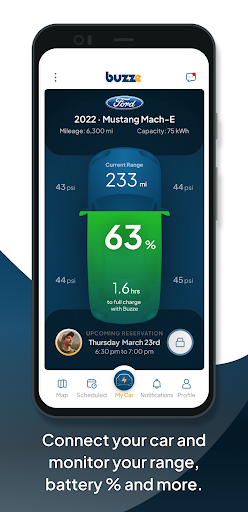
Buzze is the ultimate EV charging solution for renters, bringing convenient, affordable charging right to multifamily properties. Say goodbye to long waits at public chargers or expensive superchargers—Buzze connects you to charging stations within your apartment or condo community.
For Drivers - Charge Where You Live, On Your Schedule
Seamless Home Charging: No need to leave home to charge—simply book a nearby Buzze charger in your apartment complex or neighboring property.
Affordable Rates: Charging with Buzze is often half the cost of public stations, so you save while enjoying the convenience of home charging.
Smart Scheduling: Plan your charges ahead of time, whether you’re a daily commuter or rideshare driver, ensuring your EV is ready when you need it.
Community-Powered Convenience: Like Airbnb for EV charging, Buzze lets you find chargers within your community, making it easier than ever for renters to access reliable EV power.
For Property Owners - Transform EV Charging into a Valuable Amenity
Easy Setup & Management: Buzze handles everything from installation to real-time monitoring, so property managers can offer charging without the hassle.
Revenue Opportunity: With Buzze, EV charging becomes a valuable amenity and revenue source, adding appeal to your property and attracting eco-conscious residents.
Comprehensive Admin Panel: Manage charger access, monitor usage, and track earnings through a simple, intuitive dashboard built for multifamily properties.
Why Buzze?
Complete End-to-End Solution: We take care of installation, networking, and ongoing support, so you can focus on what matters.
Driver-Friendly App: Find and reserve chargers with ease, track your charge status, and get back to what matters—all in a few taps.
A Greener Community: Buzze helps create eco-friendly neighborhoods, making it easy for everyone to enjoy the EV driving experience.
Buzze is transforming EV charging for multifamily living, offering a simple, app-based solution that makes home charging accessible to everyone.
Join the future of EV charging—right in your community.
Questions? Need assistance? Contact us at support@buzze.biz.
もっと見る

1. MEmuインストーラーをダウンロードしてセットアップを完了する

2. MEmuを起動し、デスクトップでのPlayストアを開く

3. PlayストアでBuzzeを検索する
Install
4. Buzzeをダウンロードしてインストールする
5. インストールが完了したら、アイコンをクリックしてスタート

6. MEmuを使ってパソコンでBuzzeを体験する
MEmu Playは現在、最高の無料Androidエミュレーターであり、5,000万人のユーザーが優れたAndroidアプリ体験を楽しんでいます。MEmuの仮想化テクノロジーにより、数千ものAndroidアプリをコンピューターでスムーズに実行できます。
大画面でより精細;無限の待機、電池とドラフィックの極限を超え
キーボード・マウス・コントローラーを全力でサポート、より快適
マルチインスタンスで複数のゲームを同時に実行
Use Buzze on PC by following steps: