
Kilowatt
更新日
現在のバージョン
1.1.4
提供元

スマートフォンは不要!パソコンと同じようにキーボードとマウスで操作できます。MEmu Playは、あなたが待ち望んでいたすべての楽しみをお届けします。バッテリー残量や小さな画面を気にすることなく、Kilowattをご利用ください。最新のMEmu 9は、KilowattをPCで体験するのに最適です!完璧なキーマッピングシステムにより、PCのようなスムーズな操作性を実現します。マルチインスタンス機能により、複数のアプリケーションを同時に実行できます。独自の仮想化エンジンがPCのパフォーマンスを最大限に引き出します。アプリを使用するだけでなく、高品質な体験を得ることができます。
もっと見る
KilowattをPCでダウンロード!大画面でより楽しむ。電源が落ちてしまうとか通信料が足りないとかの問題を心配する必要がなく、PCの大画面でより快適にゲームを楽しましょう! Tired of being chained to money-hoarding dealers charging to flip a couple toggles on your controller?
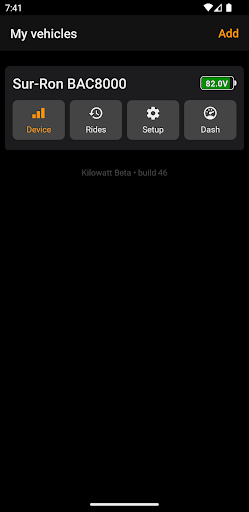
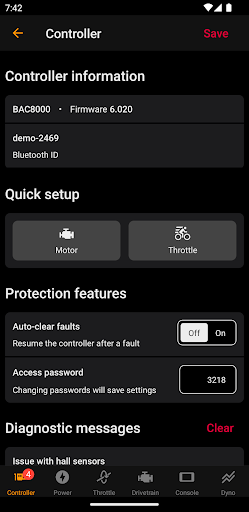
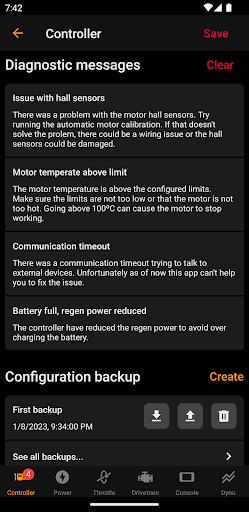
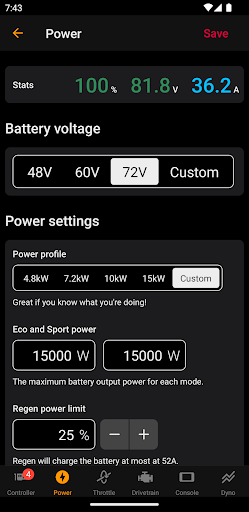
Tired of being chained to money-hoarding dealers charging to flip a couple toggles on your controller? Kilowatt brings freedom for you!
If you're looking to tweak your controller to your liking, capturing telemetry data, or just want to use your phone as a dashboard, Kilowatt got you covered.
Supported features:
- Change battery voltage, power delivery and regeneration limits
- Calibrate your throttle minimum and maximum with an easy wizard
- Set up motor parameters and calibrate the position sensor
- Enable Eco/Sport and Reverse functions using physical switches
- Enable motor cutoff or regen braking when using brake levers
- Enable and calibrate variable regen braking (thumb or foot brake)
- Change gear ratio and wheel diameter for accurate speedometer
- Enable and configure temperature sensor from a variety of models
- Track realtime parameters and export as CSV for overlaying in videos
- Use your phone as a Dashboard and get free telemetry data for your rides
*** Motor support ***
Kilowatt allows you to configure any motor, but comes with known good values for the following predefined models:
- Sur-Ron / Segway X260
- KO RS
- KO Factory Spec
- QS165 v1 / v2 / v3
*** Battery support ***
Kilowatt allows to configure your controller to work with any battery by allowing you to choose the number of cells in series and define current limits, but it comes with the following battery profiles:
- 48V, 60V and 72V
- 4.8kW (suited for Sur-Ron/Talaria stock battery when on 60V)
- 7.2kW (Suited for Sur-Ron/Talaria bypassed battery when on 60V)
- 10kW and 15kW (Suited for aftermarket batteries of any voltage)
もっと見る

1. MEmuインストーラーをダウンロードしてセットアップを完了する

2. MEmuを起動し、デスクトップでのPlayストアを開く

3. PlayストアでKilowattを検索する
Install
4. Kilowattをダウンロードしてインストールする
5. インストールが完了したら、アイコンをクリックしてスタート

6. MEmuを使ってパソコンでKilowattを体験する
MEmu Playは現在、最高の無料Androidエミュレーターであり、5,000万人のユーザーが優れたAndroidアプリ体験を楽しんでいます。MEmuの仮想化テクノロジーにより、数千ものAndroidアプリをコンピューターでスムーズに実行できます。
大画面でより精細;無限の待機、電池とドラフィックの極限を超え
キーボード・マウス・コントローラーを全力でサポート、より快適
マルチインスタンスで複数のゲームを同時に実行
Use Kilowatt on PC by following steps: