Car Nebula Launcher
更新日
現在のバージョン
5.6.7
提供元

スマートフォンは不要!パソコンと同じようにキーボードとマウスで操作できます。MEmu Playは、あなたが待ち望んでいたすべての楽しみをお届けします。バッテリー残量や小さな画面を気にすることなく、Car Nebula Launcherをご利用ください。最新のMEmu 9は、Car Nebula LauncherをPCで体験するのに最適です!完璧なキーマッピングシステムにより、PCのようなスムーズな操作性を実現します。マルチインスタンス機能により、複数のアプリケーションを同時に実行できます。独自の仮想化エンジンがPCのパフォーマンスを最大限に引き出します。アプリを使用するだけでなく、高品質な体験を得ることができます。
もっと見る
MEmu Playを使えば、PCでCar Nebula Launcherを快適に楽しめます。何千ものAndroidアプリをデスクトップ版で利用できる、パワフルな無料Androidエミュレーターです。友達とつながり、より効率的に作品を磨き上げましょう! Car Nebula: OEM-grade car software for any Android head unit.
Car Nebula: OEM-grade car software for any Android head unit
Replace your stock launcher with a full in-car platform: live vehicle data, offline navigation, dashcam, driver assistance, and an AI mechanic, all in one app built for driving.
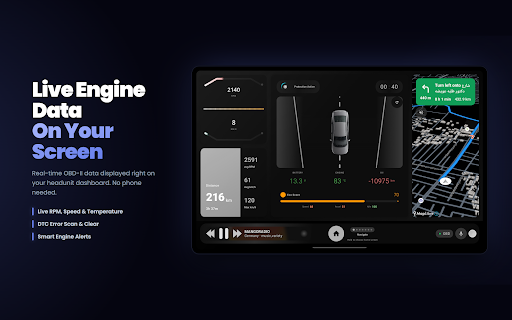
Vehicle intelligence (OBD-II)
- Real-time ECU data on your dashboard
- DTC scan and clear
- Engine protection with smart warnings
- Battery, coolant, and system monitoring
- Maintenance logs and service reminders
- AI mechanical assistant for troubleshooting
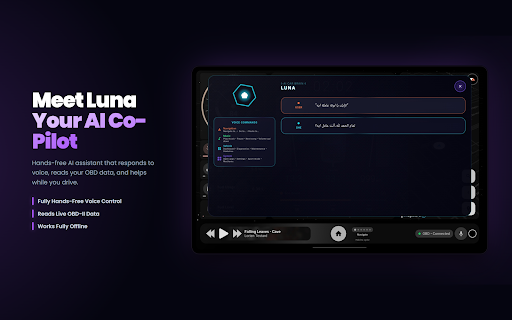
AI assistant
- Voice-controlled while you drive
- Works offline with on-device LLM support
- Answers car questions using your vehicle's live data
Safety and cameras
- Dashcam recording via USB webcam
- ADAS features via USB webcam
- Trip tracking and journey analysis
Performance and analytics
- Trip history with detailed stats
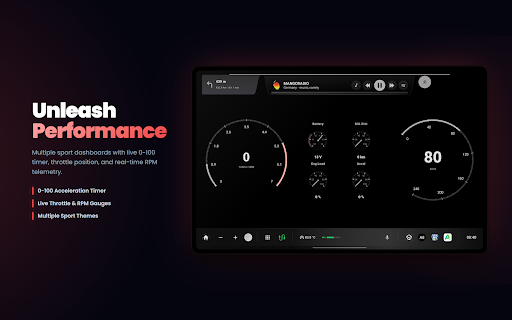
- 0-100 acceleration tracking
- Eco metrics for fuel and emissions
- Performance mode with dedicated gauges
- Visual charts and driving statistics
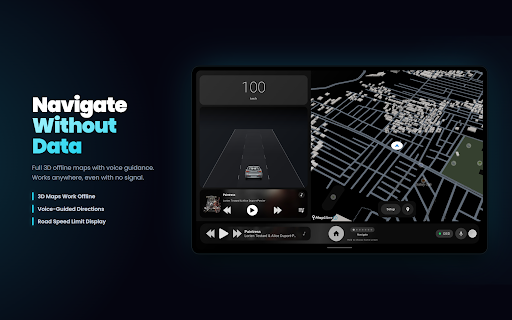
Navigation
- Full in-app offline navigation, no data connection required
- Voice-guided directions through the AI assistant
- Built for head units, not phone-sized UIs
Customization
- Modern themes that match your car's interior
- Resizable, rearrangeable widgets
- Multiple color schemes and layout styles
- License plate and speedometer layout options
Why Car Nebula?
- One app instead of five separate tools
- Privacy-first: local data storage and offline AI options
- OTA updates with new features
- Works with most OBD-II vehicles (1996+)
Download Car Nebula and turn your head unit into the dashboard your car should have shipped with.
もっと見る

1. MEmuインストーラーをダウンロードしてセットアップを完了する

2. MEmuを起動し、デスクトップでのPlayストアを開く

3. PlayストアでCar Nebula Launcherを検索する
Install
4. Car Nebula Launcherをダウンロードしてインストールする
5. インストールが完了したら、アイコンをクリックしてスタート

6. MEmuを使ってパソコンでCar Nebula Launcherを体験する
MEmu Playは現在、最高の無料Androidエミュレーターであり、5,000万人のユーザーが優れたAndroidアプリ体験を楽しんでいます。MEmuの仮想化テクノロジーにより、数千ものAndroidアプリをコンピューターでスムーズに実行できます。
大画面でより精細;無限の待機、電池とドラフィックの極限を超え
キーボード・マウス・コントローラーを全力でサポート、より快適
マルチインスタンスで複数のゲームを同時に実行
Use Car Nebula Launcher on PC by following steps: