invideo AI: Video Generator
更新日
現在のバージョン
3.1.1
提供元

スマートフォンは不要!パソコンと同じようにキーボードとマウスで操作できます。MEmu Playは、あなたが待ち望んでいたすべての楽しみをお届けします。バッテリー残量や小さな画面を気にすることなく、invideo AI: Video Generatorをご利用ください。最新のMEmu 9は、invideo AI: Video GeneratorをPCで体験するのに最適です!完璧なキーマッピングシステムにより、PCのようなスムーズな操作性を実現します。マルチインスタンス機能により、複数のアプリケーションを同時に実行できます。独自の仮想化エンジンがPCのパフォーマンスを最大限に引き出します。アプリを使用するだけでなく、高品質な体験を得ることができます。
もっと見る
invideo AI: Video GeneratorをPCでダウンロード!大画面でより楽しむ。電源が落ちてしまうとか通信料が足りないとかの問題を心配する必要がなく、PCの大画面でより快適にゲームを楽しましょう! invideo AI is the easiest app to create AI videos.
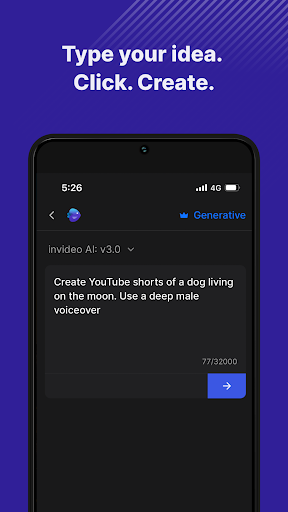
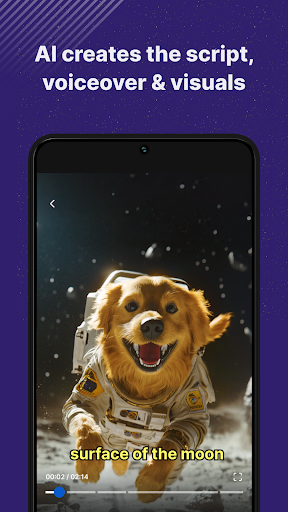
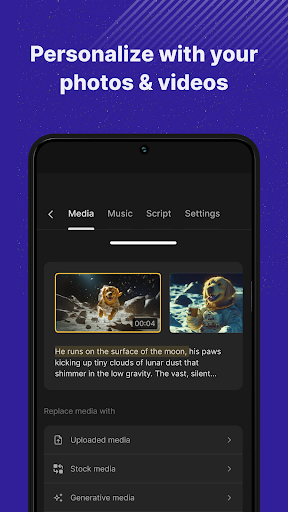
invideo AI is the easiest app to create AI videos. This easy AI video maker that turns your ideas into engaging videos with ease. Simply enter your idea, and let invideo’s advanced AI video generator craft a complete video including a script, voiceover, media, and text. Whether you're aiming to make AI videos for social media, education, or marketing, this app acts as your personal AI video editor, ready to fine-tune any element to meet your needs.
Main Features:
• Text to Video AI: Input a topic and our AI video creator will generate unique videos, automating the creation process to save you time.
• AI Movie Maker: Craft longer-form content or cinematic stories with our powerful storytelling tools.
• Detailed Customization: Leverage the versatile AI video editor to adjust the visuals, script or voiceover for your need.
• Extensive AI Media Library: Access over 16 million stock media options, searchable through AI, ensuring it perfectly aligns with your video's theme.
• Realistic AI Voiceovers: Choose from multiple natural-sounding voice options to enhance your videos.
• AI Voice Cloning: Your videos sound exactly like you with your cloned voice! Save hours of recording, personalize your videos and be consistent.
• Optimized Efficiency: As an AI video maker, this tool helps you save significant time and reduce production costs while increasing your content output.
Uses Cases of invideo AI:
• Social Media Content: Generate compelling AI story videos and motivational AI reels that resonate on platforms like Instagram and YouTube.
• Marketing Videos: Create AI videos and AI reels that captivate and inform, such as product highlights or content marketing videos.
• Educational and How-To Videos: Produce tutorials or explainer videos with ease, from cooking guides to DIY repairs, using our text to AI video capabilities.
Simple Text Command Editing:
• Creative Commands: Direct your video’s tone, from serious to humorous, or conclude with a dramatic finish.
• Audio and Text Adjustments: Customize voiceovers, alter background music, and edit subtitles to match your video’s mood.
• Visual and Pace Editing: Change scene visuals, adjust media pacing, or edit out entire segments to achieve your desired narrative flow.
Effortlessly Generate Videos: Start creating with invideo AI today and transform your creative ideas into professional-quality videos with just a few clicks. Whether you're a marketer, content creator, or business owner, invideo AI equips you with the tools to create impactful videos with minimal effort.
Terms of Use: https://invideo.io/terms-and-conditions/
Privacy Policy: https://invideo.io/privacy-policy/
もっと見る

1. MEmuインストーラーをダウンロードしてセットアップを完了する

2. MEmuを起動し、デスクトップでのPlayストアを開く

3. Playストアでinvideo AI: Video Generatorを検索する
Install
4. invideo AI: Video Generatorをダウンロードしてインストールする
5. インストールが完了したら、アイコンをクリックしてスタート

6. MEmuを使ってパソコンでinvideo AI: Video Generatorを体験する
MEmu Playは現在、最高の無料Androidエミュレーターであり、5,000万人のユーザーが優れたAndroidアプリ体験を楽しんでいます。MEmuの仮想化テクノロジーにより、数千ものAndroidアプリをコンピューターでスムーズに実行できます。
大画面でより精細;無限の待機、電池とドラフィックの極限を超え
キーボード・マウス・コントローラーを全力でサポート、より快適
マルチインスタンスで複数のゲームを同時に実行
Use invideo AI: Video Generator on PC by following steps: