Sider - AI Chat & Sidekick
更新日
現在のバージョン
2.3.0
提供元

スマートフォンは不要!パソコンと同じようにキーボードとマウスで操作できます。MEmu Playは、あなたが待ち望んでいたすべての楽しみをお届けします。バッテリー残量や小さな画面を気にすることなく、Sider - AI Chat & Sidekickをご利用ください。最新のMEmu 9は、Sider - AI Chat & SidekickをPCで体験するのに最適です!完璧なキーマッピングシステムにより、PCのようなスムーズな操作性を実現します。マルチインスタンス機能により、複数のアプリケーションを同時に実行できます。独自の仮想化エンジンがPCのパフォーマンスを最大限に引き出します。アプリを使用するだけでなく、高品質な体験を得ることができます。
もっと見る
Sider - AI Chat & SidekickをPCでダウンロード!大画面でより楽しむ。電源が落ちてしまうとか通信料が足りないとかの問題を心配する必要がなく、PCの大画面でより快適にゲームを楽しましょう! Sider is your all-in-one AI chatbot and AI chat companion.
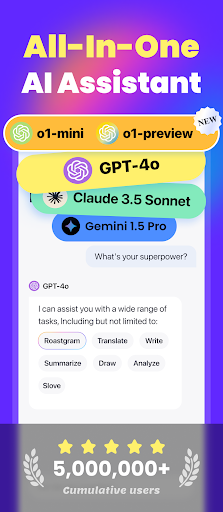

Sider is your all-in-one AI chatbot and AI chat companion. Powered by the top AI models including o1-preview, GPT-4o, Claude 3.5 Sonnet, Gemini 1.5 Pro, and more, Sider is designed to help you chat with any topic, write anything, read any files, generate any image, etc.
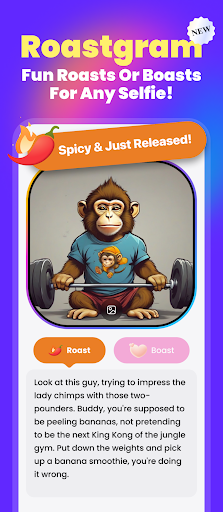
1. Roast or Boast Any Selfie - Just for Fun
Use Sider’s playful "Roast or Boast" feature to roast or boast about your selfies or your friends'. Perfect for some lighthearted fun!
2. Access AI Anytime Anywhere via a Floating Panel
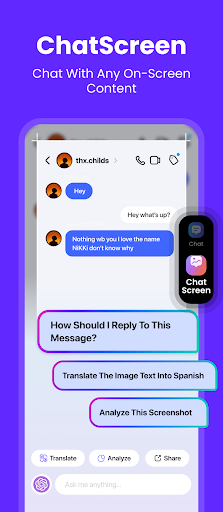
Sider's Floating Panel is always ready for instant AI interactions. Simply pull it over, hit the Chat/ChatScreen option, and start your conversation without switching apps.
- Chat with AI: Once-click to activate the AI conversation without leaving your current screen.
- Chat with any on-screen content: Engage in seamless conversations with your on-screen content, effortlessly analyze and summarize information, or extract text from screenshots. Boost your productivity with this versatile tool that serves as your ultimate work companion and academic assistant!
3. Top AI Models, All in One App
- Comprehensive AI Access: Interact with leading AI technologies, including:
*OpenAI: GPT-4o mini, GPT-4o, o1-mini, o1-preview
*Anthropic: Claude 3 Haiku, Claude 3.5 Sonnet
*Google: Gemini 1.5 Flash, Gemini 1.5 Pro
*Meta: Llama 3.1 70B, Llama 3.1 405B
- Sider Fusion model: Automatically selects the best model (GPT-4o mini, Claude 3 Haiku, Gemini 1.5 Flash, or Llama 3.1) for optimal responses.
4. Interact with 30+ File Formats
- Chat with files: Make your PDFs, documents, and presentations interactive. Just upload your files, ask questions, and get quick answers. We support 30+ file formats: pdf, doc, docx, json, pptx, txt, css, etc.
- Chat with images: Extract text and engage in conversations with your selected photo.
5. Sidekick - Engage with 100+ AI Bots
Sider offers a diverse range of preset AI sidekicks for entertainment, project assistance, study, and more.
- Chat with built-in AI sidekicks/bots: Our preset chatbots cover a wide range of popular topics, from general knowledge to personal finance. With Sider, you'll never run out of things to talk about!
- Custom your own sidekicks/bots: If you're feeling creative, create your own custom bots tailored to your specific needs.
6. Enhance Productivity with More Features
- Quick prompt access: Access built-in prompts instantly.
- Real-time web access: Stay updated with the latest information exactly when you need it.
- Writing assistance: Enhance your writing like a professional AI writer—write emails, draft blogs, rewrite content, expand sentence, adjust tones, and more.
- Text-to-Image generation: Input your text prompt to instantly generate appealing images.
Get Sider today and experience the convenience of AI chat at your fingertips!
Terms of Use: https://sider.ai/policies/terms.html
もっと見る

1. MEmuインストーラーをダウンロードしてセットアップを完了する

2. MEmuを起動し、デスクトップでのPlayストアを開く

3. PlayストアでSider - AI Chat & Sidekickを検索する
Install
4. Sider - AI Chat & Sidekickをダウンロードしてインストールする
5. インストールが完了したら、アイコンをクリックしてスタート

6. MEmuを使ってパソコンでSider - AI Chat & Sidekickを体験する
MEmu Playは現在、最高の無料Androidエミュレーターであり、5,000万人のユーザーが優れたAndroidアプリ体験を楽しんでいます。MEmuの仮想化テクノロジーにより、数千ものAndroidアプリをコンピューターでスムーズに実行できます。
大画面でより精細;無限の待機、電池とドラフィックの極限を超え
キーボード・マウス・コントローラーを全力でサポート、より快適
マルチインスタンスで複数のゲームを同時に実行
Use Sider - AI Chat & Sidekick on PC by following steps:







![TimeTree [タイムツリー]:家族や恋人、仕事仲間とカレンダーでスケジュール共有ができるアプリ PC版](https://dl.memuplay.com/new_market/img/works.jubilee.timetree.icon.2024-12-31-18-59-39.png)