Truecaller: AI Call Blocker
Dikemas kini
Versi Semasa
1752835569
Ditawarkan Oleh

Berhentilah bimbang dengan bayaran berlebihan semasa menggunakan Truecaller: AI Call Blocker di telefon bimbit anda, bebaskan diri anda dari layar kecil dan nikmati penggunaan aplikasi pada paparan yang jauh lebih besar. Mulai sekarang, dapatkan pengalaman skrin penuh aplikasi anda dengan papan kekunci dan tetikus. MEmu Play semua ciri mengejutkan yang anda harapkan: pemasangan cepat dan penyediaan mudah, kawalan intuitif, tidak ada batasan bateri, data mudah alih, dan panggilan yang mengganggu. MEmu 9 yang baru adalah pilihan terbaik untuk menggunakan Truecaller: AI Call Blocker di komputer anda. Dikodkan dengan penyerapan kami, pengurus multi-instance menjadikan pembukaan 2 atau lebih akaun pada masa yang sama mungkin. Dan yang paling penting, mesin emulasi eksklusif kami dapat melepaskan potensi penuh PC anda, menjadikan semuanya lancar dan menyeronokkan.
Tunjukkan Lagi
Download Truecaller: AI Call Blocker on PC with MEmu Android Emulator. Enjoy playing on big screen. Stay protected from spam and scams - Truecaller’s Caller ID will identify and block robocallers, fraudsters, telemarketers and other unwanted or unknown phone numbers.
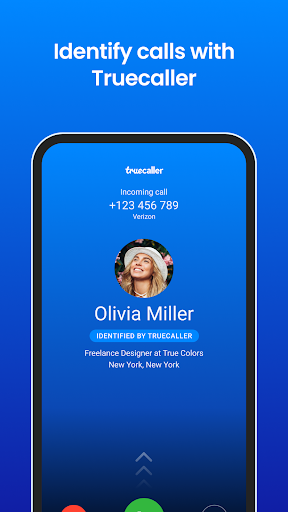
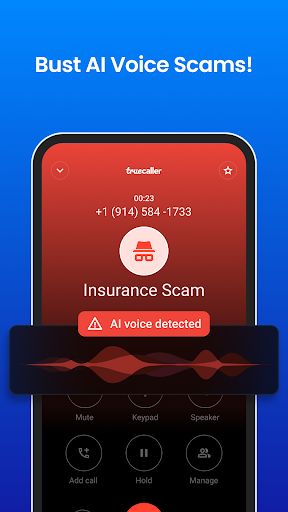
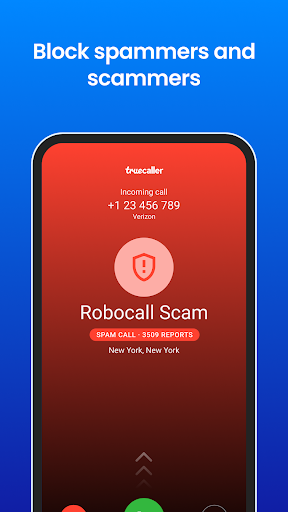
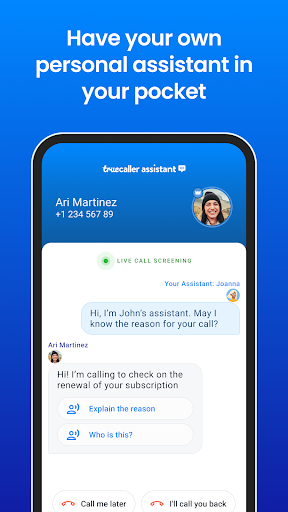
Stay protected from spam and scams - Truecaller’s Caller ID will identify and block robocallers, fraudsters, telemarketers and other unwanted or unknown phone numbers. The advanced spam detector will automatically block and protect you from fraudulent calls and SMS, and the phone numbers on this spam list are updated in real time by millions of users worldwide.
Powerful Dialer & Caller ID:
- The leading caller identification app that automatically shows who is calling, even if the phone number is not in your contacts
- Know who is calling before you answer
- Video Caller ID - record a short video that plays automatically when you call friends and family. Apart from recording a selfie video, you can also set a Video Caller ID using one of the built-in templates, aiming to create a more personalized and unique calling experience
- Use Voice calling (VoIP) to talk to your friends on Truecaller for free
- Backup and restore call history, call logs, contacts, messages, block list & settings to Google Drive.
Detection & Blocking of Spam:
- Block spam + scam calls and SMS - Identify and auto-block telemarketers, robocallers, scammers, fraud, sales, and more
- The phone numbers on the spam list are updated by millions of people across the world in real time, helping you avoid robocalls and fraud
- Advanced spam blocking options for blocking countries, similar phone number sequences, robocallers, unknown numbers, telemarketers and more!
- Automatically identify + block every unknown, spam, scam or telemarketing SMS
Smart Messaging:
- Automatically identify unknown SMS
- Automatically block spam and telemarketing SMS
- Organize your SMS into Personal, Other and Spam
- Chat for free with your friends and family in Group Chat
- Use Flash messaging for urgent messages
- Blacklist unwanted SMS senders
SMS & Messages Translation:
- Translate a message with one tap. It’s that easy.
- The SMS translate feature can translate from many different languages
- Truecaller automatically detects if a foreign language is used in the messaging screen and will show that a translation is available
Truecaller Premium - Upgrade and get access to:
- No ads
- Know who viewed your profile
- Advanced blocking and filtering options
- Ghost Call - set any name, number and photo to make it appear as if you are getting a call from that person
- Call announce - know who’s calling without looking at the phone
- Incognito mode - view profiles privately
- Get the Premium badge on your profile
- 30 contact requests a month
Truecaller does not upload your phonebook to make it public or searchable. We are trusted by 400 million users globally and exist to make your communication safer.
-----------------------
Got feedback? Write to support@truecaller.com or go to http://truecaller.com/support
Tunjukkan Lagi

1. Muat turun pemasang MEmu dan selesaikan persediaan

2. Mulakan MEnu kemudian buka Google Play di desktop

3. Cari Truecaller: AI Call Blocker di Google Play
Install
4. Muat turun dan Pasang Truecaller: AI Call Blocker
5. Apabila selesai pemasangan, menekan ikon itu untuk memulakan

6. Gunakan MENu untuk mengalami Truecaller: AI Call Blocker pada komputer anda
MEmu Play ialah emulator Android terbaik, dengan lebih 100 juta pengguna mengalami pengalaman aplikasi Android yang unggul. Teknologi virtualisasi MEmu membolehkan anda menjalankan beribu-ribu aplikasi Android dengan lancar pada komputer anda, walaupun yang paling mencabar.
Skrin lebih besar dengan grafik yang lebih baik; Tempoh yang panjang, tanpa had bateri atau data mudah alih.
Sokongan Keymapping penuh untuk kawalan tepat papan kekunci dan tetikus atau gamepad.
Pelbagai akaun permainan atau tugas pada satu PC sekaligus dengan pengurus pelbagai contoh.
Use Truecaller: AI Call Blocker on PC by following steps: