
Truecaller: Caller ID Blocker
Atualizada
Versão atual
1786109027
Oferecido por

Pare de se preocupar com sobrecargas ao usar Truecaller: Caller ID Blocker no seu celular, liberte-se da pequena tela e aproveite o uso do aplicativo numa tela muito maior. A partir de agora, obtenha uma experiência em tela cheia do seu aplicativo com teclado e mouse. O MEmu oferece-lhe todos os recursos surpreendentes que você esperava: instalação rápida e configuração fácil, controles intuitivos, sem mais limitações de bateria, dados móveis e chamadas perturbadoras. O novíssimo MEmu 9 é a melhor opção para usar Truecaller: Caller ID Blocker no seu computador. Codificado com a nossa absorção, o gerenciador de multi-instâncias possibilita a abertura de 2 ou mais contas ao mesmo tempo. E o mais importante, nosso mecanismo de emulação exclusivo pode liberar todo o potencial do seu PC, tornando tudo suave e agradável.
Mostre mais
Download do Truecaller: Caller ID Blocker no PC com MEmu Android Emulador: Divirta-se jogando na tela grande. India’s most trusted caller ID and spam blocking app helps you identify unknown callers, block spam calls, TRAI fraud calls, and stay protected from scams and fraud.
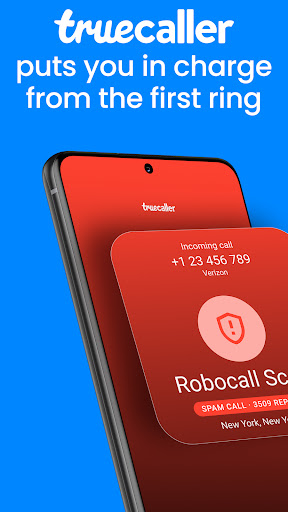

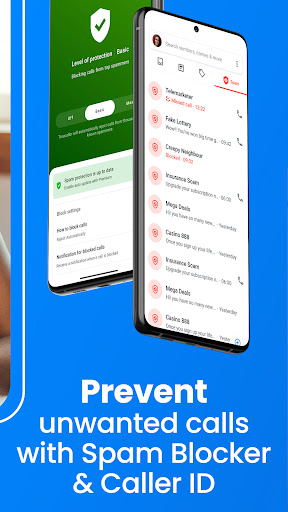

India’s most trusted caller ID and spam blocking app helps you identify unknown callers, block spam calls, TRAI fraud calls, and stay protected from scams and fraud. Scammers often target parents and family members who may not recognize fraud calls in time.
With Truecaller Family, you can protect your parents and loved ones from scams, fraud calls, and suspicious callers. It makes it easier to look out for your family and keep everyone safer from spam and scam calls.
Truecaller helps millions of Indians and their families avoid fraud, telemarketers, and suspicious numbers while keeping their communication safe every day.
Daily Spam & Scam Protection Stay protected from spam callers, scams, and unwanted communication.
- Identify unknown callers instantly
- Get warnings for spam and scam calls
- Block TRAI fraud calls, fake service callers, and identity scams
- Real-time spam detection powered by millions of users
- Block telemarketers and robocalls
- Help protect family members with Truecaller Family
Caller ID – Know Who’s Calling Instantly identify callers, even if they are not saved in your contacts.
- See caller names before answering
- Identify unknown numbers instantly
- Avoid spam calls and suspicious callers
- Community-powered caller identification
Powerful Spam Blocking Take full control over who can contact you.
- Automatically block spam callers
- Block telemarketers and robocalls
- Block hidden or unknown numbers
- Create and manage your personal block list
- Extend protection to loved ones with Truecaller Family
Fraud & Scam Call Detection Recognize fraud before answering the phone.
- Get alerts for numbers reported as scams
- See spam risk indicators before answering
- Detect suspicious callers instantly
- Community-powered fraud reporting
- Help protect your family from financial scams
Truecaller Assistant – Smart Call Screening Screen unknown calls before deciding to answer.
- Automatically handle unknown callers
- Ask callers why they are calling
- Detect spam, robocalls, and fraud calls
- Decide whether to answer or block
Advanced Dialer & Communication Tools Everything you need to manage calls and contacts.
- Instant caller ID for unknown numbers
- Video Caller ID for friends and contacts
- Free voice calling with Truecaller contacts
- Backup and restore contacts, call history, messages, and settings
Call Recorder Record and organize important conversations.
- Record incoming and outgoing calls
- Smart labels to organize recordings
- AI summaries for long calls
- Transcriptions for easy reference
Smart Messaging for SMS Manage your inbox and stop spam messages.
- Identify unknown SMS senders
- Automatically block spam messages
- Organize SMS into Personal, Other, and Spam
- Block unwanted senders easily
Truecaller Premium – Go Beyond the Basics
- No ads for a cleaner experience
- Screen calls with Truecaller Assistant
- Call Recording
- See who viewed your profile
- Ghost Call – simulate an incoming call when needed
- Announce Calls – hear the caller’s name without looking at your phone
- Incognito Mode
- Premium badge and 30 monthly contact requests
Truecaller Family – Protect Your Loved Ones Help protect your parents and loved ones from spam, scams, and fraud calls.
- Remotely end suspicious or fraud calls
- Get real-time scam call alerts
- Manage spam block lists for your family
- Enable automatic spam blocking
- Block suspicious callers for family members
- Check battery level and activity status
- Receive low battery alerts and weekly safety reports
Privacy First Your data stays protected.
Truecaller never uploads your phonebook to make it public or searchable.
Need help?
Visit: truecaller.com/support
Email: support@truecaller.com
Mostre mais

1. Faça o download do instalador do MEmu e conclua a instalação

2. Inicie o MEmu e depois abra o Google Play na página inicial

3. Pesquise Truecaller: Caller ID Blocker no Google Play
Install
4. Baixe e Instale Truecaller: Caller ID Blocker
5. Na conclusão da instalação, clique no ícone para iniciar

6. º Experimente o Truecaller: Caller ID Blocker no PC com o MEmu.
O MEmu Play é o melhor emulador Android gratuito, com 50 milhões de utilizadores a desfrutar da sua experiência superior com aplicações Android. A tecnologia de virtualização do MEmu permite-lhe executar milhares de aplicações Android sem problemas no seu computador, mesmo as mais exigentes.
Tela maior com gráficos melhores; Longa duração e sem limitação de bateria ou dados móveis.
Suporte completo ao Mapaeamento de Teclas para controle preciso do teclado e mouse ou gamepad.
Várias contas de jogos ou tarefas em um único PC de uma só vez com o Gerenciador de várias instâncias.
Use Truecaller: Caller ID Blocker on PC by following steps: