
Truecaller: Phone Call Blocker
Ενημερώθηκε
Τρέχουσα έκδοση
1786709089
Προσφέρεται από

Σταματήστε να ανησυχείτε για υπερβολικές χρεώσεις όταν χρησιμοποιείτε το Truecaller: Phone Call Blocker στο κινητό σας, απελευθερώστε τον εαυτό σας από τη μικροσκοπική οθόνη και απολαύστε τη χρήση της εφαρμογής σε μια πολύ μεγαλύτερη οθόνη. Από τώρα και στο εξής, αποκτήστε εμπειρία πλήρους οθόνης της εφαρμογής σας με πληκτρολόγιο και ποντίκι. Το MEmu σας προσφέρει όλες τις εκπληκτικές δυνατότητες που περιμένατε: γρήγορη εγκατάσταση και εύκολη εγκατάσταση, διαισθητικά χειριστήρια, όχι περισσότερους περιορισμούς μπαταρίας, δεδομένα κινητής τηλεφωνίας και ενοχλητικές κλήσεις. Το ολοκαίνουργιο MEmu 9 είναι η καλύτερη επιλογή για χρήση του Truecaller: Phone Call Blocker στον υπολογιστή σας. Κωδικοποιημένο με την απορρόφηση μας, ο διαχειριστής πολλαπλών παρουσιών καθιστά δυνατό το άνοιγμα 2 ή περισσότερων λογαριασμών ταυτόχρονα. Και το πιο σημαντικό, ο αποκλειστικός κινητήρας εξομοίωσης μπορεί να απελευθερώσει όλες τις δυνατότητες του υπολογιστή σας, να κάνει τα πάντα ομαλά και ευχάριστα.
Show more
Απολαύστε την υπέροχη εμπειρία αναπαραγωγής του Truecaller: Phone Call Blocker σε υπολογιστή με το MEMU Play. Πρόκειται για έναν ισχυρό δωρεάν εξομοιωτή Android που σας επιτρέπει να παίζετε χιλιάδες παιχνίδια Android. Truecaller: Your all-in-one solution for caller ID, call screening, call recording & spam or scam blocking.
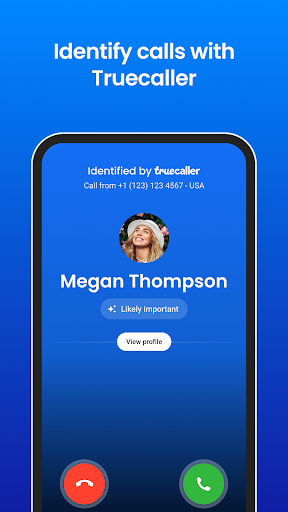
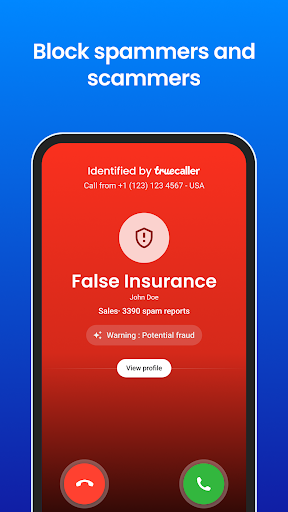
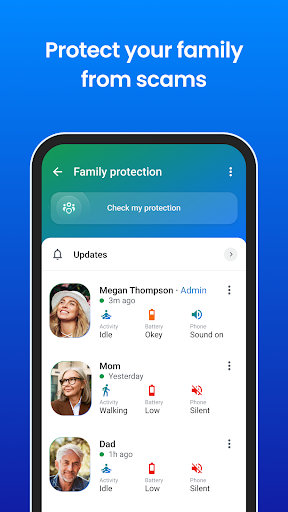
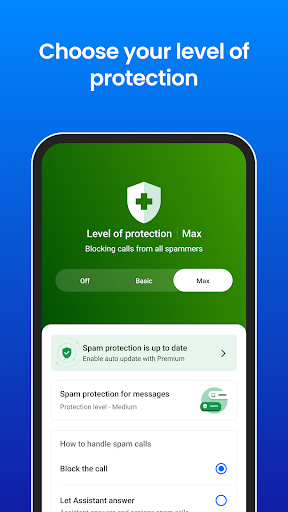
Truecaller: Your all-in-one solution for caller ID, call screening, call recording & spam or scam blocking.
Block spam & scams calls with Truecaller’s Caller ID. Truecaller will record, identify & block robocallers, phone fraudsters, telemarketers, scammers & other unwanted or unknown phone numbers.
The spam detector will automatically record calls & block phone numbers to protect against fraudulent calling & SMS messages. The phone numbers on our spam list are updated & blocked in real time by millions of users worldwide. Use the reverse call lookup feature to search for unknown phone numbers in our community-based spam database.
Powerful Auto-Dialer, Caller ID and Advanced Features:
- Get the leading caller ID app, which automatically shows who’s calling even if the caller is not in your contacts. Filter & block spam calls before you answer.
- Use Video Caller ID to record a short video that plays automatically when you call friends & family. Record a selfie video or set your Video Caller ID using our built-in templates.
- Use Voice Calling to talk to friends on Truecaller for free.
- Back up and restore call history, call logs, contacts, messages, block list & settings to Google Drive.
Block & Detect Spam:
- Set Truecaller as your default calling app. It can manage all incoming/outgoing calls & display Caller ID regardless if the caller is in your contacts.
- Block spam calls, scam calls, fraud, traps & robocalls alongside unwanted SMS messages. Identify & auto-block telemarketers, robocallers, scammers, fraudsters & sale calls.
- The phone numbers on Truecaller’s blocked spam list are updated daily by millions of users worldwide, helping you avoid robocalls, fraud & spam calls.
- Unsure if the number that texted you is a real person? Use our reverse number lookup to find their identity or Caller ID.
- Utilize Truecaller’s advanced scam shield to block spam automatically. Block callers from specific countries, phone number sequences, robocalls, unknown or no Caller ID numbers & telemarketers.
Smart Messaging:
- Automatically identify unknown SMS.
- Automatically block spam and telemarketing SMS
- Organize your SMS into Personal, Other and Spam.
- Blacklist unwanted SMS senders.
- SMS and Message Translation.
- Truecaller auto-detects foreign languages & translates them with one tap.
Seamless Call Recording with Truecaller:
- Truecaller can record any incoming/outgoing calls easily.
- Auto-generated Call Subjects: For easy organization of call recordings.
- Instant Call Summary: Get caller ID contact info & recaps of call recordings.
- AI-powered Transcriptions: Receive written & searchable call transcripts.
Truecaller Premium - Upgrade and get access to:
- Ad-free experience.
- Knowing who searched & viewed your profile.
- Advanced options to block & filter calls.
- Call Announce: Know who’s calling without looking at the phone.
- Incognito Mode: View other caller’s profiles privately.
- Get the Premium badge on your profile.
- Get 30 contact requests per month.
Truecaller does not upload your phonebook & does not make your phonebook public or searchable.
Show more

1. Κατεβάστε το πρόγραμμα εγκατάστασης MEmu και ολοκληρώστε την εγκατάσταση

2. Ξεκινήστε το MEmu και στη συνέχεια ανοίξτε το Google Play στην επιφάνεια εργασίας

3. Αναζητήστε τον Truecaller: Phone Call Blocker στο Google Play
Install
4. Λήψη και εγκατάσταση του Truecaller: Phone Call Blocker
5. Μόλις ολοκληρωθεί η εγκατάσταση, κάντε κλικ στο εικονίδιο για να ξεκινήσετε

6. Απολαύστε τη χρήση του Truecaller: Phone Call Blocker σε υπολογιστή με το MEmu
Το MEmu Play είναι ο καλύτερος δωρεάν εξομοιωτής Android, που χρησιμοποιείται αυτήν τη στιγμή από πάνω από 50 εκατομμύρια χρήστες που απολαμβάνουν την εμπειρία εφαρμογών που προσφέρει. Μέσω της τεχνολογίας εικονικοποίησης MEmu 9, οι χρήστες μπορούν να δοκιμάσουν εφαρμογές Android στους υπολογιστές τους, ακόμα και σε εκείνους που απαιτούν υψηλή ισχύ επεξεργασίας γραφικών, οι οποίες λειτουργούν ομαλά σαν να λειτουργούν στα κινητά τηλέφωνα τελευταίας γενιάς, χωρίς να θυσιάζεται η ποιότητα της εικόνας και η εμπειρία χρήστη.
Μεγαλύτερη οθόνη με καλύτερα γραφικά. Μεγάλη διάρκεια ζωής, χωρίς περιορισμό μπαταρίας ή δεδομένων κινητής τηλεφωνίας.
Πλήρης υποστήριξη αντιστοίχισης πλήκτρων για ακριβή έλεγχο του πληκτρολογίου και του ποντικιού ή του gamepad.
Πολλαπλοί λογαριασμοί παιχνιδιών ή εργασίες σε έναν υπολογιστή ταυτόχρονα με τον διαχειριστή πολλαπλών περιπτώσεων.
Use Truecaller: Phone Call Blocker on PC by following steps: