Dragon Village 3
Bijgewerkt
Huidige Versie
Aangeboden door

Met al je passie voor het spelen van Dragon Village 3, zouden je handen niet beperkt moeten zijn tot een klein scherm van je telefoon. Speel als een professional en krijg volledige controle over je spel met toetsenbord en muis. MEmu biedt je alles wat je verwacht. Download en speel Dragon Village 3 op PC. Speel zo lang als je wilt, geen beperkingen meer van batterij, mobiele data en storende oproepen. De gloednieuwe MEmu 9 is de beste keuze om Dragon Village 3 op PC te spelen. Voorbereid met onze expertise, maakt het uitmuntende vooraf ingestelde keymapping systeem van Dragon Village 3 een echt PC-spel. MEmu multi-instance manager maakt het spelen van 2 of meer accounts op hetzelfde apparaat mogelijk. En het belangrijkste, onze exclusieve emulatie-engine kan het volledige potentieel van je PC benutten, waardoor alles soepel verloopt.
Meer tonen
Download Dragon Village 3 op je pc met de MEmu Android-emulator. Geniet van spelen op een groot scherm. ■ Back after 12 years, the official sequel!
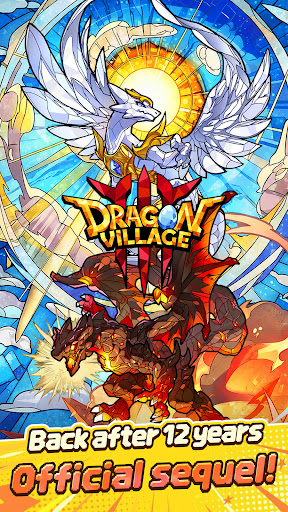

■ Back after 12 years, the official sequel!
The legendary collection RPG Dragon Village returns with a completely new look.
Join the grand conflict between God Dragon and Darknix, and step into the newly forged epic world of Dragon Village 3.
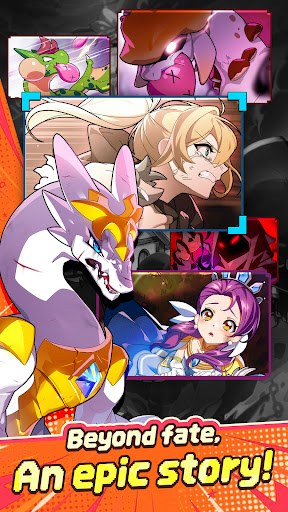
■ Beyond fate, an epic story!
Uncover the hidden tales of dragons with immersive illustrations.
Experience a touching epic woven by diverse dragons and tamers, brought to life with high-quality cutscenes.
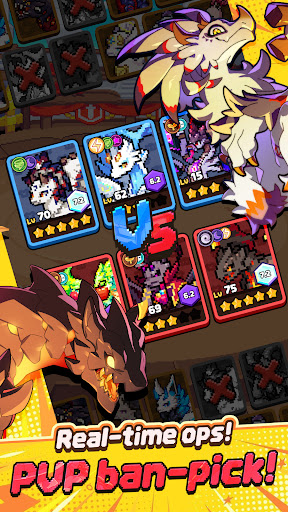
■ Real-time strategy, PVP ban-pick system!
Compete against global tamers in the arena with fierce mind games.
Analyze your opponent's deck, ban their key dragons, and pick your best team to seize control of the battlefield and claim victory.
■ Healing daily life of cute dragons!
Spend peaceful times with pixel dragons in Dragon Village.
Enjoy the simple pleasures of feeding, interacting, and watching your charming dragons gather around the campfire to play.
■ Express yourself, complete tamer customization!
Create your perfect look with hundreds of costume combinations.
Show off your unique style using various outfits and accessories from head to toe, and stand out in the game world.
■ Infinite possibilities, Altar of Life breeding system!
Breed two dragons to acquire completely new and rare dragons.
Discover hidden legendary eggs through strategic breeding based on elements and lineage, and enjoy the thrill of completing the ultimate dragon collection.
■ Endless challenge for the top, giant boss raids!
Fight against mighty boss monsters with your best dragon team.
Test your limits in extreme battles that require precise elemental synergies and skill timing. Reach the highest rankings to claim honorable rewards.
[Subscription Description]
1. Subscription Price and Period
By clicking the "Remove Ads" button in the menu, you can subscribe to "Remove Ads Premium".
The subscription price is $6.99, and the subscription period is one month.
2. Subscription Details
The subscription type is "Remove Ads Premium".
Subscriptions automatically renew every month. If you cancel your subscription during the validity period, you will no longer receive the monthly benefits after the current subscription period ends.
The Remove Ads subscription removes all ads during the subscription period and instantly grants items that are normally rewarded for watching ads.
3. Auto-Renewal Description
The Google Play subscription feature is an auto-renewing system, and payments are automatically charged to your Google Play Account. To cancel the subscription service, you can turn off the auto-renewal feature in the Google Play Store subscriptions management page on your mobile device. Auto-renewals are charged within 24 hours prior to the end of the current subscription cycle, and payment is confirmed directly through your Google Play Account. If you do not cancel the auto-renewing subscription at least 24 hours before the end of the current cycle, your subscription will automatically renew.
Upon confirmation of purchase, the subscription cost will be charged to your Google Play Account.
The subscription extension and the cost of the extension are verified within 24 hours before the end of the subscription period.
4. How to Cancel
To cancel your subscription, open the "Google Play Store" app on your Android device ---> tap the profile icon on the top right ---> select "Payments & subscriptions" ---> tap "Subscriptions" ---> select the subscription for "Dragon Village 3" to cancel.
[Personal Information Processing Policy]
https://terms.withhive.com/terms/policy/view/M371/T167#T167
[Terms of Service]
https://terms.withhive.com/terms/policy/view/M371/T167#T166
Meer tonen

1. Download de MEmu-installatie en voltooi de setup

2. Start MEmu en open vervolgens Google Play op het bureaublad

3. Zoek Dragon Village 3 in Google Play
Install
4. Download en installeer Dragon Village 3
5. Klik op het icoon om te starten na het voltooien van de installatie

6. Geniet van het spelen van Dragon Village 3 op PC met MEmu
MEmu Play is de beste Android Emulator en 100 miljoen mensen genieten al van de superieure Android-game-ervaring. De virtualisatietechnologie van MEmu stelt je in staat om duizenden Android-spellen soepel op je PC te spelen, zelfs de meest grafisch intensieve.
Groter scherm met betere graphics; Lange duur, zonder beperking van batterij of mobiele data.
Volledige Keymapping-ondersteuning voor nauwkeurige besturing van toetsenbord en muis of gamepad.
Meerdere game-accounts of taken op één PC tegelijk met Multi-Instance manager.
Speel Dragon Village 3 op PC door de volgende stappen te volgen: