Thrifty Business
Bijgewerkt
Huidige Versie
Aangeboden door

Met al je passie voor het spelen van Thrifty Business, zouden je handen niet beperkt moeten zijn tot een klein scherm van je telefoon. Speel als een professional en krijg volledige controle over je spel met toetsenbord en muis. MEmu biedt je alles wat je verwacht. Download en speel Thrifty Business op PC. Speel zo lang als je wilt, geen beperkingen meer van batterij, mobiele data en storende oproepen. De gloednieuwe MEmu 9 is de beste keuze om Thrifty Business op PC te spelen. Voorbereid met onze expertise, maakt het uitmuntende vooraf ingestelde keymapping systeem van Thrifty Business een echt PC-spel. MEmu multi-instance manager maakt het spelen van 2 of meer accounts op hetzelfde apparaat mogelijk. En het belangrijkste, onze exclusieve emulatie-engine kan het volledige potentieel van je PC benutten, waardoor alles soepel verloopt.
Meer tonen
Download Thrifty Business op je pc met de MEmu Android-emulator. Geniet van spelen op een groot scherm. [TRY BEFORE YOU BUY].
[TRY BEFORE YOU BUY]
Try the first 60 minutes of Thrifty Business for free! If you like it, you can unlock the full game with a one-time purchase!
There’s a brand new thrift store in town, and guess what? You’re in charge!
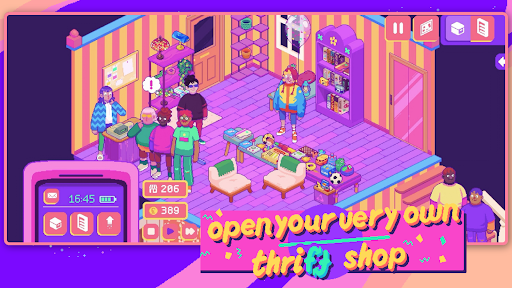
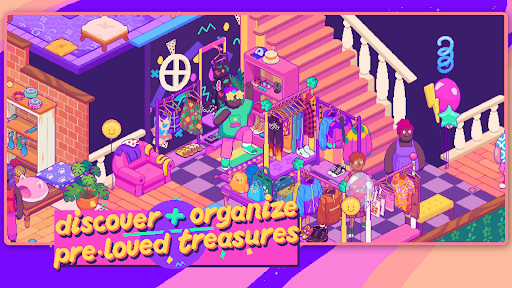
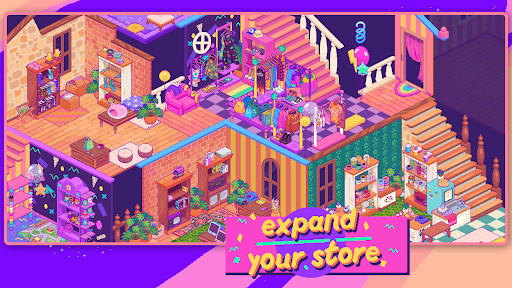
In Thrifty Business, you’ll set up and manage your very own 90’s-inspired vintage thrift shop. Search through boxes filled with pre-loved gems and use them to create gorgeous displays. Unlock furniture, decorations, wallpaper & floors to create a beautiful community space that brings everybody together!
Adjust your layout and organize your shelves and racks to the finest detail. Group your wares by colour, theme, purpose, or whatever you like. The more organized your store is, the more community points you’ll get to unlock new goodies!
Customize the furniture, wallpaper, flooring and decor to make your store as welcoming and cozy as possible. As business grows, you might even need to expand into the adjacent rooms!
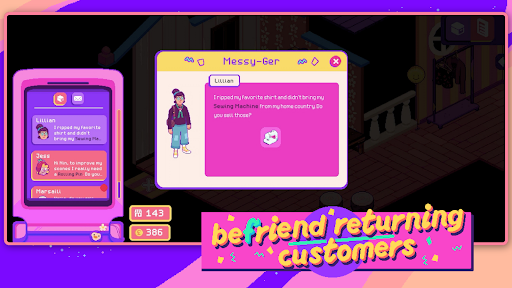
This is so much more than just a store. Listen to customer’s stories and try to fulfill their requests. You can also unlock and host hobbyist events, turning your business into a treasured third space for locals!
What Thrifty Business has in store for you:
- laid-back management sim
- colorful 90s-inspired graphics
- 500+ different items to add to your shelves
- precision placing so you can organize exactly how you want
- customization options: furniture, decorations, wallpaper & flooring
- a quirky and unique cast of customers
What you won’t find on our shelves:
- stressful min-maxing to get the best possible profit
- setting item prices or haggling
- impatient customers that leave your store in anger
Meer tonen

1. Download de MEmu-installatie en voltooi de setup

2. Start MEmu en open vervolgens Google Play op het bureaublad

3. Zoek Thrifty Business in Google Play
Install
4. Download en installeer Thrifty Business
5. Klik op het icoon om te starten na het voltooien van de installatie

6. Geniet van het spelen van Thrifty Business op PC met MEmu
MEmu Play is de beste Android Emulator en 100 miljoen mensen genieten al van de superieure Android-game-ervaring. De virtualisatietechnologie van MEmu stelt je in staat om duizenden Android-spellen soepel op je PC te spelen, zelfs de meest grafisch intensieve.
Groter scherm met betere graphics; Lange duur, zonder beperking van batterij of mobiele data.
Volledige Keymapping-ondersteuning voor nauwkeurige besturing van toetsenbord en muis of gamepad.
Meerdere game-accounts of taken op één PC tegelijk met Multi-Instance manager.
Speel Thrifty Business op PC door de volgende stappen te volgen: