
Asobi: Remote Play
Bijgewerkt
Huidige Versie
1.0.4
Aangeboden door

Maak je geen zorgen meer over extra kosten bij het gebruik van Asobi: Remote Play op je mobiele telefoon, bevrijd jezelf van het kleine scherm en geniet van het gebruik van de app op een veel groter display. Vanaf nu, krijg een volledige schermervaring van je app met toetsenbord en muis. MEmu biedt je alle verrassende functies die je verwachtte: snelle installatie en eenvoudige configuratie, intuïtieve besturing, geen beperkingen meer van batterij, mobiele data en storende oproepen. De gloednieuwe MEmu 9 is de beste keuze voor het gebruik van Asobi: Remote Play op je computer. MEmu multi-instance manager maakt het mogelijk om tegelijkertijd 2 of meer accounts te openen. En het belangrijkste, onze exclusieve emulatiemotor kan het volledige potentieel van je PC benutten, waardoor alles soepel en plezierig wordt.
Meer tonen
Geniet van een fantastische ervaring met Asobi: Remote Play op je pc met MEmu Play. Het is een krachtige gratis Android-emulator die je duizenden Android-apps biedt voor de desktopversie. Geniet van contact met vrienden en verbeter je werk met hogere efficiëntie! Asobi: Remote Play & Cloud Streaming for your PlayStation®.
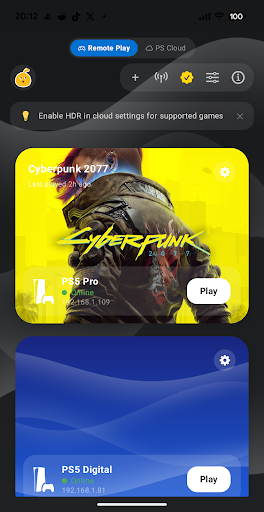
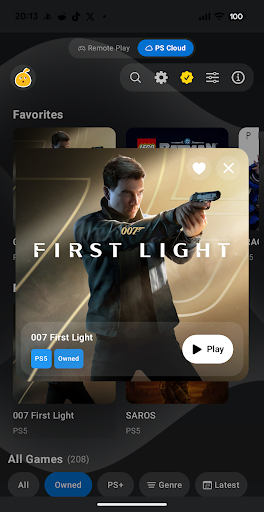
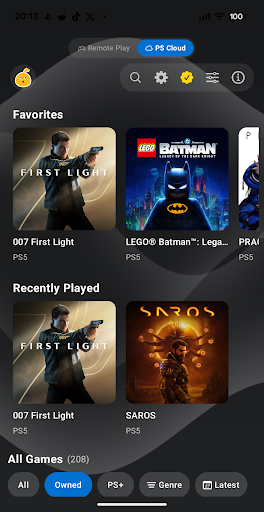
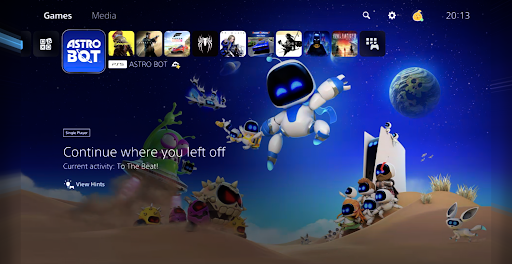
Asobi: Remote Play & Cloud Streaming for your PlayStation®
Turn your Android phone or tablet into a high-quality PS Remote Play client for your PlayStation® 4 and PlayStation® 5, with real controllers, virtual buttons, and smart streaming.
Core experience (free):
• Remote Play from PS4 and PS5 over your local network or the internet
• PlayStation® 5 Cloud streaming (PlayStation®Plus Premium required for cloud games)
• Multiple PSN accounts with one-tap switching
• Game info & progress: latest trophies, currently played, and how far you've come
• 1080p / 30 fps SDR streaming: smooth, sharp, just works
• Automatic bitrate: the app adapts quality to your network
• Forward Error Correction (FEC): recover from short Wi-Fi glitches without a stutter
• Backbone controller support with a PlayStation Portal-like experience
• Built-in virtual controller overlay for when you don't have a controller
• Foldable & dual-screen support: full-panel video on Pixel Fold inner, video-up / touchpad-down layout on AYN Thor
• Automatic console registration: pair without a PIN on the same PSN account
Premium, a single one-time unlock:
• Full DualSense, DualSense Edge, and DualShock 4 support (USB and Bluetooth)
• HDR video: full color and contrast on supported displays
• 1080p / 60 fps streaming: double the smoothness for responsive play
• FSR Upscaling (Quality 2K / Ultra 4K) and up to 120 fps frame generation on supported devices
• Multiple low-latency modes for tighter Competition / Ultra Low / Low latency
• Manual bitrate control (2 to 100 Mbps)
• Controller vibration via DualSense USB or Bluetooth
• Ambient Lightspill: bias-light glow around the picture matched to the edge of the stream
• Fill, Zoom, Stretch, and Safe Zoom view modes: choose how the picture sits on screen
• On-screen lightbar halo: visualize controller status right on your display
• On device haptics when using the Virtual or a Telescope controller
Disclaimer
Asobi is a remote play client for PlayStation®4 and PlayStation®5 and is not affiliated with or endorsed by Sony Interactive Entertainment. PlayStation®, PlayStation®Plus, DualShock®, DualSense®, PlayStation®Portal, PlayStation®4, PlayStation®5 are trademarks of the Sony Group Corporation.
Meer tonen

1. Download de MEmu-installatie en voltooi de setup

2. Start MEmu en open vervolgens Google Play op het bureaublad

3. Zoek Asobi: Remote Play in Google Play
Install
4. Download en installeer Asobi: Remote Play
5. Klik op het icoon om te starten na het voltooien van de installatie

6. Ervaar Asobi: Remote Play op pc met MEmu
MEmu Play is de beste Android-emulator, met meer dan 100 miljoen gebruikers die genieten van de superieure Android-app-ervaring. Dankzij de virtualisatietechnologie van MEmu kun je duizenden Android-apps soepel op je computer draaien, zelfs de meest veeleisende.
Groter scherm met betere graphics; Lange duur, zonder beperking van batterij of mobiele data.
Volledige Keymapping-ondersteuning voor nauwkeurige besturing van toetsenbord en muis of gamepad.
Meerdere game-accounts of taken op één PC tegelijk met Multi-Instance manager.
Gebruik Asobi: Remote Play op PC door de volgende stappen te volgen: