Drop Duchy
Zaktualizowano
Aktualna wersja
1.2.20
Sprzedawca

Przy całej swojej pasji do grania w Drop Duchy, twoje ręce nie powinny być ograniczone na małym ekranie telefonu. Graj jak zawodowiec i uzyskaj pełną kontrolę nad grą za pomocą klawiatury i myszy. MEmu oferuje ci wszystko, czego oczekujesz. Pobierz i graj Drop Duchy na PC. Graj tak długo, jak chcesz, bez ograniczeń baterii, danych komórkowych i niepokojących połączeń. Zupełnie nowy MEmu 9 to najlepszy wybór do grania w Drop Duchy na PC. Przygotowany dzięki naszej wiedzy, znakomity, wstępnie ustawiony system mapowania klawiszy sprawia, że Drop Duchy jest prawdziwą grą na PC. Zakodowany naszą absorpcją, menedżer wielu instancji umożliwia granie na 2 lub więcej kontach na tym samym urządzeniu. A co najważniejsze, nasz emulator może uwolnić pełny potencjał twojego komputera, sprawić, że wszystko będzie płynne. Dbamy nie tylko o to, jak grasz, ale także o cały proces czerpania radości z grania.
Pokaż więcej
Ciesz się wspaniałym doświadczeniem podczas grania w Drop Duchy na komputerze z aplikacją MEMU App Player. Jest to potężny darmowy emulator Androida pozwalający grać w tysiące gier na Androida. [SPRÓBUJ PRZED KUPNEM!
[SPRÓBUJ PRZED KUPNEM!] Ukochana gra na PC, teraz dostępna na urządzeniach mobilnych.
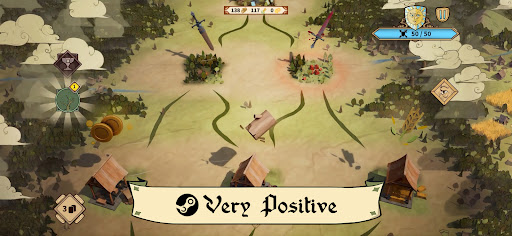
Metacritic: 83. Bardzo pozytywna na STEAM - 90%.
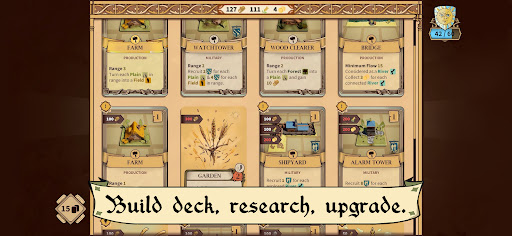
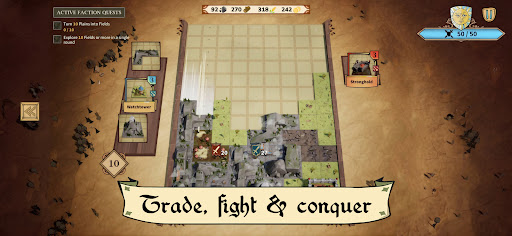
Drop Duchy to kultowa, geometryczna łamigłówka, którą wszyscy znamy i kochamy, z nową perspektywą: zamiast po prostu oczyszczać linie, budujesz królestwo. Połączenie budowania talii, łamigłówki i rogue-lite, zaprojektowane, aby zaostrzyć Twój apetyt jako taktyka układania bloków.
Układaj kafelki tak, jak w grach z układaniem bloków, ale dopasuj je tak, aby zmaksymalizować ich aktywację. Postaw odpowiednie struktury w pobliżu bujnych lasów, dzikich rzek i trawiastych równin, aby pozyskać jak najwięcej zasobów i jednostek.
Następnie zbierz swoje wojska, odzyskaj regiony pod kontrolą wroga i szturmuj wrogą fortecę rozgałęziającymi się ścieżkami pełnymi decyzji. Jeśli Twój zamek poniesie zbyt duże obrażenia, wyprawa się zakończy – ale porażka to nie koniec: od razu wróć do gry z nową strategią i wykorzystaj zdobyte doświadczenie, aby odblokować jeszcze więcej zawartości.
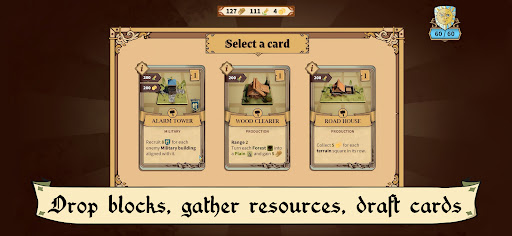
Zdobądź władzę dzięki ponad 110 unikalnym kartom, handluj z targowiskami i gildiami i wspinaj się po meta-progresji ponad 90 misji powiązanych z trzema grywalnymi frakcjami: Księstwem, Zakonem i Republiką.
Adaptuj się, podbijaj i utrzymuj akcję w ruchu!
CECHY
* Oryginalne połączenie rozgrywki logicznej i strategii czasu rzeczywistego
* Zupełnie nowe wrażenia z gry w każdej rozgrywce dzięki generowaniu proceduralnemu
* Graj frakcjami: Księstwem, Zakonem, Republiką
* Meta-progresja: ponad 90 wyzwań zaprojektowanych, aby pomóc Ci w Twojej podróży
* Zbuduj idealną talię z ponad 110 unikalnymi kartami
* Elegancka i urocza oprawa graficzna, która ucieszy Twoje oczy
* Wciągająca i stale ewoluująca ścieżka dźwiękowa, która ucieszy Twoje uszy
* Wybierz swoją ścieżkę między jeziorami, polanami, lasami, wioskami, gildiami… i nie tylko!
Pokaż więcej

1. Pobierz instalator MEmu i zakończ instalację

2. Uruchom MEmu, a następnie otwórz Google Play na pulpicie

3. Wyszukaj Drop Duchy w Google Play
Install
4. Pobierz i zainstaluj Drop Duchy
5. Po zakończeniu instalacji kliknij ikonę, aby rozpocząć

6. Ciesz się grą Drop Duchy na PC z MEmu
MEmu Play to najlepszy emulator Androida, a 100 milionów ludzi już korzysta z jego i dosta doskonałe wrażenia z gier na Androida. Technologia wirtualizacji MEmu umożliwia płynne granie w tysiące gier Androida na komputerze, nawet tych najbardziej wymagających grafiki.
Większy ekran z lepszą grafiką; Długi czas, bez ograniczeń baterii lub danych mobilnych.
Pełna obsługa mapowania klawiszy dla precyzyjnego sterowania klawiaturą i myszą lub gamepadem.
Wiele kont gier lub zadań na jednym komputerze jednocześnie z menedżerem wielu instancji.
Play Drop Duchy on PC by following steps: