
Drop Duchy
อัปเดตเมื่อ
เวอร์ชันปัจจุบัน
1791309315
ให้บริการโดย

เวลาคุณเล่น Drop Duchy, คุณอาจรู้สึกว่ามือคุณอาจบังจอแล้วทำให้ไม่ได้เล่นแบบเต็มที่. เล่นแบบไร้ขีดจำกัดด้วยเม้าส์และคีย์บอร์ด. MEmu มีตัวเลือกหลายอย่างให้คุณใช้งานเกมที่คุณเล่นแบบที่คุณต้องการ. ดาวน์โหลดและเล่น Drop Duchy บน PC. เล่นนานแค่ไหนก็ได้, ไม่ต้องชาร์จแบตเตอรี่, หรือเจอคนโทรเข้ามาระหว่างเล่น. MEmu 9 เป็นตัวเลือกสำหรับการเล่น Drop Duchy บน PC. ทางทีมงานเราได้ปรับแต่งเกม, ปรับให้เล่นเกมบางเกมได้เหมือนเล่น Drop Duchy เป็นเกม PC เช่นเล็งด้วยเม้าส์หรือใช้คีย์บอร์ด. ระบบของเรายังทำให้คุณสามารถเปิดเล่นได้มากกว่า 2 เกมพร้อมๆกันในคอมของคุณ. และที่สำคัญที่สุด, ระบบโปรแกรมของเราสามารถทำให้คุณใช้ระบบของ PC ทำให้เกมลื่นเหมือนกับใช้โทรศัพท์รุ่นล่าสุด. เราไม่ได้ดูแลเรื่องการเล่นเกม, แต่เราดูแลถึงความสนุกสนานที่คุณได้จากการเล่นด้วย.
แสดงเพิ่มเติม
ดาวน์โหลด Drop Duchy บน PC ด้วย MEmu Android Emulator สนุกกับการเล่นบนหน้าจอขนาดใหญ่ เกมพีซีสุดฮิต กำลังจะมาถึงมือถือแล้ว!
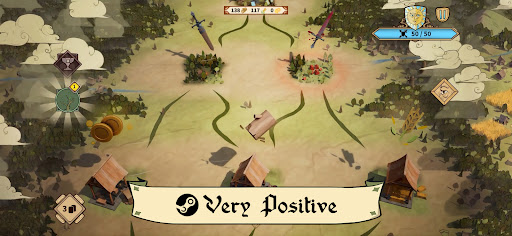
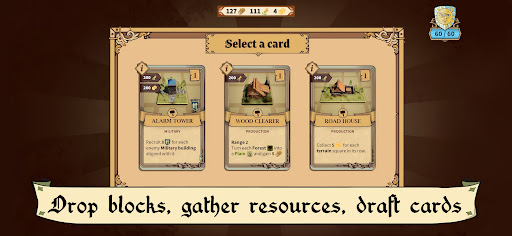
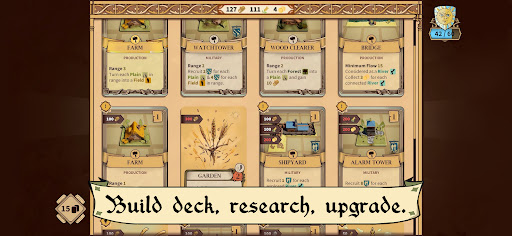
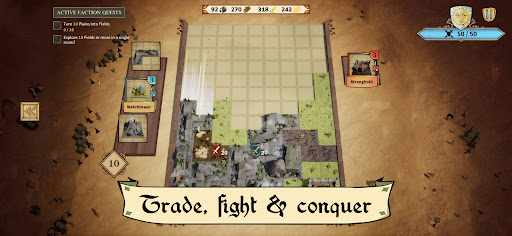
เกมพีซีสุดฮิต กำลังจะมาถึงมือถือแล้ว!
คะแนน Metacritic: 83. ได้รับคำชมอย่างมากบน STEAM - 90%
Drop Duchy นำเอาเกมปริศนาเรขาคณิตสุดคลาสสิกที่เราทุกคนชื่นชอบมาปรับโฉมใหม่: แทนที่จะแค่เคลียร์เส้น คุณจะได้สร้างอาณาจักรขึ้นมา เกมนี้ผสมผสานการสร้างเด็ค การแก้ปริศนา และเกมแนวโร้กไลท์ ออกแบบมาเพื่อฝึกฝนทักษะการวางแผนกลยุทธ์ของคุณ
วางชิ้นส่วนไทล์เหมือนกับเกมบล็อก แต่จัดเรียงให้ถูกต้องเพื่อเพิ่มประสิทธิภาพการใช้งานกฎต่างๆ วางสิ่งก่อสร้างที่เหมาะสมไว้ใกล้กับป่าเขียวชอุ่ม แม่น้ำที่ไหลเชี่ยว และทุ่งหญ้า เพื่อดึงทรัพยากรและหน่วยรบออกมาให้ได้มากที่สุด
จากนั้นรวบรวมกองทัพของคุณ ยึดคืนพื้นที่ที่อยู่ภายใต้การควบคุมของศัตรู และบุกโจมตีป้อมปราการของศัตรูตามเส้นทางที่แตกแขนงและเต็มไปด้วยการตัดสินใจ หากปราสาทของคุณได้รับความเสียหายมากเกินไป เกมก็จะจบลง - แต่ความพ่ายแพ้ไม่ใช่จุดจบ: กลับมาเล่นใหม่ด้วยกลยุทธ์ใหม่ และใช้ประสบการณ์ที่ได้รับเพื่อปลดล็อกเนื้อหาเพิ่มเติม
เพิ่มพูนพลังด้วยการ์ดที่ไม่ซ้ำกันกว่า 110 ใบ ค้าขายในตลาดและกิลด์ และไต่ระดับความก้าวหน้าของภารกิจกว่า 90 ภารกิจที่เชื่อมโยงกับสามฝ่ายที่เล่นได้: ดัชชี, ออร์เดอร์ และสาธารณรัฐ
ปรับตัว พิชิต และดำเนินเรื่องราวต่อไป!
คุณสมบัติ
* การผสมผสานที่เป็นเอกลักษณ์ระหว่างเกมเพลย์ปริศนาและกลยุทธ์แบบเรียลไทม์
* ประสบการณ์การเล่นเกมใหม่ทุกครั้งที่เล่นด้วยระบบสร้างแผนที่แบบสุ่ม
* เล่นกับฝ่ายต่างๆ: ดัชชี, ออร์เดอร์, สาธารณรัฐ
* ความก้าวหน้าของภารกิจ: ความท้าทายกว่า 90 ภารกิจที่ออกแบบมาเพื่อช่วยคุณในการเดินทาง
* สร้างเด็คที่สมบูรณ์แบบด้วยการ์ดที่ไม่ซ้ำกันกว่า 110 ใบ
* ทิศทางศิลปะที่สวยงามและมีเสน่ห์ที่จะทำให้คุณเพลิดเพลิน
* เพลงประกอบที่น่าดึงดูดและพัฒนาอยู่เสมอที่จะทำให้คุณเพลิดเพลิน
* เลือกเส้นทางของคุณระหว่างทะเลสาบ ทุ่งหญ้า ป่า หมู่บ้าน กิลด์… และอีกมากมาย!
แสดงเพิ่มเติม

1. ดาวน์โหลดตัวติดตั้ง MEmu และสิ้นสุดการติดตั้ง

2. เริ่ม MEmu จากนั้นเปิด Google Play บนหน้าแรก

3. ค้นหา Drop Duchy ใน Google Play
Install
4. ดาวน์โหลดและติดตั้ง Drop Duchy
5. เมื่อติดตั้งเสร็จให้คลิกที่ไอคอนเพื่อเริ่มใช้งาน

6. สนุกกับการเล่น Drop Duchy บนพีซีด้วย MEmu
MEmu App Player เป็นอีมูเลเตอร์ Android ที่ดีที่สุดและผู้คนกว่า 50 ล้านคนเพลิดเพลินไปกับประสบการณ์การเล่นเกม Android ที่ยอดเยี่ยม เทคโนโลยีการจำลองเสมือนของ MEmu ช่วยให้คุณเล่นเกม Android หลายพันเกมได้อย่างราบรื่นบนพีซีของคุณแม้แต่เกมที่ต้องใช้กราฟิกมากที่สุด
จอใหญ่และกราฟฟิกสวยกว่า; เล่นได้นาน, ไม่ต้องใช้แบตเตอรี่โทรศัพท์หรือเน็ตโทรศัพท์.
ระบบปรับแต่งปุ่มคีย์บอร์ดและเม้าส์ตามที่คุณเลือก
เล่นมากกว่าหนึ่งเกมบน PC ในเวลาเดียวกันด้วยระบบหลายจอหรือ Multi-Instance manager.
Play Drop Duchy on PC by following steps:

























![[ไกด์เกม] CookieRun Classic แนะนำ 5 คุกกี้น่าปั้น น่าลงทุน ที่มือใหม่ห้ามพลาด! (เล่นบน PC ผ่าน MEmu ให้ลื่นสุด ๆ) PC](https://www.memuplay.com/blog/wp-content/uploads/2026/08/579c01ab-a953-45b3-8115-9b6279b7d6f9.png)

















