Hamdoku: Sudoku Logic Puzzle
Zaktualizowano
Aktualna wersja
1.0.4
Sprzedawca

Przy całej swojej pasji do grania w Hamdoku: Sudoku Logic Puzzle, twoje ręce nie powinny być ograniczone na małym ekranie telefonu. Graj jak zawodowiec i uzyskaj pełną kontrolę nad grą za pomocą klawiatury i myszy. MEmu oferuje ci wszystko, czego oczekujesz. Pobierz i graj Hamdoku: Sudoku Logic Puzzle na PC. Graj tak długo, jak chcesz, bez ograniczeń baterii, danych komórkowych i niepokojących połączeń. Zupełnie nowy MEmu 9 to najlepszy wybór do grania w Hamdoku: Sudoku Logic Puzzle na PC. Przygotowany dzięki naszej wiedzy, znakomity, wstępnie ustawiony system mapowania klawiszy sprawia, że Hamdoku: Sudoku Logic Puzzle jest prawdziwą grą na PC. Zakodowany naszą absorpcją, menedżer wielu instancji umożliwia granie na 2 lub więcej kontach na tym samym urządzeniu. A co najważniejsze, nasz emulator może uwolnić pełny potencjał twojego komputera, sprawić, że wszystko będzie płynne. Dbamy nie tylko o to, jak grasz, ale także o cały proces czerpania radości z grania.
Pokaż więcej
Ciesz się wspaniałym doświadczeniem podczas grania w Hamdoku: Sudoku Logic Puzzle na komputerze z aplikacją MEMU App Player. Jest to potężny darmowy emulator Androida pozwalający grać w tysiące gier na Androida. [Codziennie odświeżane, zabawne łamigłówki].
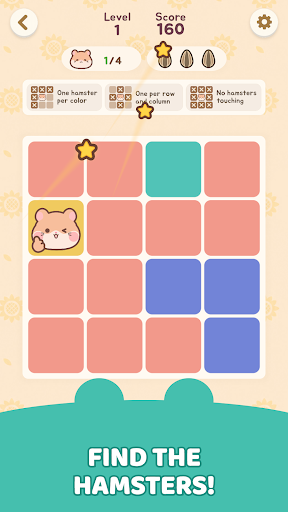
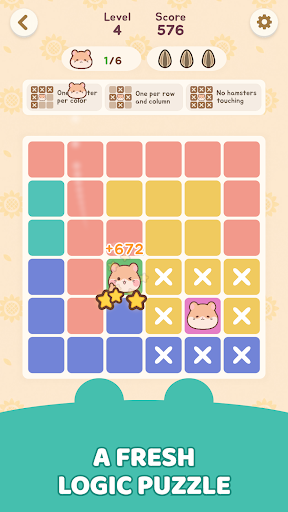
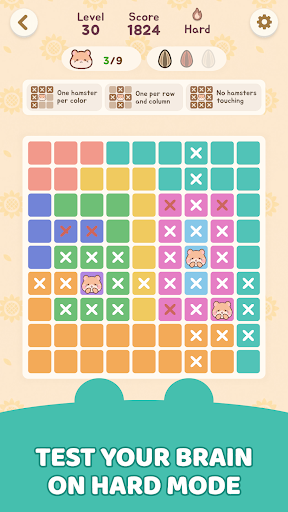
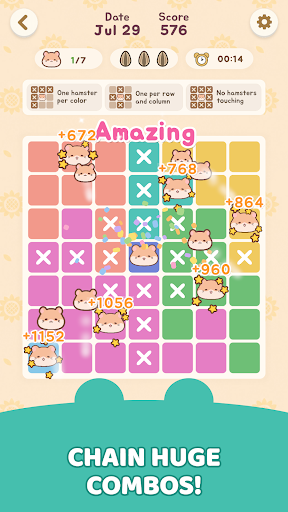
[Codziennie odświeżane, zabawne łamigłówki]
A gdyby Sudoku było przytulniejsze i pełne uroczych chomików? To właśnie Hamdoku!
Hamdoku to czysta logiczna łamigłówka, która dodaje urocze, pulchne chomiki do żmudnego procesu dedukcji, jaki oferuje Sudoku. Nie potrzeba żadnych liczb. Twoja jedyna misja: znaleźć idealne miejsce dla każdego chomika!
[Proste zasady, rozbudowana strategia]
Nauka zajmuje sekundy, ale nigdy nie jest łatwa.
- Jeden chomik na strefę: Plansza jest podzielona na kolorowe obszary. Umieść dokładnie jednego chomika w każdym obszarze, w każdym rzędzie i w każdej kolumnie!
- Przestrzeń osobista: Chomiki nigdy nie mogą się ze sobą stykać – nawet po przekątnej.
- Trzy serca: Błąd kosztuje serce, a dostajesz tylko trzy. Zgadywanie cię nie uratuje – każdy ruch się liczy!
- Wskazówki i notatki: Utknąłeś? Wskazówki pomogą. Nie jesteś pewien? Zanotuj. Każdy może grać bez presji.
[Funkcje gry]
1. Nowe codzienne wyzwanie każdego dnia
Rozwiąż dzisiejszą łamigłówkę i utrzymaj passę. Ścigaj się ze stoperem i pobij swój rekord!
2. Urocze, pulchnopolicze chomiki
Urocze chomiki czekają na Ciebie w każdej łamigłówce. Ich okrągłe, urocze spojrzenie rozwesela Twoje codzienne życie.
3. Relaksująca, swobodna gra w dowolnym czasie i miejscu
W drodze do pracy, przed snem lub podczas krótkiej przerwy – bez rywalizacji, po prostu we własnym tempie. Jasna, radosna grafika i przejrzysty układ zapewnią spokój oczu i umysłu.
Gotowy na łamigłówkową przygodę pełną uroczych chomików?
Pobierz Hamdoku już teraz i sprawdź swoją logikę!
--------------------------------------------------
[Opcjonalne] Powiadomienia: Otrzymuj powiadomienia informacyjne i promocyjne
※ Udzielenie opcjonalnych uprawnień nie jest obowiązkowe do korzystania z usługi. Po udzieleniu uprawnień możesz je zmodyfikować lub cofnąć w ustawieniach smartfona.
[Jak cofnąć dostęp]
* Android 6.0 i nowsze:
- Cofnięcie dostępu: Ustawienia urządzenia > Aplikacje > Więcej (Ustawienia i sterowanie) > Ustawienia aplikacji > Uprawnienia aplikacji > Wybierz ten dostęp > Zezwól lub Cofnij dostęp
- Cofnięcie dostępu przez aplikację: Ustawienia urządzenia > Aplikacje > Wybrana aplikacja > Uprawnienia > Zezwól lub Cofnij dostęp
* Android 6.0 i starsze:
Ze względu na specyfikę systemu operacyjnego, uprawnień dostępu nie można cofnąć, dlatego można je cofnąć tylko w przypadku usunięcia aplikacji. Zalecamy aktualizację systemu Android do wersji 6.0 lub nowszej.
--------------------------------------------------
Pomoc : cs@mobirix.com
Strona główna:
https://play.google.com/store/apps/dev?id=4864673505117639552
Facebook:
https://www.facebook.com/mobirixplayen
YouTube:
https://www.youtube.com/user/mobirix1
Instagram:
https://www.instagram.com/mobirix_official/
TikTok:
https://www.tiktok.com/@mobirix_official
Pokaż więcej

1. Pobierz instalator MEmu i zakończ instalację

2. Uruchom MEmu, a następnie otwórz Google Play na pulpicie

3. Wyszukaj Hamdoku: Sudoku Logic Puzzle w Google Play
Install
4. Pobierz i zainstaluj Hamdoku: Sudoku Logic Puzzle
5. Po zakończeniu instalacji kliknij ikonę, aby rozpocząć

6. Ciesz się grą Hamdoku: Sudoku Logic Puzzle na PC z MEmu
MEmu Play to najlepszy emulator Androida, a 100 milionów ludzi już korzysta z jego i dosta doskonałe wrażenia z gier na Androida. Technologia wirtualizacji MEmu umożliwia płynne granie w tysiące gier Androida na komputerze, nawet tych najbardziej wymagających grafiki.
Większy ekran z lepszą grafiką; Długi czas, bez ograniczeń baterii lub danych mobilnych.
Pełna obsługa mapowania klawiszy dla precyzyjnego sterowania klawiaturą i myszą lub gamepadem.
Wiele kont gier lub zadań na jednym komputerze jednocześnie z menedżerem wielu instancji.
Play Hamdoku: Sudoku Logic Puzzle on PC by following steps: