Hamdoku: Sudoku Logic Puzzle
อัปเดตเมื่อ
เวอร์ชันปัจจุบัน
ให้บริการโดย

เวลาคุณเล่น Hamdoku: Sudoku Logic Puzzle, คุณอาจรู้สึกว่ามือคุณอาจบังจอแล้วทำให้ไม่ได้เล่นแบบเต็มที่. เล่นแบบไร้ขีดจำกัดด้วยเม้าส์และคีย์บอร์ด. MEmu มีตัวเลือกหลายอย่างให้คุณใช้งานเกมที่คุณเล่นแบบที่คุณต้องการ. ดาวน์โหลดและเล่น Hamdoku: Sudoku Logic Puzzle บน PC. เล่นนานแค่ไหนก็ได้, ไม่ต้องชาร์จแบตเตอรี่, หรือเจอคนโทรเข้ามาระหว่างเล่น. MEmu 9 เป็นตัวเลือกสำหรับการเล่น Hamdoku: Sudoku Logic Puzzle บน PC. ทางทีมงานเราได้ปรับแต่งเกม, ปรับให้เล่นเกมบางเกมได้เหมือนเล่น Hamdoku: Sudoku Logic Puzzle เป็นเกม PC เช่นเล็งด้วยเม้าส์หรือใช้คีย์บอร์ด. ระบบของเรายังทำให้คุณสามารถเปิดเล่นได้มากกว่า 2 เกมพร้อมๆกันในคอมของคุณ. และที่สำคัญที่สุด, ระบบโปรแกรมของเราสามารถทำให้คุณใช้ระบบของ PC ทำให้เกมลื่นเหมือนกับใช้โทรศัพท์รุ่นล่าสุด. เราไม่ได้ดูแลเรื่องการเล่นเกม, แต่เราดูแลถึงความสนุกสนานที่คุณได้จากการเล่นด้วย.
แสดงเพิ่มเติม
ดาวน์โหลด Hamdoku: Sudoku Logic Puzzle บน PC ด้วย MEmu Android Emulator สนุกกับการเล่นบนหน้าจอขนาดใหญ่ [Fun Brain Puzzles Refreshed Daily].
[Fun Brain Puzzles Refreshed Daily]
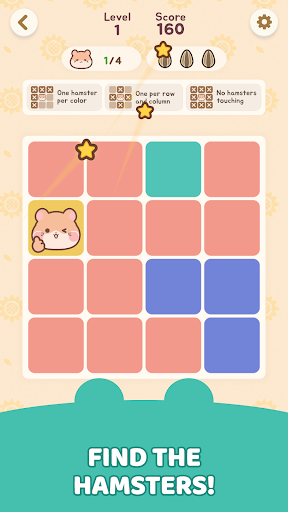
What if Sudoku were cozier and filled with cute hamsters? That's Hamdoku!
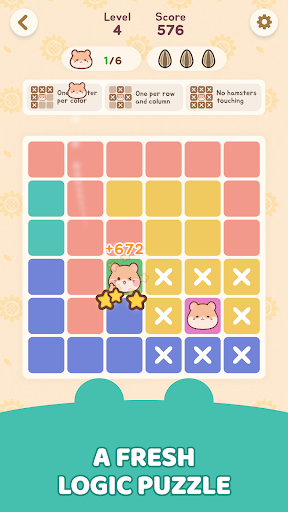
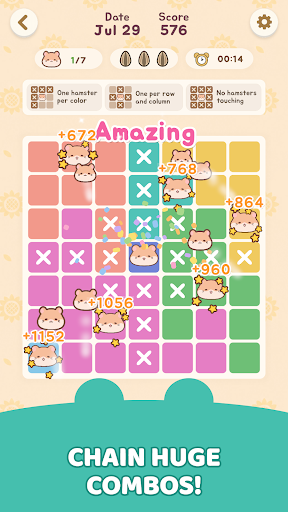
Hamdoku is a pure logic puzzle that adds adorable, chubby-cheeked hamsters to the tight deduction of Sudoku. No numbers needed. Your one and only mission: find the perfect spot for every hamster!
[Simple Rules, Deep Strategy]
It takes seconds to learn, but it's never a pushover.
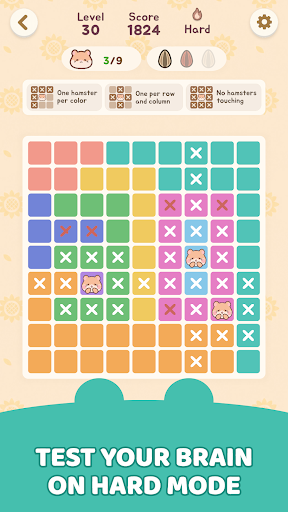
- One per zone: The board is divided into colored regions. Place exactly one hamster in each region, each row, and each column!
- Personal space: Hamsters can never touch each other - not even diagonally.
- Three hearts: A mistake costs you a heart, and you only get three. Guessing won't save you - every move counts!
- Hints & notes: Stuck? Hints help. Unsure? Take notes. Anyone can play without pressure.
[Game Features]
1. A New Daily Challenge Every Day
Solve today's puzzle and keep your streak alive. Race the stopwatch and beat your personal best!
2. Heart-Stealing Chubby-Cheeked Hamsters
Adorable hamster friends await you in every puzzle. Their round, lovely look brings a warm smile to your daily life.
3. Casual Relaxing Play Anytime, Anywhere
On your commute, before bed, or during a short break - no competition, just your own pace. Bright, cheerful graphics and a clean layout keep your eyes and mind at ease.
Ready for a brain-teasing puzzle adventure packed with cute hamsters?
Download Hamdoku now and put your logic to the test!
--------------------------------------------------
[Optional] Notifications: Receive informational and promotional notifications
※ Granting optional permissions is not mandatory to use the service. After giving permission, you can modify or revoke it in your smartphone's settings.
[How to withdraw access]
* Android 6.0 and above:
- Withdraw by access: Device Settings > Apps > More (Settings and Controls) > App Settings > App Permissions > Select that access > Allow or Withdraw Access
- Withdraw by app: Device Settings > Apps > Selected app > Permissions > Allow or Withdraw Access
* Android 6.0 or less:
Due to the nature of the operating system, access rights cannot be withdrawn, so it can only be withdrawn if the app is deleted. We recommend that you upgrade the Android version to 6.0 or higher.
--------------------------------------------------
Help : cs@mobirix.com
Homepage :
https://play.google.com/store/apps/dev?id=4864673505117639552
Facebook :
https://www.facebook.com/mobirixplayen
YouTube :
https://www.youtube.com/user/mobirix1
Instagram :
https://www.instagram.com/mobirix_official/
TikTok :
https://www.tiktok.com/@mobirix_official
แสดงเพิ่มเติม

1. ดาวน์โหลดตัวติดตั้ง MEmu และสิ้นสุดการติดตั้ง

2. เริ่ม MEmu จากนั้นเปิด Google Play บนหน้าแรก

3. ค้นหา Hamdoku: Sudoku Logic Puzzle ใน Google Play
Install
4. ดาวน์โหลดและติดตั้ง Hamdoku: Sudoku Logic Puzzle
5. เมื่อติดตั้งเสร็จให้คลิกที่ไอคอนเพื่อเริ่มใช้งาน

6. สนุกกับการเล่น Hamdoku: Sudoku Logic Puzzle บนพีซีด้วย MEmu
MEmu App Player เป็นอีมูเลเตอร์ Android ที่ดีที่สุดและผู้คนกว่า 50 ล้านคนเพลิดเพลินไปกับประสบการณ์การเล่นเกม Android ที่ยอดเยี่ยม เทคโนโลยีการจำลองเสมือนของ MEmu ช่วยให้คุณเล่นเกม Android หลายพันเกมได้อย่างราบรื่นบนพีซีของคุณแม้แต่เกมที่ต้องใช้กราฟิกมากที่สุด
จอใหญ่และกราฟฟิกสวยกว่า; เล่นได้นาน, ไม่ต้องใช้แบตเตอรี่โทรศัพท์หรือเน็ตโทรศัพท์.
ระบบปรับแต่งปุ่มคีย์บอร์ดและเม้าส์ตามที่คุณเลือก
เล่นมากกว่าหนึ่งเกมบน PC ในเวลาเดียวกันด้วยระบบหลายจอหรือ Multi-Instance manager.
Play Hamdoku: Sudoku Logic Puzzle on PC by following steps: