Hamdoku: Sudoku Logic Puzzle
Updated
Current Version
1.0.5
Offered By

With your passion for Hamdoku: Sudoku Logic Puzzle, you shouldn’t have to limit yourself to the small screen of a phone. Play like a pro and take full control of the game using a keyboard and mouse. MEmu gives you everything you’re looking for. Download and play Hamdoku: Sudoku Logic Puzzle on PC. Play as long as you want — no more worries about battery life, mobile data, or unexpected calls. The all-new MEmu 9 is the best way to play Hamdoku: Sudoku Logic Puzzle on PC. With our expertly designed keymapping system, Hamdoku: Sudoku Logic Puzzle feels just like a real PC game. The MEmu multi-instance manager lets you run two or more accounts on the same device at the same time. Most importantly, our exclusive emulation engine unlocks your PC’s full potential, delivering smooth and seamless performance.
Show more
Download Hamdoku: Sudoku Logic Puzzle on PC with MEmu Android Emulator. Enjoy playing on big screen. [Fun Brain Puzzles Refreshed Daily].
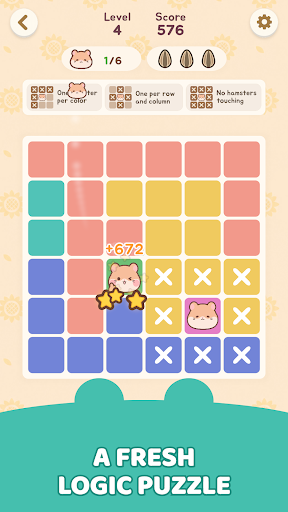
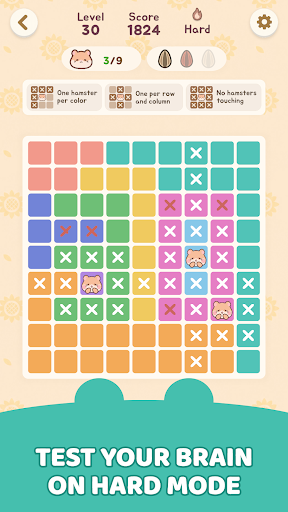
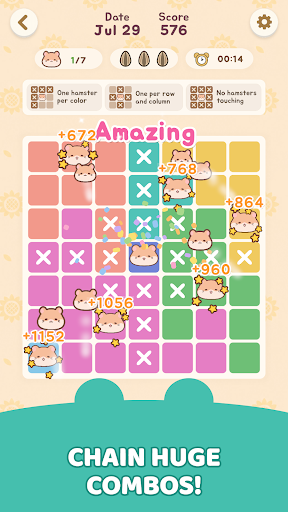
[Fun Brain Puzzles Refreshed Daily]
What if Sudoku were cozier and filled with cute hamsters? That's Hamdoku!
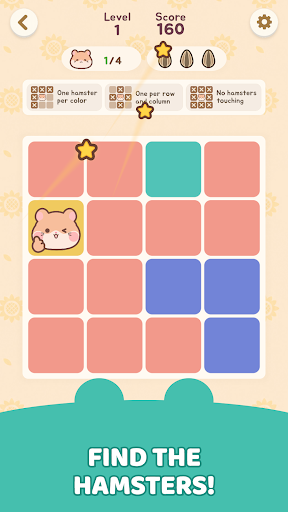
Hamdoku is a pure logic puzzle that adds adorable, chubby-cheeked hamsters to the tight deduction of Sudoku. No numbers needed. Your one and only mission: find the perfect spot for every hamster!
[Simple Rules, Deep Strategy]
It takes seconds to learn, but it's never a pushover.
- One per zone: The board is divided into colored regions. Place exactly one hamster in each region, each row, and each column!
- Personal space: Hamsters can never touch each other - not even diagonally.
- Three hearts: A mistake costs you a heart, and you only get three. Guessing won't save you - every move counts!
- Hints & notes: Stuck? Hints help. Unsure? Take notes. Anyone can play without pressure.
[Game Features]
1. A New Daily Challenge Every Day
Solve today's puzzle and keep your streak alive. Race the stopwatch and beat your personal best!
2. Heart-Stealing Chubby-Cheeked Hamsters
Adorable hamster friends await you in every puzzle. Their round, lovely look brings a warm smile to your daily life.
3. Casual Relaxing Play Anytime, Anywhere
On your commute, before bed, or during a short break - no competition, just your own pace. Bright, cheerful graphics and a clean layout keep your eyes and mind at ease.
Ready for a brain-teasing puzzle adventure packed with cute hamsters?
Download Hamdoku now and put your logic to the test!
--------------------------------------------------
[Optional] Notifications: Receive informational and promotional notifications
※ Granting optional permissions is not mandatory to use the service. After giving permission, you can modify or revoke it in your smartphone's settings.
[How to withdraw access]
* Android 6.0 and above:
- Withdraw by access: Device Settings > Apps > More (Settings and Controls) > App Settings > App Permissions > Select that access > Allow or Withdraw Access
- Withdraw by app: Device Settings > Apps > Selected app > Permissions > Allow or Withdraw Access
* Android 6.0 or less:
Due to the nature of the operating system, access rights cannot be withdrawn, so it can only be withdrawn if the app is deleted. We recommend that you upgrade the Android version to 6.0 or higher.
--------------------------------------------------
Help : cs@mobirix.com
Homepage :
https://play.google.com/store/apps/dev?id=4864673505117639552
Facebook :
https://www.facebook.com/mobirixplayen
YouTube :
https://www.youtube.com/user/mobirix1
Instagram :
https://www.instagram.com/mobirix_official/
TikTok :
https://www.tiktok.com/@mobirix_official
Show more

1. Download MEmu installer and finish the setup

2. Start MEmu then open Google Play on the desktop

3. Search Hamdoku: Sudoku Logic Puzzle in Google Play
Install
4. Download and Install Hamdoku: Sudoku Logic Puzzle
5. On install completion click the icon to start

6. Enjoy playing Hamdoku: Sudoku Logic Puzzle on PC with MEmu
MEmu Play is the best Android emulator and 100 million people already enjoy its superb Android gaming experience. The MEmu virtualization technology empowers you to play thousands of Android games smoothly on your PC, even the most graphic-intensive ones.
Bigger screen with better graphics; Long duration, without limitation of battery or mobile data.
Full Keymapping support for precise control of keyboard and mouse or gamepad.
Multiple game accounts or tasks on single PC at one time with Multi-Instance manager.
Play Hamdoku: Sudoku Logic Puzzle on PC by following steps: