Together: Moon Escape
Zaktualizowano
Aktualna wersja
Sprzedawca

Przy całej swojej pasji do grania w Together: Moon Escape, twoje ręce nie powinny być ograniczone na małym ekranie telefonu. Graj jak zawodowiec i uzyskaj pełną kontrolę nad grą za pomocą klawiatury i myszy. MEmu oferuje ci wszystko, czego oczekujesz. Pobierz i graj Together: Moon Escape na PC. Graj tak długo, jak chcesz, bez ograniczeń baterii, danych komórkowych i niepokojących połączeń. Zupełnie nowy MEmu 9 to najlepszy wybór do grania w Together: Moon Escape na PC. Przygotowany dzięki naszej wiedzy, znakomity, wstępnie ustawiony system mapowania klawiszy sprawia, że Together: Moon Escape jest prawdziwą grą na PC. Zakodowany naszą absorpcją, menedżer wielu instancji umożliwia granie na 2 lub więcej kontach na tym samym urządzeniu. A co najważniejsze, nasz emulator może uwolnić pełny potencjał twojego komputera, sprawić, że wszystko będzie płynne. Dbamy nie tylko o to, jak grasz, ale także o cały proces czerpania radości z grania.
Pokaż więcej
Ciesz się wspaniałym doświadczeniem podczas grania w Together: Moon Escape na komputerze z aplikacją MEMU App Player. Jest to potężny darmowy emulator Androida pozwalający grać w tysiące gier na Androida. A Fresh Take on Co-Op GamingAt a time when co-op games explore all kinds of fast-paced and experimental ideas, Together Moon Escape offers a different kind of experience.
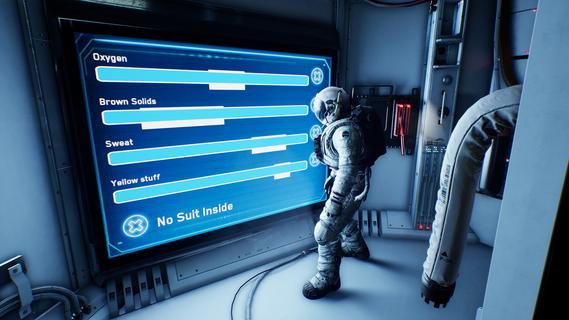

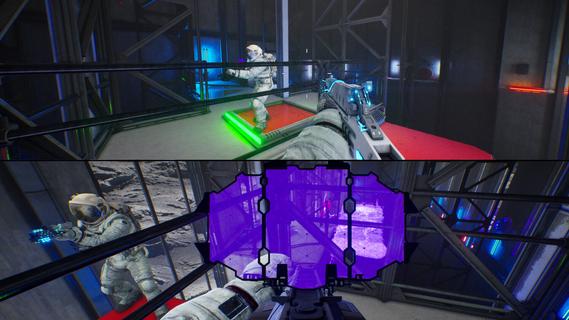
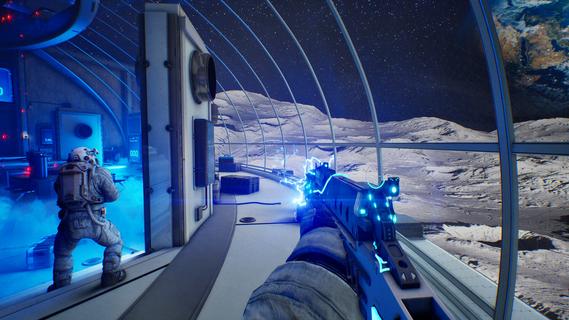
A Fresh Take on Co-Op GamingAt a time when co-op games explore all kinds of fast-paced and experimental ideas, Together Moon Escape offers a different kind of experience.This is a carefully crafted, story-driven, two-player puzzle adventure designed from the ground up for meaningful cooperation. Every puzzle is intentional. Every mechanic serves the narrative. Every moment is built to make you communicate, think, and feel.If you love the asymmetric design of We Were Here and the emotional cooperation of It Takes Two, you donât want to miss this lunar journey!Welcome to the MoonYou are Moonfishers, specialized astronauts sent to the Moon. Your employer? Moontella. A trillionare corporation extracting rare (and questionably carcinogenic) lunar slimes to supply high-end restaurants back on Earth. The job was simple. Until something went wrong.This is not your average serious space game. Expect absurd tools, ridiculous logic, and nonstop cooperation. Whether you're arguing over a puzzle or laughing at your partner falling into a crater (again), youâll need each other to get home.Features2-player online or local co-op â Grab a friend and play split-screen or over the internet. No solo mode: the Moon demands teamwork.True co-op puzzles â Communication is key! Youâll each see different things, control different systems, or need to act in perfect sync.Lunar exploration â Travel across varied environments like the Moonâs surface, dark caves, derelict ships, and secret facilities.Ridiculous tools â Use special weapons and gadgets like the Slime Fryer or the Slime Vision Goggles to solve puzzles... or prank your partner.
Pokaż więcej

1. Pobierz instalator MEmu i zakończ instalację

2. Uruchom MEmu, a następnie otwórz Google Play na pulpicie

3. Wyszukaj Together: Moon Escape w Google Play
Install
4. Pobierz i zainstaluj Together: Moon Escape
5. Po zakończeniu instalacji kliknij ikonę, aby rozpocząć

6. Ciesz się grą Together: Moon Escape na PC z MEmu
MEmu Play to najlepszy emulator Androida, a 100 milionów ludzi już korzysta z jego i dosta doskonałe wrażenia z gier na Androida. Technologia wirtualizacji MEmu umożliwia płynne granie w tysiące gier Androida na komputerze, nawet tych najbardziej wymagających grafiki.
Większy ekran z lepszą grafiką; Długi czas, bez ograniczeń baterii lub danych mobilnych.
Pełna obsługa mapowania klawiszy dla precyzyjnego sterowania klawiaturą i myszą lub gamepadem.
Wiele kont gier lub zadań na jednym komputerze jednocześnie z menedżerem wielu instancji.
Play Together: Moon Escape on PC by following steps: