
Together: Moon Escape
อัปเดตเมื่อ
เวอร์ชันปัจจุบัน
ให้บริการโดย

เวลาคุณเล่น Together: Moon Escape, คุณอาจรู้สึกว่ามือคุณอาจบังจอแล้วทำให้ไม่ได้เล่นแบบเต็มที่. เล่นแบบไร้ขีดจำกัดด้วยเม้าส์และคีย์บอร์ด. MEmu มีตัวเลือกหลายอย่างให้คุณใช้งานเกมที่คุณเล่นแบบที่คุณต้องการ. ดาวน์โหลดและเล่น Together: Moon Escape บน PC. เล่นนานแค่ไหนก็ได้, ไม่ต้องชาร์จแบตเตอรี่, หรือเจอคนโทรเข้ามาระหว่างเล่น. MEmu 9 เป็นตัวเลือกสำหรับการเล่น Together: Moon Escape บน PC. ทางทีมงานเราได้ปรับแต่งเกม, ปรับให้เล่นเกมบางเกมได้เหมือนเล่น Together: Moon Escape เป็นเกม PC เช่นเล็งด้วยเม้าส์หรือใช้คีย์บอร์ด. ระบบของเรายังทำให้คุณสามารถเปิดเล่นได้มากกว่า 2 เกมพร้อมๆกันในคอมของคุณ. และที่สำคัญที่สุด, ระบบโปรแกรมของเราสามารถทำให้คุณใช้ระบบของ PC ทำให้เกมลื่นเหมือนกับใช้โทรศัพท์รุ่นล่าสุด. เราไม่ได้ดูแลเรื่องการเล่นเกม, แต่เราดูแลถึงความสนุกสนานที่คุณได้จากการเล่นด้วย.
แสดงเพิ่มเติม
ดาวน์โหลด Together: Moon Escape บน PC ด้วย MEmu Android Emulator สนุกกับการเล่นบนหน้าจอขนาดใหญ่ A Fresh Take on Co-Op GamingAt a time when co-op games explore all kinds of fast-paced and experimental ideas, Together Moon Escape offers a different kind of experience.
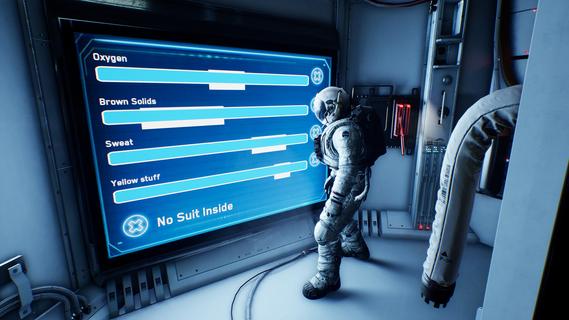

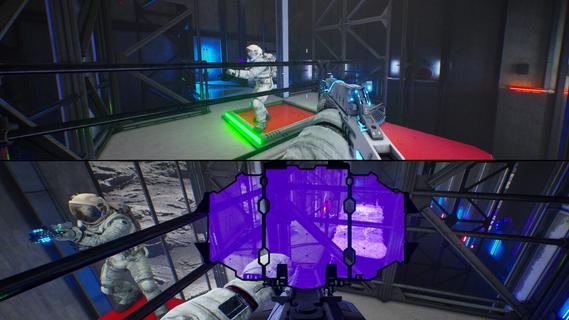

A Fresh Take on Co-Op GamingAt a time when co-op games explore all kinds of fast-paced and experimental ideas, Together Moon Escape offers a different kind of experience.This is a carefully crafted, story-driven, two-player puzzle adventure designed from the ground up for meaningful cooperation. Every puzzle is intentional. Every mechanic serves the narrative. Every moment is built to make you communicate, think, and feel.If you love the asymmetric design of We Were Here and the emotional cooperation of It Takes Two, you donât want to miss this lunar journey!Welcome to the MoonYou are Moonfishers, specialized astronauts sent to the Moon. Your employer? Moontella. A trillionare corporation extracting rare (and questionably carcinogenic) lunar slimes to supply high-end restaurants back on Earth. The job was simple. Until something went wrong.This is not your average serious space game. Expect absurd tools, ridiculous logic, and nonstop cooperation. Whether you're arguing over a puzzle or laughing at your partner falling into a crater (again), youâll need each other to get home.Features2-player online or local co-op â Grab a friend and play split-screen or over the internet. No solo mode: the Moon demands teamwork.True co-op puzzles â Communication is key! Youâll each see different things, control different systems, or need to act in perfect sync.Lunar exploration â Travel across varied environments like the Moonâs surface, dark caves, derelict ships, and secret facilities.Ridiculous tools â Use special weapons and gadgets like the Slime Fryer or the Slime Vision Goggles to solve puzzles... or prank your partner.
แสดงเพิ่มเติม

1. ดาวน์โหลดตัวติดตั้ง MEmu และสิ้นสุดการติดตั้ง

2. เริ่ม MEmu จากนั้นเปิด Google Play บนหน้าแรก

3. ค้นหา Together: Moon Escape ใน Google Play
Install
4. ดาวน์โหลดและติดตั้ง Together: Moon Escape
5. เมื่อติดตั้งเสร็จให้คลิกที่ไอคอนเพื่อเริ่มใช้งาน

6. สนุกกับการเล่น Together: Moon Escape บนพีซีด้วย MEmu
MEmu App Player เป็นอีมูเลเตอร์ Android ที่ดีที่สุดและผู้คนกว่า 50 ล้านคนเพลิดเพลินไปกับประสบการณ์การเล่นเกม Android ที่ยอดเยี่ยม เทคโนโลยีการจำลองเสมือนของ MEmu ช่วยให้คุณเล่นเกม Android หลายพันเกมได้อย่างราบรื่นบนพีซีของคุณแม้แต่เกมที่ต้องใช้กราฟิกมากที่สุด
จอใหญ่และกราฟฟิกสวยกว่า; เล่นได้นาน, ไม่ต้องใช้แบตเตอรี่โทรศัพท์หรือเน็ตโทรศัพท์.
ระบบปรับแต่งปุ่มคีย์บอร์ดและเม้าส์ตามที่คุณเลือก
เล่นมากกว่าหนึ่งเกมบน PC ในเวลาเดียวกันด้วยระบบหลายจอหรือ Multi-Instance manager.
Play Together: Moon Escape on PC by following steps:


























![[ไกด์เกม] CookieRun Classic แนะนำ 5 คุกกี้น่าปั้น น่าลงทุน ที่มือใหม่ห้ามพลาด! (เล่นบน PC ผ่าน MEmu ให้ลื่นสุด ๆ) PC](https://www.memuplay.com/blog/wp-content/uploads/2026/08/579c01ab-a953-45b3-8115-9b6279b7d6f9.png)