Chicken Road para PC

Baixar Chicken Road no PC

Chicken Road para PC

Chicken Road

  • Atualizada

  • Versão atual

    6.0.0.0

  • Oferecido por

    Chicken Road para PC

Características do Chicken Road no PC

Com toda a sua paixão por jogar Chicken Road, não deixe os polegares te atrapalharem em uma pequena tela do seu celular. Jogue como um profissional e tenha controle total do seu jogo com teclado e mouse. O MEmu oferece todas as coisas que você está esperando. Baixe e jogue Chicken Road no PC. Jogue o tempo que quiser, sem mais limitações de bateria, dados móveis e aquelas ligações enquanto estiver jogando. O novíssimo MEmu 9 é a melhor escolha de jogar Chicken Road no PC. Com grandes novidades no sistema de mapeamento que faz Chicken Road um jogo de PC real. Nossa equipe melhorou o gerenciamento de várias instâncias do Android, reduzindo tempo de reprodução de 2 ou mais contas no mesmo dispositivo. O mais importante, nosso mecanimos de emulação exclusivo pode liberar todo o potencial do seu PC sem travamentos, rodando tudo liso. Nós nos preocupamos não apenas com você joga, mas com todo o processo de desfrutar de 100% do seu jogo favorito.

Mostre mais

Capturas de tela & vídeo do Chicken Road no PC

Download do Chicken Road no PC com MEmu Android Emulador: Divirta-se jogando na tela grande. Welcome to Chiken Road – the ultimate arcade space adventure where skill, reflexes, and a bit of luck decide your fate!

Informações do Jogo

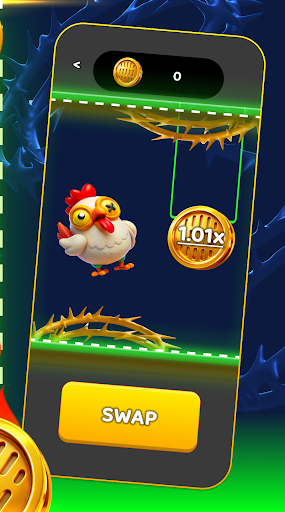
Welcome to Chiken Road – the ultimate arcade space adventure where skill, reflexes, and a bit of luck decide your fate! Prepare to dive into an intergalactic journey, dodge enemy attacks, and take on hilarious yet challenging chicken bosses in this one-of-a-kind action game.
Gameplay Experience
In Chiken Road, you command a futuristic spaceship on a vibrant cosmic highway, dodging colorful projectiles and collecting bonuses. Your main enemy? Not just any boss, but the notorious chicken overlord and its egg-shaped minions! Chiken Road combines the best elements of classic arcade shooters with modern visuals, intuitive controls, and addicting progression.
Key Features:
Swipe or tap to move your ship and avoid danger
Face off against the infamous chicken boss and tricky attacks
Collect power-ups and bonuses for high scores
Compete for the top spot on the records leaderboard
Unique Enemies & Bosses
Every stage in Chiken Road brings new challenges. The main antagonist – a giant, angry chicken – isn’t just for laughs. Its clever attack patterns and relentless waves of projectiles require precise movement and strategic thinking. As you progress through Chiken Road, bosses get tougher, with smarter patterns and more intense action.
Customizable Settings
Chiken Road lets you play your way! Adjust the game to fit your style:
Music: Turn sound on or off to match your mood
Vibration: Feel the action with tactile feedback
Difficulty: Choose your challenge level, from easy to hardcore
All settings are easily accessible from the stylish and intuitive settings menu, so your Chiken Road experience is always in your control.
Records & Achievements
Push your skills to the limit on Chiken Road! Track your highest scores and see how you stack up against friends and other players. The more you play, the better you’ll get – aim for a perfect run and claim your spot as the true champion of Chiken Road.
How to Play
Guide your spaceship along the endless Chiken Road, dodging incoming eggs and projectiles. Every accurate move and successful dodge brings you closer to victory over the chicken boss. Keep an eye on your health and score, and remember: only the most agile pilots can conquer Chiken Road!
Visual Style & Atmosphere
Chiken Road boasts bright, cartoonish graphics and fluid animations, creating a fun and inviting world for players of all ages. The game’s cosmic road theme, combined with the quirky chicken antagonist, delivers a unique atmosphere that makes Chiken Road both hilarious and challenging.
Why You’ll Love Chiken Road
Fast-paced, dynamic gameplay that never gets old
Easy to learn, hard to master – perfect for quick play sessions or long gaming marathons
Endless fun for kids and adults alike
Regular updates and new challenges coming soon
Whether you’re a fan of arcade classics or looking for a fresh challenge, Chiken Road is the perfect game to test your skills and have a blast. Download Chiken Road today and see if you have what it takes to beat the chicken boss and become a legend on the galactic highway!

Mostre mais

Como Baixar Chicken Road no PC

  • Chicken Road para PC

    1. Faça o download do instalador do MEmu e conclua a instalação

  • Chicken Road para PC

    2. Inicie o MEmu e depois abra o Google Play na página inicial

  • Chicken Road para PC

    3. Pesquise Chicken Road no Google Play

  • Chicken Road para PC Install

    4. Baixe e Instale Chicken Road

  • Chicken Road para PC

    5. Na conclusão da instalação, clique no ícone para iniciar

  • Chicken Road para PC
    Chicken Road para PC Chicken Road para PC

    6. Divirta-se jogando Chicken Road no PC com MEmu

Porquê escolher o MEmu para experimentar o Chicken Road

O MEmu App Player é o melhor emulador de Android grátis e 50 milhões de pessoas já desfrutam de sua excelente experiência de jogos no Android. A tecnologia de virtualização do MEmu permite que você jogue milhares de jogos do Android sem problemas no seu PC, mesmo os com gráficos mais intensivos.

  • Tela maior com gráficos melhores; Longa duração e sem limitação de bateria ou dados móveis.

  • Suporte completo ao Mapaeamento de Teclas para controle preciso do teclado e mouse ou gamepad.

  • Várias contas de jogos ou tarefas em um único PC de uma só vez com o Gerenciador de várias instâncias.

Pronto para jogar?

Chicken Road - FAQs

  • Como jogar Chicken Road no PC?

    Play Chicken Road on PC by following steps:

    • Download MEmu, then install and launch it
    • Login to Google Play Store, install the game
    • Enjoy playing the game on PC with MEmu
  • Quais são os requisitos mínimos do sistema para executar Chicken Road no PC?
    • Intel or AMD Processor
    • Microsoft Windows 7 and above
    • 2GB of memory
    • 5GB of free disk space
    • Hardware Virtualization Technology