Dream11: Fantasy Cricket App
Atualizada
Versão atual
7.7.2
Oferecido por

Pare de se preocupar com sobrecargas ao usar Dream11: Fantasy Cricket App no seu celular, liberte-se da pequena tela e aproveite o uso do aplicativo numa tela muito maior. A partir de agora, obtenha uma experiência em tela cheia do seu aplicativo com teclado e mouse. O MEmu oferece-lhe todos os recursos surpreendentes que você esperava: instalação rápida e configuração fácil, controles intuitivos, sem mais limitações de bateria, dados móveis e chamadas perturbadoras. O novíssimo MEmu 9 é a melhor opção para usar Dream11: Fantasy Cricket App no seu computador. Codificado com a nossa absorção, o gerenciador de multi-instâncias possibilita a abertura de 2 ou mais contas ao mesmo tempo. E o mais importante, nosso mecanismo de emulação exclusivo pode liberar todo o potencial do seu PC, tornando tudo suave e agradável.
Mostre mais
Download do Dream11: Fantasy Cricket App no PC com MEmu Android Emulador: Divirta-se jogando na tela grande. Dream11 has made watching sports a whole lot better — it's the only app where playing and watching live happen together.
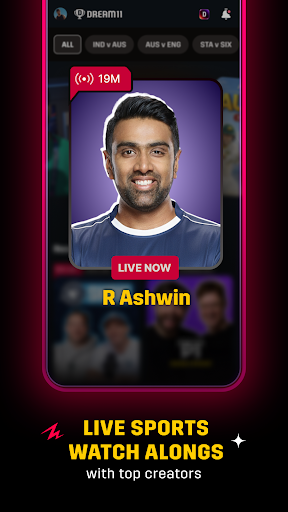
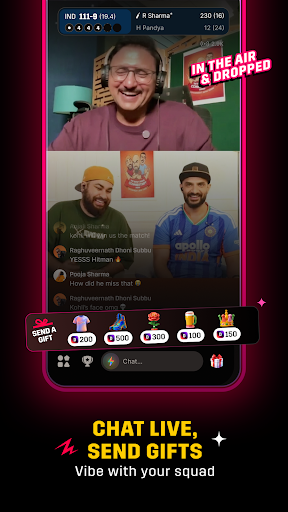
Dream11 has made watching sports a whole lot better — it's the only app where playing and watching live happen together. Join Watch Alongs led by top creators like R Ashwin, Tanmay Bhat, Stuart Broad, and many more, who bring real, unfiltered energy to every Indian T20 League 2026. They highlight the biggest moments, share instant reactions, and turn every over into something exciting.
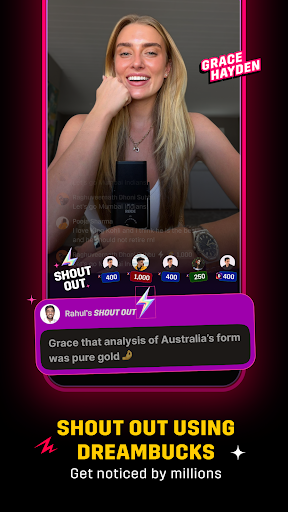
Want to get even more out of every Indian T20 League match? Use your DreamBucks to send Shout Outs on your favourite creators' live streams and get your comments pinned right in the live chat—an easy and enjoyable way to get noticed and feel like part of the action!
And when your competitive instincts kick in, create your fantasy team and enter contests, called leagues, on Dream11, because this is a place where you can watch, play, and stay entertained, all at once.
Dream11 Welcomes You to Tune In to Watch Alongs & Participate in Squad Goals
Download the Dream11 app and jump into live streams happening right during the Indian T20 League 2026 match
Watch, chat, or challenge creators using DreamBucks to enjoy every bit of the Watch Alongs
Spend your DreamBucks to get shoutouts from top creators like AB Cric Info, Pahul Walia, Azeem Banatwalla, Kumar Varun, and more, and get noticed during the stream!
What Happens in Dream11 Live Streams & Watch Alongs
Creators like R Ashwin, Tanmay Bhat, Stuart Broad, and other prominent names share key moments and match stats in a raw, unfiltered style
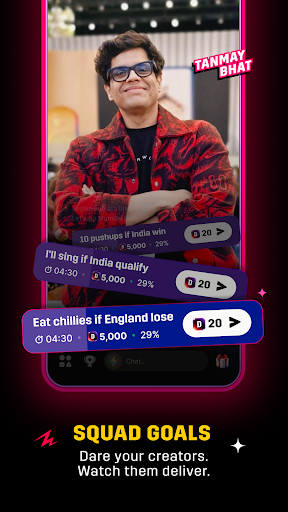
Participate in Squad Goals using DreamBucks to challenge creators during the Live Stream
Join the Hit or Miss competition and earn DreamBucks by answering correctly
Participate in fun polls, banters, and live chats, and vibe with lakhs of sports fans from across the world
Send gifts to the creators you love, from a rose and pizza slice to a mic and beyond
Connect with fans of teams you love, through live video in clubs
Build Your Fantasy Cricket Team and Compete for Exciting Rewards—All for Free!
Pick your best 11, choose your captain and vice-captain wisely, and let the match do the rest. Every run, wicket, and catch earns your team points, and the better your team performs, the higher you rank!
Getting started on Dream11 is simple:
1⃣ Pick a match and jump right in
2⃣ Choose real players from international and domestic lineups to build your team
3⃣ Lock in your captain and vice-captain and watch the points roll in with every live match moment
4⃣ Join free leagues and compete for exciting rewards
Your players play. You win. It's that simple—only on Dream11!
Why Choose Dream11?
Join Watch Alongs hosted by top international and domestic creators with raw and unfiltered match commentary
Chat, vibe, and be a part of the excitement as every big moment unfolds in real time
Win or buy DreamBucks, and use them to get your chats pinned, give Shout Outs, or send gifts
Challenge creators with Squad Goals and make your presence felt in the live stream
Build your fantasy team and join free contests in Indian T20 League matches to compete for exciting rewards
Win amazing prizes through giveaways, Hit or Miss, and other fun creator contests
Everything in one app — watch, chat, play, and win all at the same time!
Mostre mais

1. Faça o download do instalador do MEmu e conclua a instalação

2. Inicie o MEmu e depois abra o Google Play na página inicial

3. Pesquise Dream11: Fantasy Cricket App no Google Play
Install
4. Baixe e Instale Dream11: Fantasy Cricket App
5. Na conclusão da instalação, clique no ícone para iniciar

6. º Experimente o Dream11: Fantasy Cricket App no PC com o MEmu.
O MEmu Play é o melhor emulador Android gratuito, com 50 milhões de utilizadores a desfrutar da sua experiência superior com aplicações Android. A tecnologia de virtualização do MEmu permite-lhe executar milhares de aplicações Android sem problemas no seu computador, mesmo as mais exigentes.
Tela maior com gráficos melhores; Longa duração e sem limitação de bateria ou dados móveis.
Suporte completo ao Mapaeamento de Teclas para controle preciso do teclado e mouse ou gamepad.
Várias contas de jogos ou tarefas em um único PC de uma só vez com o Gerenciador de várias instâncias.
Use Dream11: Fantasy Cricket App on PC by following steps: