Navinosuke: The Yo-kai Buster
Atualizada
Versão atual
Oferecido por

Com toda a sua paixão por jogar Navinosuke: The Yo-kai Buster, não deixe os polegares te atrapalharem em uma pequena tela do seu celular. Jogue como um profissional e tenha controle total do seu jogo com teclado e mouse. O MEmu oferece todas as coisas que você está esperando. Baixe e jogue Navinosuke: The Yo-kai Buster no PC. Jogue o tempo que quiser, sem mais limitações de bateria, dados móveis e aquelas ligações enquanto estiver jogando. O novíssimo MEmu 9 é a melhor escolha de jogar Navinosuke: The Yo-kai Buster no PC. Com grandes novidades no sistema de mapeamento que faz Navinosuke: The Yo-kai Buster um jogo de PC real. Nossa equipe melhorou o gerenciamento de várias instâncias do Android, reduzindo tempo de reprodução de 2 ou mais contas no mesmo dispositivo. O mais importante, nosso mecanimos de emulação exclusivo pode liberar todo o potencial do seu PC sem travamentos, rodando tudo liso. Nós nos preocupamos não apenas com você joga, mas com todo o processo de desfrutar de 100% do seu jogo favorito.
Mostre mais
Download do Navinosuke: The Yo-kai Buster no PC com MEmu Android Emulador: Divirta-se jogando na tela grande. In the early 2000s, a team led by akio, known for their work in the arcade game industry, secretly developed an RPG titled Navinosuke: The Yo-kai Buster.
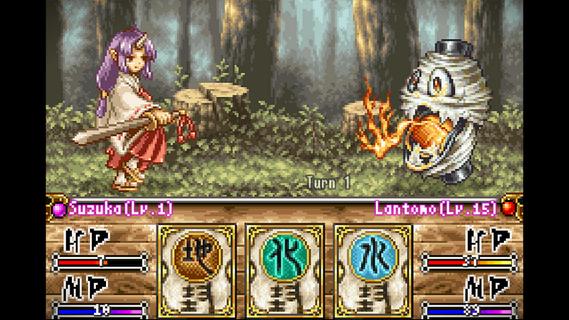
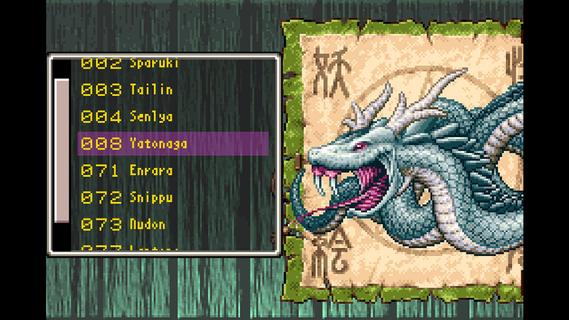
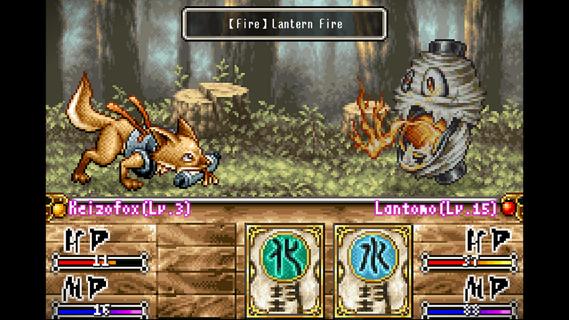
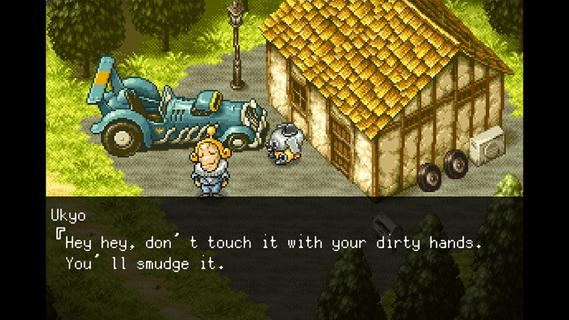
In the early 2000s, a team led by akio, known for their work in the arcade game industry, secretly developed an RPG titled Navinosuke: The Yo-kai Buster.Though the game was never released and remained dormant for over 20 years, it is now finally coming back to life.Set in a fictional ancient Japan, this 2D pixel-art RPG follows Navinosuke, a karakuri Onmyoji apprentice, as he travels across the land resolving Yo-kai-related incidents.Throughout the journey, players will encounter over 200 unique Yo-kai. Some will stand in your way as enemies, while others will become trusted allies and fight alongside you.Using elemental attributes and the Shikigami system, players can build their own party and engage in strategic turn-based battles.An Epic Japanese Folklore AdventureJourney through a fictional ancient Japan where the worlds of humans and Yo-kai are on the brink of collapse.Recruit More Than 200 Yo-kaiBattle fearsome supernatural creatures before convincing many to join your party as loyal companions.Strategic Turn-based CombatMaster elemental affinities and the Shikigami system to create powerful team combinations tailored to your playstyle.Classic Pixel Art, ReimaginedDiscover beautifully animated pixel artwork inspired by the craftsmanship and visual style of Japan's arcade era.A Story Across TimeFollow the journey of a modern human whose soul is transported more than 1,000 years into the past, where their fate becomes intertwined with Navinosuke, a karakuri Onmyoji apprentice.
Mostre mais

1. Faça o download do instalador do MEmu e conclua a instalação

2. Inicie o MEmu e depois abra o Google Play na página inicial

3. Pesquise Navinosuke: The Yo-kai Buster no Google Play
Install
4. Baixe e Instale Navinosuke: The Yo-kai Buster
5. Na conclusão da instalação, clique no ícone para iniciar

6. Divirta-se jogando Navinosuke: The Yo-kai Buster no PC com MEmu
O MEmu App Player é o melhor emulador de Android grátis e 50 milhões de pessoas já desfrutam de sua excelente experiência de jogos no Android. A tecnologia de virtualização do MEmu permite que você jogue milhares de jogos do Android sem problemas no seu PC, mesmo os com gráficos mais intensivos.
Tela maior com gráficos melhores; Longa duração e sem limitação de bateria ou dados móveis.
Suporte completo ao Mapaeamento de Teclas para controle preciso do teclado e mouse ou gamepad.
Várias contas de jogos ou tarefas em um único PC de uma só vez com o Gerenciador de várias instâncias.
Play Navinosuke: The Yo-kai Buster on PC by following steps: