Adobe Express: AI Video Design
Atualizada
Versão atual
30.9.0
Oferecido por

Pare de se preocupar com sobrecargas ao usar Adobe Express: AI Video Design no seu celular, liberte-se da pequena tela e aproveite o uso do aplicativo numa tela muito maior. A partir de agora, obtenha uma experiência em tela cheia do seu aplicativo com teclado e mouse. O MEmu oferece-lhe todos os recursos surpreendentes que você esperava: instalação rápida e configuração fácil, controles intuitivos, sem mais limitações de bateria, dados móveis e chamadas perturbadoras. O novíssimo MEmu 9 é a melhor opção para usar Adobe Express: AI Video Design no seu computador. Codificado com a nossa absorção, o gerenciador de multi-instâncias possibilita a abertura de 2 ou mais contas ao mesmo tempo. E o mais importante, nosso mecanismo de emulação exclusivo pode liberar todo o potencial do seu PC, tornando tudo suave e agradável.
Mostre mais
Download do Adobe Express: AI Video Design no PC com MEmu Android Emulador: Divirta-se jogando na tela grande. O Adobe Express é um aplicativo rápido e intuitivo para criar conteúdo consistente com a marca que destaca a sua empresa.
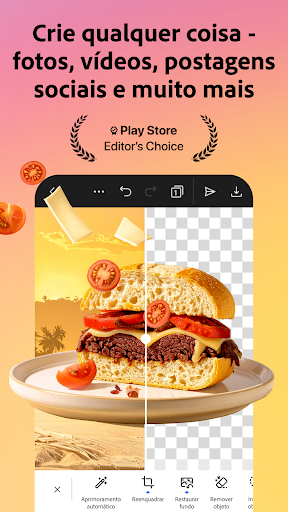
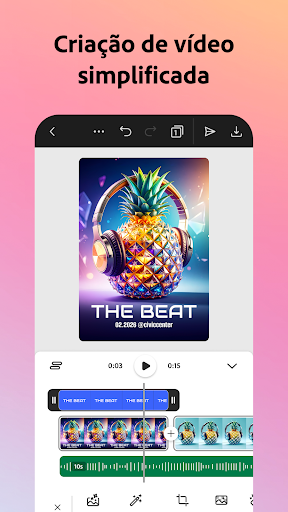
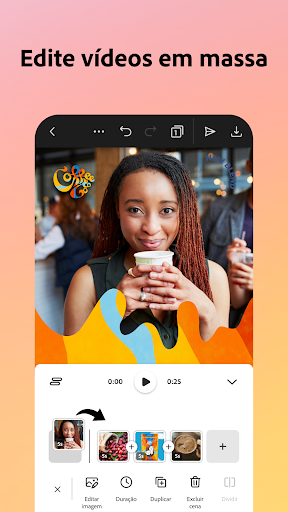

O Adobe Express é um aplicativo rápido e intuitivo para criar conteúdo consistente com a marca que destaca a sua empresa. Podem criar materiais de marketing e comerciais de alta qualidade, garantindo sempre a consistência da marca.
EDIÇÃO DE VÍDEO DESCOMPLICADA
Em busca do melhor editor de vídeo grátis? O Adobe Express simplifica a edição de vídeos. Aproveite modelos personalizáveis, faça upload de clipes da sua galeria, corte e junte cenas, insira texto, trilhas sonoras, transições e efeitos sonoros. Inclua legendas automaticamente, ajuste o formato para redes sociais e elimine ruídos de fundo.
EDIÇÃO DE FOTOS PARA QUALQUER PESSOA
O Adobe Express é o editor de fotos grátis ideal para iniciantes, com ferramentas fáceis de usar para transformar suas imagens. Utilize inteligência artificial para adicionar ou remover elementos, aplicar filtros do Photoshop e criar artes visuais impressionantes com nosso gerador de fotos por IA.
DIGA ADEUS AOS FUNDOS
Está procurando o melhor aplicativo para remover o fundo de fotos? O Adobe Express facilita esse processo. Com as Ações rápidas, você remove fundos de imagens ou vídeos em segundos, transforma imagens em GIFs e redimensiona conteúdo.
QR CODES PERSONALIZADOS EM POUCOS CLIQUES
Crie QR codes exclusivos e da marca com praticidade. O Adobe Express é o gerador de QR code online ideal, com opções de cores e estilos personalizados para refletir a identidade da sua marca.
CONTEÚDO SEMPRE ALINHADO À SUA MARCA
Com os kits de marca, tenha logotipos, cores e fontes prontos para aplicar em qualquer projeto. Com apenas um toque, sua identidade visual se integra a todos os designs. Use o recurso Gerar similar para manter a consistência e aperfeiçoar os layouts.
EDIÇÃO RÁPIDA DE PDFs
Faça atualizações, substitua imagens, ajuste o layout ou aplique os elementos visuais da sua marca com poucos cliques. Você também pode converter documentos em PDF ou exportar PDFs para compartilhamento em um piscar de olhos.
FERRAMENTAS DE AÇÃO RÁPIDA
· Recorte fotos e converta arquivos de imagem
· Transforme imagens e vídeos em GIFs
· Dê vida a personagens com sua própria voz
· Importe PDFs
Alguns recursos podem não estar disponíveis em todos os dispositivos por enquanto, mas temos atualizações a caminho. A compatibilidade com mais dispositivos será expandida gradualmente.
DÚVIDAS?
Seu feedback e engajamento são essenciais para tornar o Adobe Express cada vez melhor.
Participe da nossa comunidade no Discord
[https://discord.gg/adobeexpress] para trocar ideias, interagir com outros usuários e participar de desafios criativos
Quer sugerir novos recursos? Acesse o UserVoice [https://adobeexpress.uservoice.com/forums/951181-adobe-express]
Encontrou um problema? Relate bugs ou dificuldades no fórum da comunidade Adobe [https://community.adobe.com/t5/adobe-express/ct-p/ct-adobe-express]
ASSINATURA PREMIUM
Com a assinatura Adobe Express Premium, você tem acesso a recursos avançados:
· Mais de 200 milhões de imagens, vídeos, trilhas sonoras, elementos gráficos e fontes do Adobe Stock, todos isentos de royalties
· 250 créditos generativos para criar imagens, modelos e muito mais
· Ferramentas como remoção de fundo de vídeos, redimensionamento com um clique para múltiplos canais, kits de marca e muito mais
Utilize seu plano Adobe Express Premium tanto no navegador do desktop quanto no dispositivo móvel. Inclui também o Adobe Photoshop Express para dispositivos móveis.
Consulte nossos termos de serviço na íntegra para saber mais. [http://www.adobe.com/go/terms_br]
Termos & Condições: O seu uso deste aplicativo é regido pelos Termos Gerais de Uso da Adobe http://www.adobe.com/go/terms_br e a Política de Privacidade da Adobe http://www.adobe.com/go/privacy_policy_br e por quaisquer versões posteriores dos mesmos.
Não vender nem compartilhar minhas informações pessoais www.adobe.com/go/ca-rights
Todas as marcas registradas são de propriedade dos seus respectivos titulares.
Mostre mais

1. Faça o download do instalador do MEmu e conclua a instalação

2. Inicie o MEmu e depois abra o Google Play na página inicial

3. Pesquise Adobe Express: AI Video Design no Google Play
Install
4. Baixe e Instale Adobe Express: AI Video Design
5. Na conclusão da instalação, clique no ícone para iniciar

6. º Experimente o Adobe Express: AI Video Design no PC com o MEmu.
O MEmu Play é o melhor emulador Android gratuito, com 50 milhões de utilizadores a desfrutar da sua experiência superior com aplicações Android. A tecnologia de virtualização do MEmu permite-lhe executar milhares de aplicações Android sem problemas no seu computador, mesmo as mais exigentes.
Tela maior com gráficos melhores; Longa duração e sem limitação de bateria ou dados móveis.
Suporte completo ao Mapaeamento de Teclas para controle preciso do teclado e mouse ou gamepad.
Várias contas de jogos ou tarefas em um único PC de uma só vez com o Gerenciador de várias instâncias.
Use Adobe Express: AI Video Design on PC by following steps: