
Bella: AI Roleplay Chat
Atualizada
Versão atual
3.1.0
Oferecido por

Pare de se preocupar com sobrecargas ao usar Bella: AI Roleplay Chat no seu celular, liberte-se da pequena tela e aproveite o uso do aplicativo numa tela muito maior. A partir de agora, obtenha uma experiência em tela cheia do seu aplicativo com teclado e mouse. O MEmu oferece-lhe todos os recursos surpreendentes que você esperava: instalação rápida e configuração fácil, controles intuitivos, sem mais limitações de bateria, dados móveis e chamadas perturbadoras. O novíssimo MEmu 9 é a melhor opção para usar Bella: AI Roleplay Chat no seu computador. Codificado com a nossa absorção, o gerenciador de multi-instâncias possibilita a abertura de 2 ou mais contas ao mesmo tempo. E o mais importante, nosso mecanismo de emulação exclusivo pode liberar todo o potencial do seu PC, tornando tudo suave e agradável.
Mostre mais
Desfrute de uma experiência incrível utilizando o Bella: AI Roleplay Chat no PC com o MEmu Play. É um poderoso emulador Android gratuito que oferece milhares de aplicações Android nas suas versões para desktop. Estabeleça ligação com amigos e aprimore o seu trabalho com mais eficiência! You hold the pen in Bella, an AI roleplay chat for creating characters, building worlds, and guiding ongoing stories with remembered context.
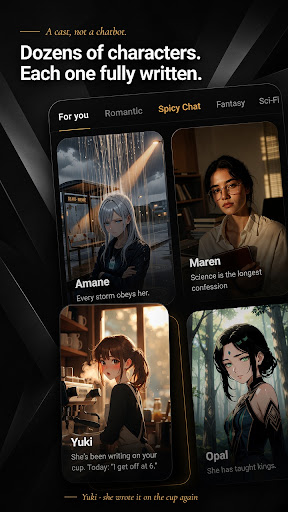
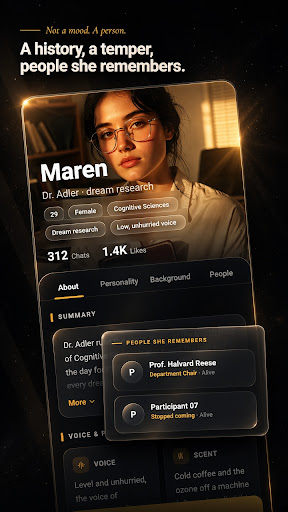
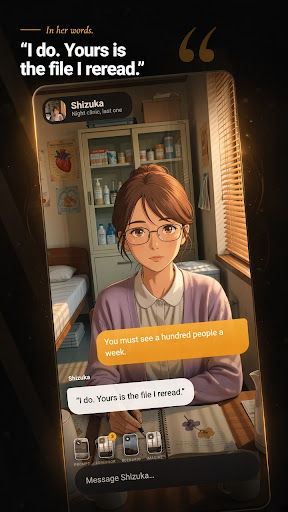
You hold the pen in Bella, an AI roleplay chat for creating characters, building worlds, and guiding ongoing stories with remembered context.
Meet a curated cast with hand-written backstories or create an AI character of your own. Bella gives you more than a blank chat box: shape the character, set the scene, steer the tone, and keep each roleplay moving in your direction.
Create and customize characters
Use the guided character creator for step-by-step character customization. Add an optional note, explore generated scenario concepts, and create a character with an avatar. Create an anime AI chat character, an AI waifu for roleplay, or anyone else you imagine. Keep characters and images organized in My Creations.
Build stories that remember
Conversation history and remembered context help characters build on earlier scenes. Attach lorebooks for the characters, places, and situations that matter to your world. Choose a prompt set or add a custom system prompt to guide behavior, tone, and story direction.
Shape each AI chat
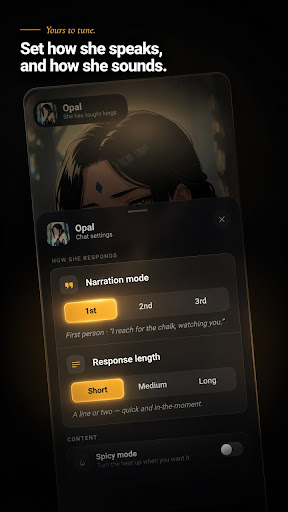
Choose short, medium, or long responses to fit the moment. Select a model and content mode for each chat, use suggested replies when you want a nudge, and react to, copy, or delete messages. Save favorite characters so your next scene is easy to find.
Bring scenes to life
Use Imagine to create an image during a conversation. Change a roleplay costume or outfit, or move the action to a new background. Browse the curated cast by category or use the full-screen swipe deck.
Set the tone
Choose Story Mode for romance, tension, and slow-burn plots without explicit content. Adults can switch to optional age-gated Spicy Mode (18+) in Settings.
Stay free from interruptions
Bella has no ads. Start with one-tap anonymous sign-in, then link a Google account if you choose.
Create the character. Build the world. Guide the story. Take the pen.
Mostre mais

1. Faça o download do instalador do MEmu e conclua a instalação

2. Inicie o MEmu e depois abra o Google Play na página inicial

3. Pesquise Bella: AI Roleplay Chat no Google Play
Install
4. Baixe e Instale Bella: AI Roleplay Chat
5. Na conclusão da instalação, clique no ícone para iniciar

6. º Experimente o Bella: AI Roleplay Chat no PC com o MEmu.
O MEmu Play é o melhor emulador Android gratuito, com 50 milhões de utilizadores a desfrutar da sua experiência superior com aplicações Android. A tecnologia de virtualização do MEmu permite-lhe executar milhares de aplicações Android sem problemas no seu computador, mesmo as mais exigentes.
Tela maior com gráficos melhores; Longa duração e sem limitação de bateria ou dados móveis.
Suporte completo ao Mapaeamento de Teclas para controle preciso do teclado e mouse ou gamepad.
Várias contas de jogos ou tarefas em um único PC de uma só vez com o Gerenciador de várias instâncias.
Use Bella: AI Roleplay Chat on PC by following steps: