
Bella: AI Roleplay Chat
อัปเดตเมื่อ
เวอร์ชันปัจจุบัน
3.1.0
ให้บริการโดย

เมื่อใช้ Bella: AI Roleplay Chat บนโทรศัพท์ของคุณไม่ต้องกังวลกับการชาร์จไฟมากเกินไปปลดปล่อยตัวคุณเองจากหน้าจอขนาดเล็กและสนุกกับการใช้แอพนี้บนหน้าจอขนาดใหญ่ จากนี้ไปรับประสบการณ์เต็มหน้าจอของแอปพลิเคชันของคุณด้วยคีย์บอร์ดและเมาส์ MEmu มีคุณสมบัติที่น่าแปลกใจที่คุณคาดหวัง: การติดตั้งที่รวดเร็วและการตั้งค่าที่ง่ายควบคุมได้ง่ายไม่ จำกัด แบตเตอรี่ข้อมูลมือถือและการโทรที่รบกวน MEmu 9 ใหม่ล่าสุดเป็นตัวเลือกที่ดีที่สุดสำหรับการใช้ Meitu – โปรแกรมแก้ไขภาพแนวธรรมชาติ บนคอมพิวเตอร์ของคุณ ด้วยรหัสการดูดซึมของเราผู้จัดการหลายอินสแตนซ์ทำให้สามารถเปิดบัญชี 2 บัญชีขึ้นไปในเวลาเดียวกันได้ และที่สำคัญที่สุดเอ็นจิ้นจำลองพิเศษของเราสามารถปลดปล่อยศักยภาพของPCของคุณและทำให้ทุกอย่างราบรื่นและสนุกสนาน
แสดงเพิ่มเติม
สัมผัสประสบการณ์สุดยอดการใช้งาน Bella: AI Roleplay Chat บนพีซีด้วย MEmu Play นี่คือโปรแกรมจำลอง Android ฟรีที่ทรงพลัง ให้คุณใช้งานแอป Android นับพันบนเดสก์ท็อป สนุกกับการเชื่อมต่อกับเพื่อนๆ และขัดเกลาผลงานของคุณอย่างมีประสิทธิภาพยิ่งขึ้น! You hold the pen in Bella, an AI roleplay chat for creating characters, building worlds, and guiding ongoing stories with remembered context.
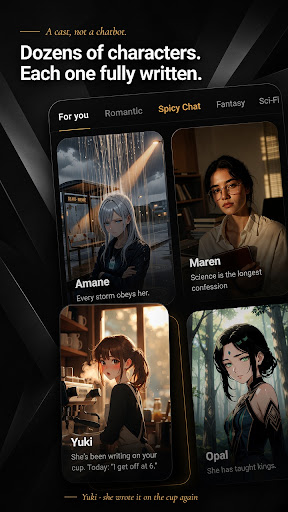
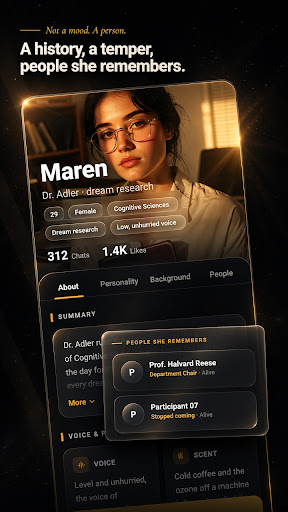
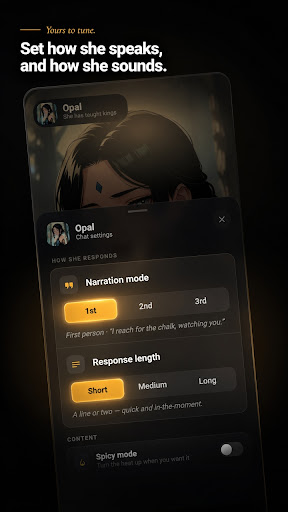
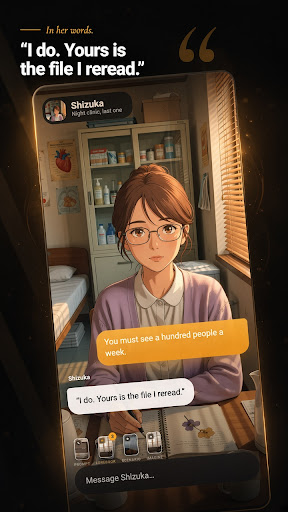
You hold the pen in Bella, an AI roleplay chat for creating characters, building worlds, and guiding ongoing stories with remembered context.
Meet a curated cast with hand-written backstories or create an AI character of your own. Bella gives you more than a blank chat box: shape the character, set the scene, steer the tone, and keep each roleplay moving in your direction.
Create and customize characters
Use the guided character creator for step-by-step character customization. Add an optional note, explore generated scenario concepts, and create a character with an avatar. Create an anime AI chat character, an AI waifu for roleplay, or anyone else you imagine. Keep characters and images organized in My Creations.
Build stories that remember
Conversation history and remembered context help characters build on earlier scenes. Attach lorebooks for the characters, places, and situations that matter to your world. Choose a prompt set or add a custom system prompt to guide behavior, tone, and story direction.
Shape each AI chat
Choose short, medium, or long responses to fit the moment. Select a model and content mode for each chat, use suggested replies when you want a nudge, and react to, copy, or delete messages. Save favorite characters so your next scene is easy to find.
Bring scenes to life
Use Imagine to create an image during a conversation. Change a roleplay costume or outfit, or move the action to a new background. Browse the curated cast by category or use the full-screen swipe deck.
Set the tone
Choose Story Mode for romance, tension, and slow-burn plots without explicit content. Adults can switch to optional age-gated Spicy Mode (18+) in Settings.
Stay free from interruptions
Bella has no ads. Start with one-tap anonymous sign-in, then link a Google account if you choose.
Create the character. Build the world. Guide the story. Take the pen.
แสดงเพิ่มเติม

1. ดาวน์โหลดตัวติดตั้ง MEmu และสิ้นสุดการติดตั้ง

2. เริ่ม MEmu จากนั้นเปิด Google Play บนหน้าแรก

3. ค้นหา Bella: AI Roleplay Chat ใน Google Play
Install
4. ดาวน์โหลดและติดตั้ง Bella: AI Roleplay Chat
5. เมื่อติดตั้งเสร็จให้คลิกที่ไอคอนเพื่อเริ่มใช้งาน

6. ใช้ MEmu เพื่อสัมผัสประสบการณ์ Bella: AI Roleplay Chat บนคอมพิวเตอร์ของคุณ
MEmu Play คือโปรแกรมจำลอง Android ที่ดีที่สุด มีผู้ใช้มากกว่า 50 ล้านคน มอบประสบการณ์การใช้งานแอป Android ขั้นสุดยอดให้กับคุณ เทคโนโลยีจำลองเสมือนของ MEmu ช่วยให้คุณรันแอป Android หลายพันแอปบนคอมพิวเตอร์ได้อย่างราบรื่น แม้แอปที่กินทรัพยากรเครื่องสูงที่สุด
จอใหญ่และกราฟฟิกสวยกว่า; เล่นได้นาน, ไม่ต้องใช้แบตเตอรี่โทรศัพท์หรือเน็ตโทรศัพท์.
ระบบปรับแต่งปุ่มคีย์บอร์ดและเม้าส์ตามที่คุณเลือก
เล่นมากกว่าหนึ่งเกมบน PC ในเวลาเดียวกันด้วยระบบหลายจอหรือ Multi-Instance manager.
Use Bella: AI Roleplay Chat on PC by following steps: