Realistic Mod for Minecraft
Atualizada
Versão atual
1.2
Oferecido por

Pare de se preocupar com sobrecargas ao usar Realistic Mod for Minecraft no seu celular, liberte-se da pequena tela e aproveite o uso do aplicativo numa tela muito maior. A partir de agora, obtenha uma experiência em tela cheia do seu aplicativo com teclado e mouse. O MEmu oferece-lhe todos os recursos surpreendentes que você esperava: instalação rápida e configuração fácil, controles intuitivos, sem mais limitações de bateria, dados móveis e chamadas perturbadoras. O novíssimo MEmu 9 é a melhor opção para usar Realistic Mod for Minecraft no seu computador. Codificado com a nossa absorção, o gerenciador de multi-instâncias possibilita a abertura de 2 ou mais contas ao mesmo tempo. E o mais importante, nosso mecanismo de emulação exclusivo pode liberar todo o potencial do seu PC, tornando tudo suave e agradável.
Mostre mais
Enjoy superb experience of using Realistic Mod for Minecraft on PC with MEMU App Player. It's a powerful free Android emulator which provides you with thousands of android apps for their desktop version. Enjoy connecting with friends and polishing your work with higher efficiency! The Realistic Mod for Minecraft is a game-changer that revolutionizes the way you experience the iconic sandbox adventure.

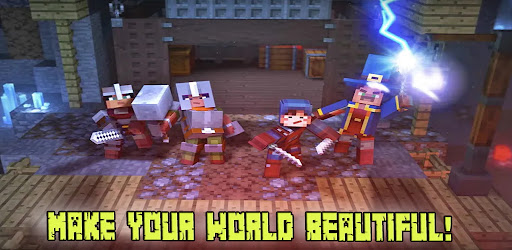
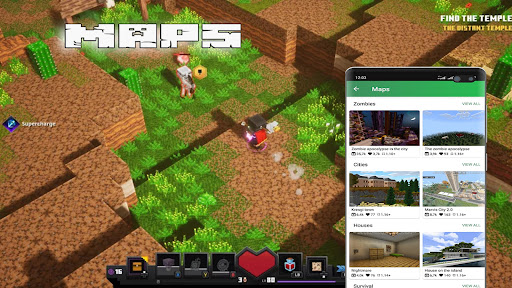
The Realistic Mod for Minecraft is a game-changer that revolutionizes the way you experience the iconic sandbox adventure. Created by a dedicated team of developers, this mod aims to inject a new level of realism into the Minecraft universe, providing players with an immersive and lifelike gameplay experience like never before.
With the Realistic Mod, prepare to be astounded by the attention to detail and the depth of realism it brings to every aspect of the game. From the environment to the physics, this mod enhances the overall aesthetics and mechanics of Minecraft, creating a world that feels more vibrant and believable.
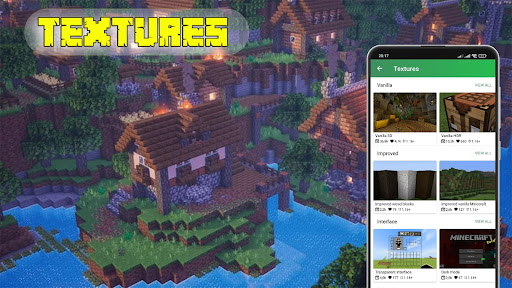
The mod introduces stunning visual enhancements, including improved textures, lighting effects, and weather systems. Watch as the sun rises and sets in breathtakingly realistic ways, casting dynamic shadows that add depth and immersion to your surroundings. Feel the awe-inspiring power of thunderstorms as lightning strikes illuminate the sky, and raindrops gently cascade down, creating puddles that interact realistically with the terrain.
But the Realistic Mod goes beyond visuals. It introduces a dynamic ecosystem where animals behave realistically, following their own natural instincts and lifecycles. Observe as animals graze, hunt, and breed in a manner that mirrors their real-life counterparts. The mod also adds a greater variety of plants and vegetation, resulting in a more vibrant and diverse ecosystem.
Physics and mechanics receive a significant overhaul with the Realistic Mod. Experience a more realistic day-night cycle, with accurate time measurements and lighting conditions that affect gameplay and exploration. Interact with objects and blocks in a more lifelike manner, as they respond to forces and collisions based on real-world physics. Whether you're building structures or exploring treacherous caves, the mod brings a new level of immersion and authenticity to your actions.
Survival becomes even more challenging and rewarding with the Realistic Mod. Players must consider realistic needs like hunger, thirst, and fatigue as they navigate the world. Engage in hunting, fishing, and farming to gather food and resources, while managing your energy levels and ensuring your character's overall well-being. It adds an additional layer of depth and strategy to the survival aspect of Minecraft.
The Realistic Mod is designed with compatibility in mind, ensuring a seamless integration with other popular mods and Minecraft versions. The development team is dedicated to providing regular updates, addressing community feedback, and expanding the mod's features and functionalities.
Immerse yourself in the world of Minecraft like never before with the Realistic Mod. Feel the wonder of exploring a lifelike environment, marvel at the stunning visuals, and adapt to the challenges of a more realistic survival experience. This mod is a must-have for players seeking a new level of immersion and authenticity in their Minecraft adventures.
Mostre mais

1. Faça o download do instalador do MEmu e conclua a instalação

2. Inicie o MEmu e depois abra o Google Play na página inicial

3. Pesquise Realistic Mod for Minecraft no Google Play
Install
4. Baixe e Instale Realistic Mod for Minecraft
5. Na conclusão da instalação, clique no ícone para iniciar

6. º Experimente o Realistic Mod for Minecraft no PC com o MEmu.
O MEmu Play é o melhor emulador Android gratuito, com 50 milhões de utilizadores a desfrutar da sua experiência superior com aplicações Android. A tecnologia de virtualização do MEmu permite-lhe executar milhares de aplicações Android sem problemas no seu computador, mesmo as mais exigentes.
Tela maior com gráficos melhores; Longa duração e sem limitação de bateria ou dados móveis.
Suporte completo ao Mapaeamento de Teclas para controle preciso do teclado e mouse ou gamepad.
Várias contas de jogos ou tarefas em um único PC de uma só vez com o Gerenciador de várias instâncias.
Use Realistic Mod for Minecraft on PC by following steps:


![Color Changer Free [root] para PC](https://dl.memuplay.com/new_market/img/mobi.omegacentauri.red.icon.2024-12-13-07-17-50.png)