Tezza: Aesthetic Editor
Atualizada
Versão atual
2.84.4
Oferecido por

Pare de se preocupar com sobrecargas ao usar Tezza: Aesthetic Editor no seu celular, liberte-se da pequena tela e aproveite o uso do aplicativo numa tela muito maior. A partir de agora, obtenha uma experiência em tela cheia do seu aplicativo com teclado e mouse. O MEmu oferece-lhe todos os recursos surpreendentes que você esperava: instalação rápida e configuração fácil, controles intuitivos, sem mais limitações de bateria, dados móveis e chamadas perturbadoras. O novíssimo MEmu 9 é a melhor opção para usar Tezza: Aesthetic Editor no seu computador. Codificado com a nossa absorção, o gerenciador de multi-instâncias possibilita a abertura de 2 ou mais contas ao mesmo tempo. E o mais importante, nosso mecanismo de emulação exclusivo pode liberar todo o potencial do seu PC, tornando tudo suave e agradável.
Mostre mais
Download do Tezza: Aesthetic Editor no PC com MEmu Android Emulador: Divirta-se jogando na tela grande. Female-founded by creators and for creators, the Tezza photo & video editing app is your one-stop shop for creating beautiful content.
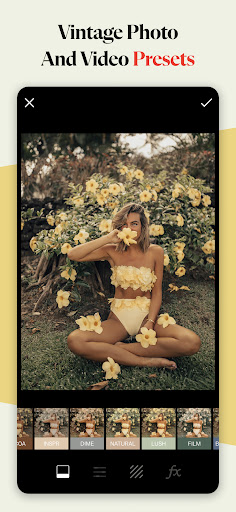
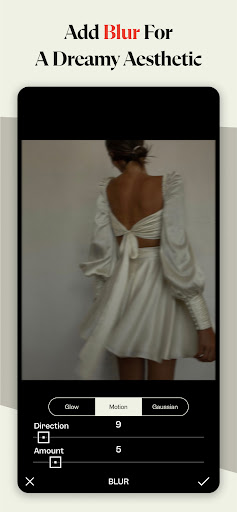
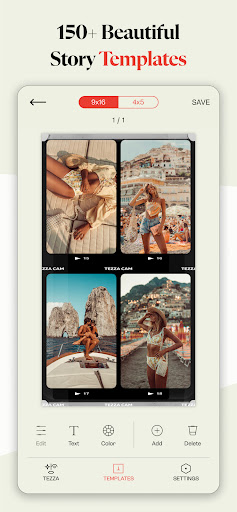
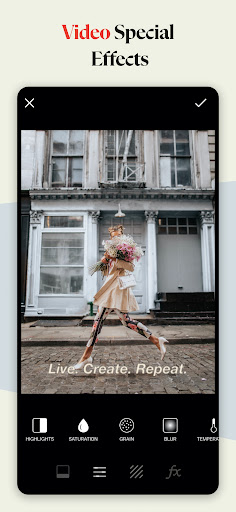
Female-founded by creators and for creators, the Tezza photo & video editing app is your one-stop shop for creating beautiful content. Every feature is hand-crafted with you in mind to help you achieve the aesthetic of your dreams.
We’re honored to be the preferred editing app of today’s top content creators — We hope that you’re next!
Make your photos & videos pop with our on-trend editing tools, including:
PRESETS
Easily add the perfect filter from 40+ presets made with love by our founder. Ranging in style from vintage vibes, to dark and moody, to minimal edits, to bright and colorful.
EFFECTS
Set your content apart with our vintage-inspired effects. Some favorites are Stop Motion for a vibey slow motion feel, Subtitles for a dreamy vintage cinema feel, and retro film Frames, like Super 8, VHS, 8MM, Kodak, VCR, and more.
TEMPLATES
We’ve made it easy to create the perfect stories. Pick from 150+ word class designs spanning film, editorial, magazines, 90s, y2k, floral, moodboards, minimal, sketch art, and more. Add text to tell a story, and change template colors to fit your brand.
OVERLAYS
Add texture and dimension to your photos with overlays like Paper, Dust, Light, Plastic, Shadows, and more.
FEED PLANNER
Curate your perfect feed with our drag and drop feed planner, with the option to add multiple accounts.
BATCH EDITING
Once you’ve dialed in the perfect edit, easily copy and paste that exact edit to as many photos and videos as you want.
ADJUSTMENTS
Tweak your edits with 14 professional tools, including HSL. Popular favorites include Blur and Grain for an effortless film look.
Tag us in your photos and videos with @tezza and #tezza for a chance to be featured.
—————————
Auto-renewable subscription information:
Tezza app subscription pricing is as follows:
• $5.99 per month
• $39.99 per year
• Subscribers get access to everything currently in the Tezza app as well as all new features, filters, photo/video effects, editing tools, and guides as they are released for as long as they are subscribed
• Subscriptions can occur on a monthly basis for $5.99 USD per month, or on a yearly basis for $39.99 USD per year for photo + video editing
• Payment will be charged to iTunes Account at confirmation of purchase
• Subscription automatically renews unless auto-renew is turned off at least 24-hours before the end of the current period
• Account will be charged for renewal within 24-hours prior to the end of the current period and renewal of a Tezza app subscription will cost either $5.99/month USD, or $39.99/year USD for photo + video editing
• Subscriptions may be managed by the user and auto-renewal may be turned off by going to the user's Account Settings after purchase
• Any unused portion of a free trial period will be forfeited when the user purchases a subscription to that publication, where applicable
Terms of use: https://www.shoptezza.com/pages/terms-of-use
Privacy policy: https://www.shoptezza.com/pages/tezza-app-privacy-policy
If you have any questions, concerns, feedback or just want to chat, hit us up: help@bytezza.com
Mostre mais

1. Faça o download do instalador do MEmu e conclua a instalação

2. Inicie o MEmu e depois abra o Google Play na página inicial

3. Pesquise Tezza: Aesthetic Editor no Google Play
Install
4. Baixe e Instale Tezza: Aesthetic Editor
5. Na conclusão da instalação, clique no ícone para iniciar

6. º Experimente o Tezza: Aesthetic Editor no PC com o MEmu.
O MEmu Play é o melhor emulador Android gratuito, com 50 milhões de utilizadores a desfrutar da sua experiência superior com aplicações Android. A tecnologia de virtualização do MEmu permite-lhe executar milhares de aplicações Android sem problemas no seu computador, mesmo as mais exigentes.
Tela maior com gráficos melhores; Longa duração e sem limitação de bateria ou dados móveis.
Suporte completo ao Mapaeamento de Teclas para controle preciso do teclado e mouse ou gamepad.
Várias contas de jogos ou tarefas em um único PC de uma só vez com o Gerenciador de várias instâncias.
Use Tezza: Aesthetic Editor on PC by following steps: