Coloring Games & Coloring Kids
อัปเดตเมื่อ
เวอร์ชันปัจจุบัน
7.7
ให้บริการโดย

เวลาคุณเล่น Coloring Games & Coloring Kids, คุณอาจรู้สึกว่ามือคุณอาจบังจอแล้วทำให้ไม่ได้เล่นแบบเต็มที่. เล่นแบบไร้ขีดจำกัดด้วยเม้าส์และคีย์บอร์ด. MEmu มีตัวเลือกหลายอย่างให้คุณใช้งานเกมที่คุณเล่นแบบที่คุณต้องการ. ดาวน์โหลดและเล่น Coloring Games & Coloring Kids บน PC. เล่นนานแค่ไหนก็ได้, ไม่ต้องชาร์จแบตเตอรี่, หรือเจอคนโทรเข้ามาระหว่างเล่น. MEmu 9 เป็นตัวเลือกสำหรับการเล่น Coloring Games & Coloring Kids บน PC. ทางทีมงานเราได้ปรับแต่งเกม, ปรับให้เล่นเกมบางเกมได้เหมือนเล่น Coloring Games & Coloring Kids เป็นเกม PC เช่นเล็งด้วยเม้าส์หรือใช้คีย์บอร์ด. ระบบของเรายังทำให้คุณสามารถเปิดเล่นได้มากกว่า 2 เกมพร้อมๆกันในคอมของคุณ. และที่สำคัญที่สุด, ระบบโปรแกรมของเราสามารถทำให้คุณใช้ระบบของ PC ทำให้เกมลื่นเหมือนกับใช้โทรศัพท์รุ่นล่าสุด. เราไม่ได้ดูแลเรื่องการเล่นเกม, แต่เราดูแลถึงความสนุกสนานที่คุณได้จากการเล่นด้วย.
แสดงเพิ่มเติม
ดาวน์โหลด Coloring Games & Coloring Kids บน PC ด้วย MEmu Android Emulator สนุกกับการเล่นบนหน้าจอขนาดใหญ่ Coloring Book for Kids: Learn & Play with Fun Pages.
Coloring Book for Kids: Learn & Play with Fun Pages
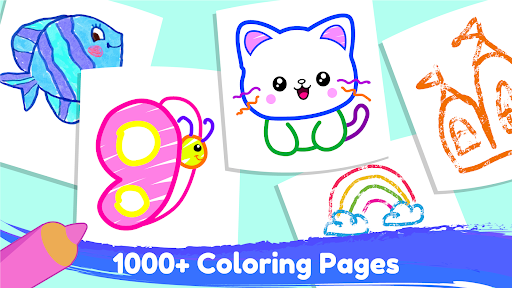
Are you looking for a fun and educational coloring game for your kids? Do you want to help them unleash their creativity and imagination with hundreds of amazing coloring pages? Do you want to teach them about animals, fruits, numbers, shapes, and more?
If you answered yes to any of these questions, then you will love Coloring Book for Kids: Learn & Play with Fun Pages!
This is the ultimate free coloring book for kids of all ages. It has over 750 coloring pages in 16 different categories, such as:
Farm Animals: Color and learn about cows, pigs, chickens, and more.
Forest Animals: Color and learn about bears, foxes, deer, and more.
Transport Vehicles: Color and learn about cars, trucks, planes, and more.
Toys: Color and learn about dolls, robots, puzzles, and more.
And many more!
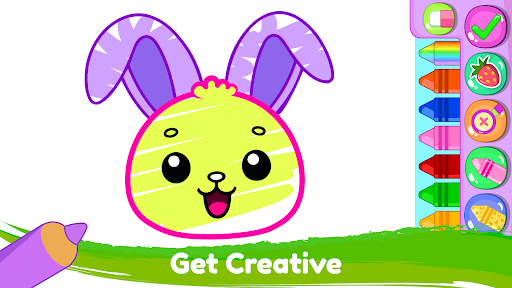
You can choose from various coloring tools, such as pencils, crayons, brushes, stickers, and glitters. You can also use the zoom feature to color every tiny detail with precision.
But this is not just a coloring game. It is also a learning game that helps your kids develop their drawing skills, logic skills, and language skills. Here are some of the amazing features that make this game a great learning tool:
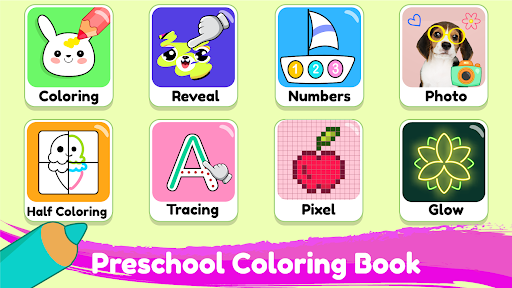
Alphabets and Numbers: Your kids can learn the alphabets (ABC) and the numbers (123) by coloring them and hearing their names. This is a great way to introduce them to the ABC coloring book and the coloring and learn concept. They can also practice writing the letters and numbers by tracing them with their fingers or a stylus.
Connecting Dots and Maze: Your kids can improve their logic skills by connecting the dots to reveal a picture or finding their way through a maze. This is a fun and challenging way to practice their coloring and learn skills. They can also discover new words and facts related to the pictures they reveal, such as animals, fruits, vehicles, etc.
Tracing and Glow Coloring: Your kids can practice their handwriting and drawing skills by tracing the lines and shapes or coloring them with glowing effects. This is a creative and exciting way to enhance their drawing for kids and coloring for kids abilities. They can also customize the colors and the brightness of the glow to create stunning artworks.
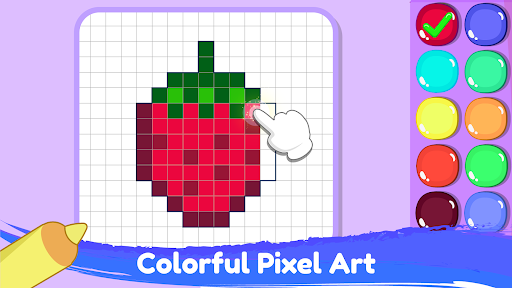
Pixel Art: Your kids can unleash their creativity and create colorful pixel art by filling the grids with colors. This is a cool and modern way to express their kids color and kids drawing talents. They can also choose from different pixel art themes, such as animals, emojis, flags, superheroes, and more.
Preschool Worksheets: Your kids can prepare for school with 25+ preschool worksheets that teach them about colors, shapes, patterns, and more. This is a smart and effective way to reinforce their coloring for toddlers and toddler color games knowledge. They can also check their answers and get feedback from the game.
This game is designed to be kid-friendly and easy to use. You can color offline without an internet connection. You can also share your coloring pages with your family and friends on social media. And you can save your artworks in the gallery for later viewing.
Coloring Book for Kids: Learn & Play with Fun Pages is one of the best free coloring games and learning games for kids on Android.
What are you waiting for? Download Coloring Book for Kids: Learn & Play with Fun Pages today and let your kids have fun while they learn!
แสดงเพิ่มเติม

1. ดาวน์โหลดตัวติดตั้ง MEmu และสิ้นสุดการติดตั้ง

2. เริ่ม MEmu จากนั้นเปิด Google Play บนหน้าแรก

3. ค้นหา Coloring Games & Coloring Kids ใน Google Play
Install
4. ดาวน์โหลดและติดตั้ง Coloring Games & Coloring Kids
5. เมื่อติดตั้งเสร็จให้คลิกที่ไอคอนเพื่อเริ่มใช้งาน

6. สนุกกับการเล่น Coloring Games & Coloring Kids บนพีซีด้วย MEmu
MEmu App Player เป็นอีมูเลเตอร์ Android ที่ดีที่สุดและผู้คนกว่า 50 ล้านคนเพลิดเพลินไปกับประสบการณ์การเล่นเกม Android ที่ยอดเยี่ยม เทคโนโลยีการจำลองเสมือนของ MEmu ช่วยให้คุณเล่นเกม Android หลายพันเกมได้อย่างราบรื่นบนพีซีของคุณแม้แต่เกมที่ต้องใช้กราฟิกมากที่สุด
จอใหญ่และกราฟฟิกสวยกว่า; เล่นได้นาน, ไม่ต้องใช้แบตเตอรี่โทรศัพท์หรือเน็ตโทรศัพท์.
ระบบปรับแต่งปุ่มคีย์บอร์ดและเม้าส์ตามที่คุณเลือก
เล่นมากกว่าหนึ่งเกมบน PC ในเวลาเดียวกันด้วยระบบหลายจอหรือ Multi-Instance manager.
Play Coloring Games & Coloring Kids on PC by following steps: