
Palworld Online
อัปเดตเมื่อ
เวอร์ชันปัจจุบัน
ให้บริการโดย

เวลาคุณเล่น Palworld Online, คุณอาจรู้สึกว่ามือคุณอาจบังจอแล้วทำให้ไม่ได้เล่นแบบเต็มที่. เล่นแบบไร้ขีดจำกัดด้วยเม้าส์และคีย์บอร์ด. MEmu มีตัวเลือกหลายอย่างให้คุณใช้งานเกมที่คุณเล่นแบบที่คุณต้องการ. ดาวน์โหลดและเล่น Palworld Online บน PC. เล่นนานแค่ไหนก็ได้, ไม่ต้องชาร์จแบตเตอรี่, หรือเจอคนโทรเข้ามาระหว่างเล่น. MEmu 9 เป็นตัวเลือกสำหรับการเล่น Palworld Online บน PC. ทางทีมงานเราได้ปรับแต่งเกม, ปรับให้เล่นเกมบางเกมได้เหมือนเล่น Palworld Online เป็นเกม PC เช่นเล็งด้วยเม้าส์หรือใช้คีย์บอร์ด. ระบบของเรายังทำให้คุณสามารถเปิดเล่นได้มากกว่า 2 เกมพร้อมๆกันในคอมของคุณ. และที่สำคัญที่สุด, ระบบโปรแกรมของเราสามารถทำให้คุณใช้ระบบของ PC ทำให้เกมลื่นเหมือนกับใช้โทรศัพท์รุ่นล่าสุด. เราไม่ได้ดูแลเรื่องการเล่นเกม, แต่เราดูแลถึงความสนุกสนานที่คุณได้จากการเล่นด้วย.
แสดงเพิ่มเติม
ดาวน์โหลด Palworld Online บน PC ด้วย MEmu Android Emulator สนุกกับการเล่นบนหน้าจอขนาดใหญ่ Palworld, the open-world survival crafting game with over 40 million players worldwide, comes to mobile as Palworld Online, a new MMORPG adventure!
Palworld, the open-world survival crafting game with over 40 million players worldwide, comes to mobile as Palworld Online, a new MMORPG adventure!
In Palworld Online, the journey is yours to define. Collect Pals, expand your Paldeck, and unlock achievements along the way. Channel your inner architect to build your dream home, construct fortresses, or collaborate with friends to create breathtaking wonders. Together, you'll brave dangerous environments, conquer challenging raids and dungeons, uncover hidden quests, and earn legendary rewards reserved for the strongest survivors.
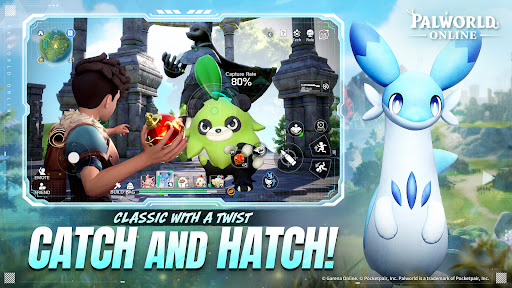
Catch and Hatch!
We’re bringing back the authentic Palworld experience—but with a twist. Dive into exclusive, all-new side stories that expand the lore of the islands. Capture, hatch, and train your ultimate squad to fight by your side and manage your base stress-free.
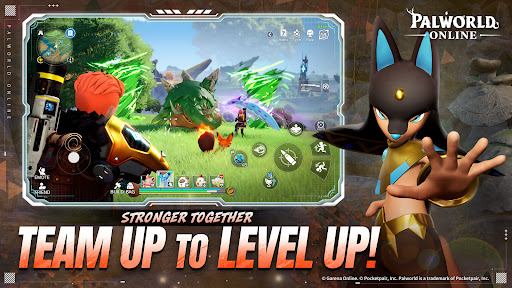
Team Up to Level Up!
Adventures are different with friends! Rally your squad and jump into massive social events. From high-tension PvE Dungeons, adrenaline-pumping PvP Duels, to lively Open World encounters, there’s always a seat for you at the table.
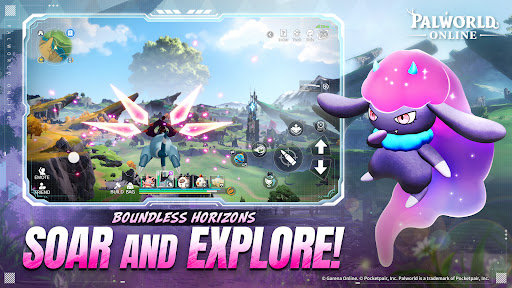
Soar and Explore!
Deploy your glider and catch the wind! Experience a vast, seamless landscape where every horizon hides a secret. Discover hidden treasures on jagged cliffs or solve ancient puzzles—in this world, curiosity is always rewarded with a new challenge.
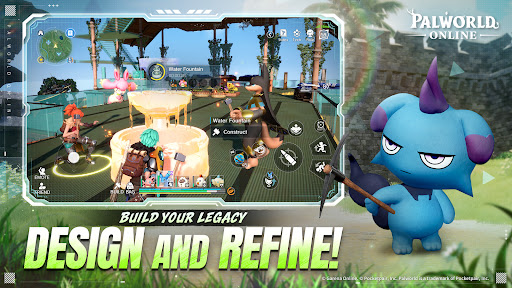
Design and Refine!
Collaborate with friends and Pals to build more than just a house—build a Living Community. Automate production lines, coordinate base defenses, and share resources to create a self-sustaining utopia. Your dream settlement is only a blueprint away.
Survive and Thrive!
Watch your step—don’t get stomped by a Mammorest! From conquering active volcanoes to trekking through frozen tundras, this is survival at its peak. Only the most prepared Pal Tamers will survive the falls, the rivers, and the heat to become true legends of the archipelago.
© Garena Online. © Pocketpair, Inc.
Palworld is a trademark of Pocketpair, Inc.
แสดงเพิ่มเติม

1. ดาวน์โหลดตัวติดตั้ง MEmu และสิ้นสุดการติดตั้ง

2. เริ่ม MEmu จากนั้นเปิด Google Play บนหน้าแรก

3. ค้นหา Palworld Online ใน Google Play
Install
4. ดาวน์โหลดและติดตั้ง Palworld Online
5. เมื่อติดตั้งเสร็จให้คลิกที่ไอคอนเพื่อเริ่มใช้งาน

6. สนุกกับการเล่น Palworld Online บนพีซีด้วย MEmu
MEmu App Player เป็นอีมูเลเตอร์ Android ที่ดีที่สุดและผู้คนกว่า 50 ล้านคนเพลิดเพลินไปกับประสบการณ์การเล่นเกม Android ที่ยอดเยี่ยม เทคโนโลยีการจำลองเสมือนของ MEmu ช่วยให้คุณเล่นเกม Android หลายพันเกมได้อย่างราบรื่นบนพีซีของคุณแม้แต่เกมที่ต้องใช้กราฟิกมากที่สุด
จอใหญ่และกราฟฟิกสวยกว่า; เล่นได้นาน, ไม่ต้องใช้แบตเตอรี่โทรศัพท์หรือเน็ตโทรศัพท์.
ระบบปรับแต่งปุ่มคีย์บอร์ดและเม้าส์ตามที่คุณเลือก
เล่นมากกว่าหนึ่งเกมบน PC ในเวลาเดียวกันด้วยระบบหลายจอหรือ Multi-Instance manager.
Play Palworld Online on PC by following steps:





























![[ไกด์เกม] CookieRun Classic แนะนำ 5 คุกกี้น่าปั้น น่าลงทุน ที่มือใหม่ห้ามพลาด! (เล่นบน PC ผ่าน MEmu ให้ลื่นสุด ๆ) PC](https://www.memuplay.com/blog/wp-content/uploads/2026/08/579c01ab-a953-45b3-8115-9b6279b7d6f9.png)















