Idle Huntress:Adventure
อัปเดตเมื่อ
เวอร์ชันปัจจุบัน
1.1.29
ให้บริการโดย

เวลาคุณเล่น Idle Huntress:Adventure, คุณอาจรู้สึกว่ามือคุณอาจบังจอแล้วทำให้ไม่ได้เล่นแบบเต็มที่. เล่นแบบไร้ขีดจำกัดด้วยเม้าส์และคีย์บอร์ด. MEmu มีตัวเลือกหลายอย่างให้คุณใช้งานเกมที่คุณเล่นแบบที่คุณต้องการ. ดาวน์โหลดและเล่น Idle Huntress:Adventure บน PC. เล่นนานแค่ไหนก็ได้, ไม่ต้องชาร์จแบตเตอรี่, หรือเจอคนโทรเข้ามาระหว่างเล่น. MEmu 9 เป็นตัวเลือกสำหรับการเล่น Idle Huntress:Adventure บน PC. ทางทีมงานเราได้ปรับแต่งเกม, ปรับให้เล่นเกมบางเกมได้เหมือนเล่น Idle Huntress:Adventure เป็นเกม PC เช่นเล็งด้วยเม้าส์หรือใช้คีย์บอร์ด. ระบบของเรายังทำให้คุณสามารถเปิดเล่นได้มากกว่า 2 เกมพร้อมๆกันในคอมของคุณ. และที่สำคัญที่สุด, ระบบโปรแกรมของเราสามารถทำให้คุณใช้ระบบของ PC ทำให้เกมลื่นเหมือนกับใช้โทรศัพท์รุ่นล่าสุด. เราไม่ได้ดูแลเรื่องการเล่นเกม, แต่เราดูแลถึงความสนุกสนานที่คุณได้จากการเล่นด้วย.
แสดงเพิ่มเติม
ดาวน์โหลด Idle Huntress:Adventure บน PC ด้วย MEmu Android Emulator สนุกกับการเล่นบนหน้าจอขนาดใหญ่ Salute to Project QT, SF Girls and Attack on Moe, we have gained a lot of artistic and creative inspiration from it.
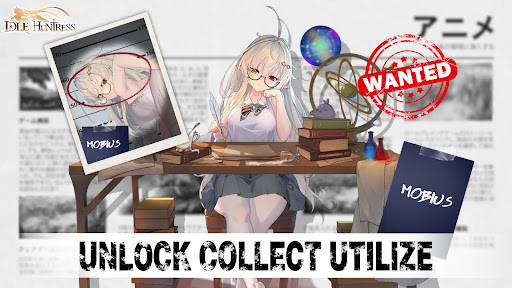


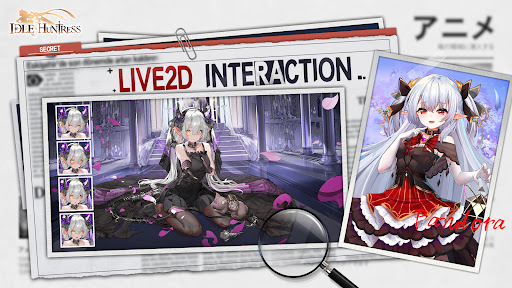
Salute to Project QT, SF Girls and Attack on Moe, we have gained a lot of artistic and creative inspiration from it.
Welcome to the Kingdom of Huntress Utopia! As the only male outsider allowed to enter in the past hundred years, I have some advice for you:
ATTENTION! Please also beware of being deceived by the appearance of huntresses. Some of them may appear to be your subordinates, but in reality, they may be spies for hostile forces. Their enchanting dance moves may be a healing balm after battles, but they can also instantly become the deadliest weapon. Don't be fooled, restrain your instinctive desires, and dig into their true inner selves.
REPEAT REPEAT and REPEAT! This is a kingdom prepared for masters who love to idle, and there is no need to log in frequently, but please at least claim your rewards! What are three most important things about this game? It's FUN, FUN and FUN!
HINT! As for the unique gameplays, it is suggested to explore them gradually. As far as I know, there are more than 20 gameplays that are waiting for you to discover, and they are all hidden in various little-known continents. Of course, as friendly reminder, if you stuck in some stages and cannot make right choices, please recruit your huntresses and they may guide you through them.
Alright, my advice ends here. I may talk too much, but anyway, there are too many indescribable places on this continent, so please come and experience it yourself. Thank you very much for reading this. I will regard you as my most precious friend. Oh, I forgot to tell you, my name is - Jack the Talker!
Good luck, the 503212221st outsider!
แสดงเพิ่มเติม

1. ดาวน์โหลดตัวติดตั้ง MEmu และสิ้นสุดการติดตั้ง

2. เริ่ม MEmu จากนั้นเปิด Google Play บนหน้าแรก

3. ค้นหา Idle Huntress:Adventure ใน Google Play
Install
4. ดาวน์โหลดและติดตั้ง Idle Huntress:Adventure
5. เมื่อติดตั้งเสร็จให้คลิกที่ไอคอนเพื่อเริ่มใช้งาน

6. สนุกกับการเล่น Idle Huntress:Adventure บนพีซีด้วย MEmu
MEmu App Player เป็นอีมูเลเตอร์ Android ที่ดีที่สุดและผู้คนกว่า 50 ล้านคนเพลิดเพลินไปกับประสบการณ์การเล่นเกม Android ที่ยอดเยี่ยม เทคโนโลยีการจำลองเสมือนของ MEmu ช่วยให้คุณเล่นเกม Android หลายพันเกมได้อย่างราบรื่นบนพีซีของคุณแม้แต่เกมที่ต้องใช้กราฟิกมากที่สุด
จอใหญ่และกราฟฟิกสวยกว่า; เล่นได้นาน, ไม่ต้องใช้แบตเตอรี่โทรศัพท์หรือเน็ตโทรศัพท์.
ระบบปรับแต่งปุ่มคีย์บอร์ดและเม้าส์ตามที่คุณเลือก
เล่นมากกว่าหนึ่งเกมบน PC ในเวลาเดียวกันด้วยระบบหลายจอหรือ Multi-Instance manager.
Play Idle Huntress:Adventure on PC by following steps:
























![[ไกด์เกม] CookieRun Classic แนะนำ 5 คุกกี้น่าปั้น น่าลงทุน ที่มือใหม่ห้ามพลาด! (เล่นบน PC ผ่าน MEmu ให้ลื่นสุด ๆ) PC](https://www.memuplay.com/blog/wp-content/uploads/2026/08/579c01ab-a953-45b3-8115-9b6279b7d6f9.png)