Hillthorn
อัปเดตเมื่อ
เวอร์ชันปัจจุบัน
ให้บริการโดย

เวลาคุณเล่น Hillthorn, คุณอาจรู้สึกว่ามือคุณอาจบังจอแล้วทำให้ไม่ได้เล่นแบบเต็มที่. เล่นแบบไร้ขีดจำกัดด้วยเม้าส์และคีย์บอร์ด. MEmu มีตัวเลือกหลายอย่างให้คุณใช้งานเกมที่คุณเล่นแบบที่คุณต้องการ. ดาวน์โหลดและเล่น Hillthorn บน PC. เล่นนานแค่ไหนก็ได้, ไม่ต้องชาร์จแบตเตอรี่, หรือเจอคนโทรเข้ามาระหว่างเล่น. MEmu 9 เป็นตัวเลือกสำหรับการเล่น Hillthorn บน PC. ทางทีมงานเราได้ปรับแต่งเกม, ปรับให้เล่นเกมบางเกมได้เหมือนเล่น Hillthorn เป็นเกม PC เช่นเล็งด้วยเม้าส์หรือใช้คีย์บอร์ด. ระบบของเรายังทำให้คุณสามารถเปิดเล่นได้มากกว่า 2 เกมพร้อมๆกันในคอมของคุณ. และที่สำคัญที่สุด, ระบบโปรแกรมของเราสามารถทำให้คุณใช้ระบบของ PC ทำให้เกมลื่นเหมือนกับใช้โทรศัพท์รุ่นล่าสุด. เราไม่ได้ดูแลเรื่องการเล่นเกม, แต่เราดูแลถึงความสนุกสนานที่คุณได้จากการเล่นด้วย.
แสดงเพิ่มเติม
ดาวน์โหลด Hillthorn บน PC ด้วย MEmu Android Emulator สนุกกับการเล่นบนหน้าจอขนาดใหญ่ Only the foolish and the desperate attempt to wander the mazelike trails of Hillthorn.
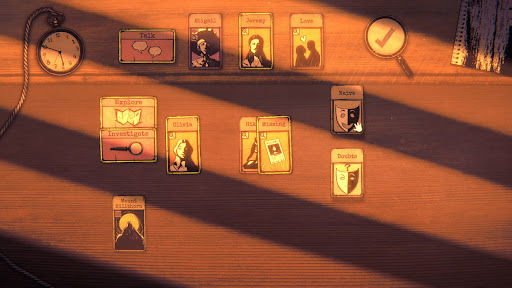
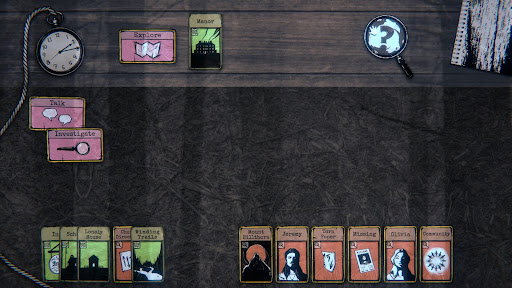
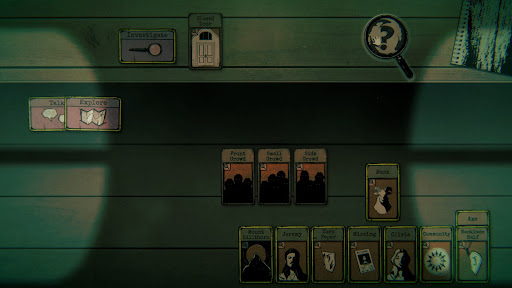

Only the foolish and the desperate attempt to wander the mazelike trails of Hillthorn. Even those who know their way may still stumble upon dangerous wildlife or a local villager’s piercing gaze. But a child has gone missing, time is in short supply, and you’re the one being tasked with unraveling the mountain’s secrets. Welcome to Hillthorn, a dark investigation game unlike any other, where the mystery unfolds without a single word spoken.
A World in Cards
Every eerie and unsettling detail of Hillthorn's story is revealed entirely through Clue cards, which can be Investigated, Explored or in some instances Talked to in your search to get closer to truth behind the disappearance.
You Are an Outsider
You've been tasked to find a missing person, though it’ll take some finesse to draw information from the locals, who seem reluctant to share details with someone outside their flock.
Time is in Short Supply
The clock is ticking. There are too many threads to follow and too little time. Something seems keen on letting you revisit untrodden paths, but at what cost?
Features
• Discover a strange mountain and uncover its secrets.
• Card-based investigation with no dialogue.
• The clock ticks with every action.
• Multiple endings to discover
• Knowledge as progression.
• No Generative AI
แสดงเพิ่มเติม

1. ดาวน์โหลดตัวติดตั้ง MEmu และสิ้นสุดการติดตั้ง

2. เริ่ม MEmu จากนั้นเปิด Google Play บนหน้าแรก

3. ค้นหา Hillthorn ใน Google Play
Install
4. ดาวน์โหลดและติดตั้ง Hillthorn
5. เมื่อติดตั้งเสร็จให้คลิกที่ไอคอนเพื่อเริ่มใช้งาน

6. สนุกกับการเล่น Hillthorn บนพีซีด้วย MEmu
MEmu App Player เป็นอีมูเลเตอร์ Android ที่ดีที่สุดและผู้คนกว่า 50 ล้านคนเพลิดเพลินไปกับประสบการณ์การเล่นเกม Android ที่ยอดเยี่ยม เทคโนโลยีการจำลองเสมือนของ MEmu ช่วยให้คุณเล่นเกม Android หลายพันเกมได้อย่างราบรื่นบนพีซีของคุณแม้แต่เกมที่ต้องใช้กราฟิกมากที่สุด
จอใหญ่และกราฟฟิกสวยกว่า; เล่นได้นาน, ไม่ต้องใช้แบตเตอรี่โทรศัพท์หรือเน็ตโทรศัพท์.
ระบบปรับแต่งปุ่มคีย์บอร์ดและเม้าส์ตามที่คุณเลือก
เล่นมากกว่าหนึ่งเกมบน PC ในเวลาเดียวกันด้วยระบบหลายจอหรือ Multi-Instance manager.
Play Hillthorn on PC by following steps: