The Magus Circle
อัปเดตเมื่อ
เวอร์ชันปัจจุบัน
ให้บริการโดย

เวลาคุณเล่น The Magus Circle, คุณอาจรู้สึกว่ามือคุณอาจบังจอแล้วทำให้ไม่ได้เล่นแบบเต็มที่. เล่นแบบไร้ขีดจำกัดด้วยเม้าส์และคีย์บอร์ด. MEmu มีตัวเลือกหลายอย่างให้คุณใช้งานเกมที่คุณเล่นแบบที่คุณต้องการ. ดาวน์โหลดและเล่น The Magus Circle บน PC. เล่นนานแค่ไหนก็ได้, ไม่ต้องชาร์จแบตเตอรี่, หรือเจอคนโทรเข้ามาระหว่างเล่น. MEmu 9 เป็นตัวเลือกสำหรับการเล่น The Magus Circle บน PC. ทางทีมงานเราได้ปรับแต่งเกม, ปรับให้เล่นเกมบางเกมได้เหมือนเล่น The Magus Circle เป็นเกม PC เช่นเล็งด้วยเม้าส์หรือใช้คีย์บอร์ด. ระบบของเรายังทำให้คุณสามารถเปิดเล่นได้มากกว่า 2 เกมพร้อมๆกันในคอมของคุณ. และที่สำคัญที่สุด, ระบบโปรแกรมของเราสามารถทำให้คุณใช้ระบบของ PC ทำให้เกมลื่นเหมือนกับใช้โทรศัพท์รุ่นล่าสุด. เราไม่ได้ดูแลเรื่องการเล่นเกม, แต่เราดูแลถึงความสนุกสนานที่คุณได้จากการเล่นด้วย.
แสดงเพิ่มเติม
ดาวน์โหลด The Magus Circle บน PC ด้วย MEmu Android Emulator สนุกกับการเล่นบนหน้าจอขนาดใหญ่ The Magus Circle is a vampire-survivors, rogue-lite game where you draw to cast spells!

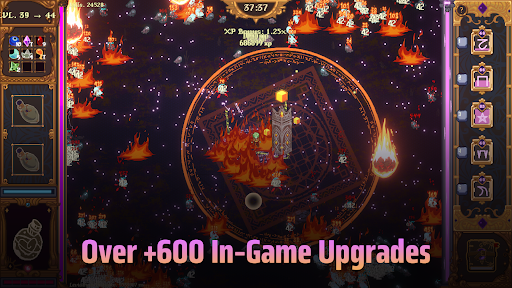
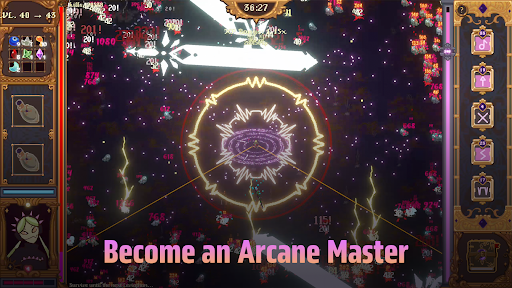
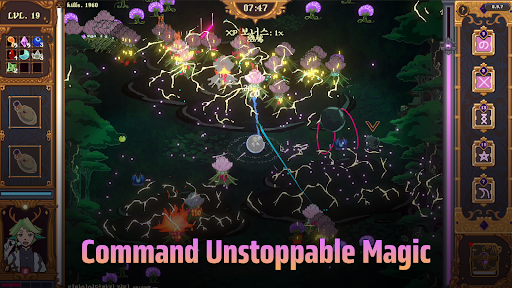
The Magus Circle is a vampire-survivors, rogue-lite game where you draw to cast spells!
When fate comes knocking, will you open the door?
Once you’ve already ruined just about everything, is there really much harm in trying again? Magic itself is under siege and you have found yourself caught in the midst of a cosmic war you did not sign up for. With nothing but your wits and your best scribing hand, you have been charged with protecting humanity's greatest ally: The Magus Circle.
Key Features
- Hand Drawn Spellcasting: Actively draw your arcane sigils to cast your spells. You don't need to be an artist. Even the most crudely drawn sigils still hold magic within.
- Diverse Build Paths: Draw magic sigils, casting 20 unique spells augmented by 600 possible upgrades.
- Maps & Content: Battle hordes of foes across 4 unique planets to face off against colossal bosses. Play as the 6 mages of the circle, each with their own skill trees, abilities and emotional baggage.
- Progression: Unlock familiars, wager your winnings, concoct potions, grow a garden and more!
- Story: Explore the manor, get to know your fellow mages and uncover the secrets of The Circle.
- Controls: The Magus Circle supports drawing tablets, touch screens, and controllers. If your drawing tablet uses Microsoft Ink, disable the setting for your drawings to work. We recommend using a mouse, drawing tablet or touch screen for the best play experience. The Magus Circle features accessibility settings to slow or freeze time when drawing or a button press mode. We recommend using one of these features for controller play.
แสดงเพิ่มเติม

1. ดาวน์โหลดตัวติดตั้ง MEmu และสิ้นสุดการติดตั้ง

2. เริ่ม MEmu จากนั้นเปิด Google Play บนหน้าแรก

3. ค้นหา The Magus Circle ใน Google Play
Install
4. ดาวน์โหลดและติดตั้ง The Magus Circle
5. เมื่อติดตั้งเสร็จให้คลิกที่ไอคอนเพื่อเริ่มใช้งาน

6. สนุกกับการเล่น The Magus Circle บนพีซีด้วย MEmu
MEmu App Player เป็นอีมูเลเตอร์ Android ที่ดีที่สุดและผู้คนกว่า 50 ล้านคนเพลิดเพลินไปกับประสบการณ์การเล่นเกม Android ที่ยอดเยี่ยม เทคโนโลยีการจำลองเสมือนของ MEmu ช่วยให้คุณเล่นเกม Android หลายพันเกมได้อย่างราบรื่นบนพีซีของคุณแม้แต่เกมที่ต้องใช้กราฟิกมากที่สุด
จอใหญ่และกราฟฟิกสวยกว่า; เล่นได้นาน, ไม่ต้องใช้แบตเตอรี่โทรศัพท์หรือเน็ตโทรศัพท์.
ระบบปรับแต่งปุ่มคีย์บอร์ดและเม้าส์ตามที่คุณเลือก
เล่นมากกว่าหนึ่งเกมบน PC ในเวลาเดียวกันด้วยระบบหลายจอหรือ Multi-Instance manager.
Play The Magus Circle on PC by following steps: