Makruk - Thai Chess (หมากรุก)
อัปเดตเมื่อ
เวอร์ชันปัจจุบัน
1.61
ให้บริการโดย

เวลาคุณเล่น Makruk - Thai Chess (หมากรุก), คุณอาจรู้สึกว่ามือคุณอาจบังจอแล้วทำให้ไม่ได้เล่นแบบเต็มที่. เล่นแบบไร้ขีดจำกัดด้วยเม้าส์และคีย์บอร์ด. MEmu มีตัวเลือกหลายอย่างให้คุณใช้งานเกมที่คุณเล่นแบบที่คุณต้องการ. ดาวน์โหลดและเล่น Makruk - Thai Chess (หมากรุก) บน PC. เล่นนานแค่ไหนก็ได้, ไม่ต้องชาร์จแบตเตอรี่, หรือเจอคนโทรเข้ามาระหว่างเล่น. MEmu 9 เป็นตัวเลือกสำหรับการเล่น Makruk - Thai Chess (หมากรุก) บน PC. ทางทีมงานเราได้ปรับแต่งเกม, ปรับให้เล่นเกมบางเกมได้เหมือนเล่น Makruk - Thai Chess (หมากรุก) เป็นเกม PC เช่นเล็งด้วยเม้าส์หรือใช้คีย์บอร์ด. ระบบของเรายังทำให้คุณสามารถเปิดเล่นได้มากกว่า 2 เกมพร้อมๆกันในคอมของคุณ. และที่สำคัญที่สุด, ระบบโปรแกรมของเราสามารถทำให้คุณใช้ระบบของ PC ทำให้เกมลื่นเหมือนกับใช้โทรศัพท์รุ่นล่าสุด. เราไม่ได้ดูแลเรื่องการเล่นเกม, แต่เราดูแลถึงความสนุกสนานที่คุณได้จากการเล่นด้วย.
แสดงเพิ่มเติม
ดาวน์โหลด Makruk - Thai Chess (หมากรุก) บน PC ด้วย MEmu Android Emulator สนุกกับการเล่นบนหน้าจอขนาดใหญ่ Makruk (Thai: หมากรุก; rtgs: Mak Ruk;), or Thai chess, is a board game descended from the 6th-century Indian game of chaturanga or a close relative thereof, and therefore related to chess.
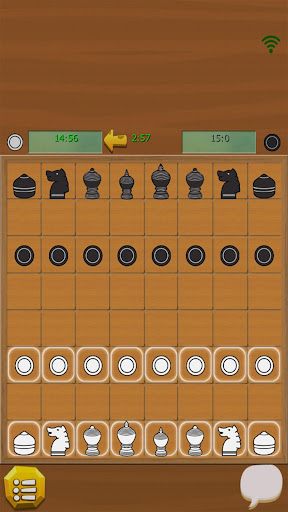
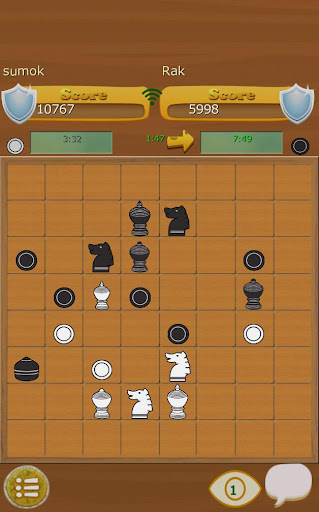
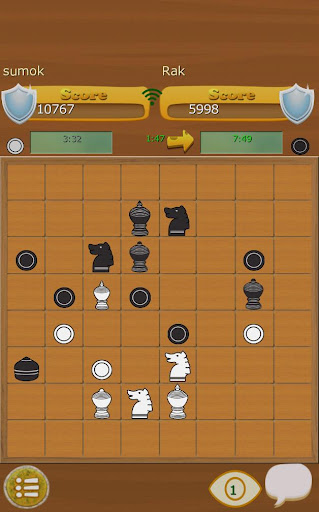
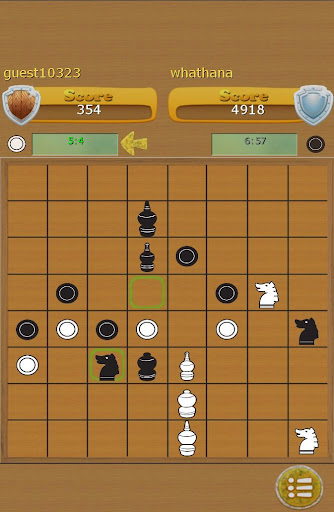
Makruk (Thai: หมากรุก; rtgs: Mak Ruk;), or Thai chess, is a board game descended from the 6th-century Indian game of chaturanga or a close relative thereof, and therefore related to chess. It is regarded as the most similar living game to this common ancestor of all chess variants.
There are around two million Thais who can play makruk, while 5000 can play chess.
According to former world chess champion Vladimir Kramnik, Makruk Thai is more strategic than international chess. You have to plan your operations with total care since Makruk Thai can be compared to an anticipated endgame of International Chess.
Rules
---------
The Pawn
(called เบี้ย bia, a cowry shell, formerly used for money) Moves and captures like a pawn in international chess, but cannot move two steps on the first move and, therefore, cannot be captured en passant. A pawn that reaches the sixth rank is always promoted to a queen (med).
The Queen
(called เม็ด met), the weakest piece, moves one step in any diagonal direction, like the fers in shatranj, or a cat sword in dai shogi.
The Bishop
(called โคน khon, nobleman or mask) moves one step in any diagonal direction or one step forward, like the silver general in shogi.
The Knight
(called ม้า ma, horse) moves like a knight in Western chess: two steps in one direction and then one step perpendicular to that movement. It jumps over any pieces in the way.
The Rook
(called เรือ ruea, boat) moves like a rook in Western chess: any number of steps horizontally or vertically.
Ang
moves like a king in international chess – one step in any direction. He is allowed to make a Ses (knight jump) at his first move (This special move is no more used in Thailand). The game ends when the king is checkmated.
แสดงเพิ่มเติม

1. ดาวน์โหลดตัวติดตั้ง MEmu และสิ้นสุดการติดตั้ง

2. เริ่ม MEmu จากนั้นเปิด Google Play บนหน้าแรก

3. ค้นหา Makruk - Thai Chess (หมากรุก) ใน Google Play
Install
4. ดาวน์โหลดและติดตั้ง Makruk - Thai Chess (หมากรุก)
5. เมื่อติดตั้งเสร็จให้คลิกที่ไอคอนเพื่อเริ่มใช้งาน

6. สนุกกับการเล่น Makruk - Thai Chess (หมากรุก) บนพีซีด้วย MEmu
MEmu App Player เป็นอีมูเลเตอร์ Android ที่ดีที่สุดและผู้คนกว่า 50 ล้านคนเพลิดเพลินไปกับประสบการณ์การเล่นเกม Android ที่ยอดเยี่ยม เทคโนโลยีการจำลองเสมือนของ MEmu ช่วยให้คุณเล่นเกม Android หลายพันเกมได้อย่างราบรื่นบนพีซีของคุณแม้แต่เกมที่ต้องใช้กราฟิกมากที่สุด
จอใหญ่และกราฟฟิกสวยกว่า; เล่นได้นาน, ไม่ต้องใช้แบตเตอรี่โทรศัพท์หรือเน็ตโทรศัพท์.
ระบบปรับแต่งปุ่มคีย์บอร์ดและเม้าส์ตามที่คุณเลือก
เล่นมากกว่าหนึ่งเกมบน PC ในเวลาเดียวกันด้วยระบบหลายจอหรือ Multi-Instance manager.
Play Makruk - Thai Chess (หมากรุก) on PC by following steps: