Flash Peak
อัปเดตเมื่อ
เวอร์ชันปัจจุบัน
1.3.0
ให้บริการโดย

เวลาคุณเล่น Flash Peak, คุณอาจรู้สึกว่ามือคุณอาจบังจอแล้วทำให้ไม่ได้เล่นแบบเต็มที่. เล่นแบบไร้ขีดจำกัดด้วยเม้าส์และคีย์บอร์ด. MEmu มีตัวเลือกหลายอย่างให้คุณใช้งานเกมที่คุณเล่นแบบที่คุณต้องการ. ดาวน์โหลดและเล่น Flash Peak บน PC. เล่นนานแค่ไหนก็ได้, ไม่ต้องชาร์จแบตเตอรี่, หรือเจอคนโทรเข้ามาระหว่างเล่น. MEmu 9 เป็นตัวเลือกสำหรับการเล่น Flash Peak บน PC. ทางทีมงานเราได้ปรับแต่งเกม, ปรับให้เล่นเกมบางเกมได้เหมือนเล่น Flash Peak เป็นเกม PC เช่นเล็งด้วยเม้าส์หรือใช้คีย์บอร์ด. ระบบของเรายังทำให้คุณสามารถเปิดเล่นได้มากกว่า 2 เกมพร้อมๆกันในคอมของคุณ. และที่สำคัญที่สุด, ระบบโปรแกรมของเราสามารถทำให้คุณใช้ระบบของ PC ทำให้เกมลื่นเหมือนกับใช้โทรศัพท์รุ่นล่าสุด. เราไม่ได้ดูแลเรื่องการเล่นเกม, แต่เราดูแลถึงความสนุกสนานที่คุณได้จากการเล่นด้วย.
แสดงเพิ่มเติม
ดาวน์โหลด Flash Peak บน PC ด้วย MEmu Android Emulator สนุกกับการเล่นบนหน้าจอขนาดใหญ่ The New Version of Flash Peak is Here!
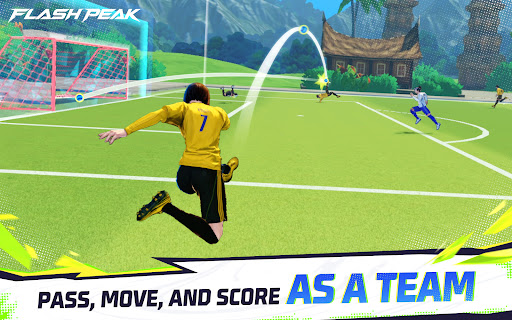
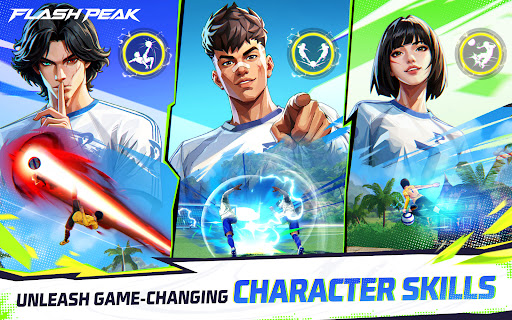
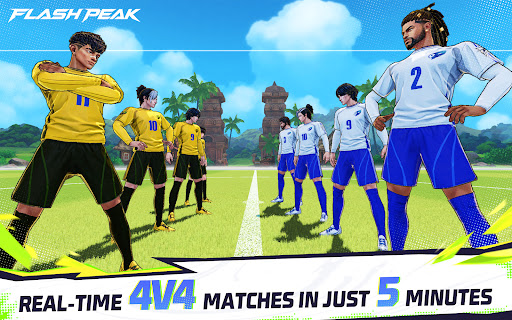
The New Version of Flash Peak is Here!
[New Characters]
CB Steffie and WF Tatsuya have joined the game! Look forward to seeing these two fan-favorite Free Fire characters showcase their unique skills on the pitch.
[Play Again Function]
Had great teamwork with your teammates? Tap “Play Again” to jump straight into another match and keep the winning streak going!
[Defense TIFO]
Make a crucial defensive play and trigger a TIFO in the stadium! Show everyone your incredible skills and celebrate your best defensive moments in style.
━━━━━━━━━━━━━━━━━━
Flash Peak is officially released!
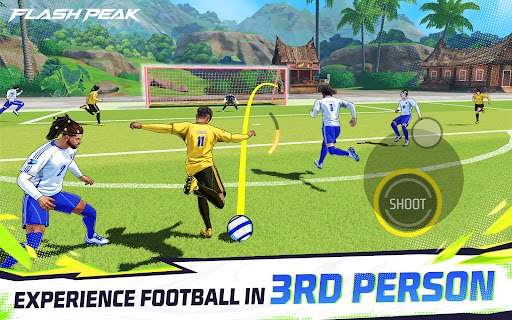
A 4v4 soccer game with freestyle football elements created by Moco Studios, a developer under Garena. This mobile soccer game features iconic Free Fire characters ready for action on the pitch!
Control your own player, team up with friends, use character skills, and score a victory together in 5 minutes!
CONTROL YOUR OWN PLAYER
Experience a different kind of soccer game. Play your character directly on the pitch in a fast-paced and intense 4v4 format. Dribble, pass, and score spectacular goals in every match.
FREE FIRE CHARACTERS WITH INCREDIBLE SKILLS
Play Free Fire characters with unique skills on the pitch. From attacking and dribbling to defending and finishing! Each skill set opens up new gameplay and adds tactical depth to every match.
PLAY WITH FRIENDS, WIN WITH TEAMWORK
Victory isn't just about individual skill. Good positioning, quick passing, and solid team coordination are the keys to breaking through the opponent's defense and dominating the game.
EXCITING REAL-TIME 4V4 GAMES IN JUST 5 MINUTES
Take on other players in real-time 4v4 matches lasting just 5 minutes. Reading the game, quick reactions, and teamwork are key to beating the competition.
RULES-FREE, FREESTYLE FOOTBALL GAME
No offsides. No fouls. No out-of-bounds. Just fast, non-stop action!
แสดงเพิ่มเติม

1. ดาวน์โหลดตัวติดตั้ง MEmu และสิ้นสุดการติดตั้ง

2. เริ่ม MEmu จากนั้นเปิด Google Play บนหน้าแรก

3. ค้นหา Flash Peak ใน Google Play
Install
4. ดาวน์โหลดและติดตั้ง Flash Peak
5. เมื่อติดตั้งเสร็จให้คลิกที่ไอคอนเพื่อเริ่มใช้งาน

6. สนุกกับการเล่น Flash Peak บนพีซีด้วย MEmu
MEmu App Player เป็นอีมูเลเตอร์ Android ที่ดีที่สุดและผู้คนกว่า 50 ล้านคนเพลิดเพลินไปกับประสบการณ์การเล่นเกม Android ที่ยอดเยี่ยม เทคโนโลยีการจำลองเสมือนของ MEmu ช่วยให้คุณเล่นเกม Android หลายพันเกมได้อย่างราบรื่นบนพีซีของคุณแม้แต่เกมที่ต้องใช้กราฟิกมากที่สุด
จอใหญ่และกราฟฟิกสวยกว่า; เล่นได้นาน, ไม่ต้องใช้แบตเตอรี่โทรศัพท์หรือเน็ตโทรศัพท์.
ระบบปรับแต่งปุ่มคีย์บอร์ดและเม้าส์ตามที่คุณเลือก
เล่นมากกว่าหนึ่งเกมบน PC ในเวลาเดียวกันด้วยระบบหลายจอหรือ Multi-Instance manager.
Play Flash Peak on PC by following steps:


















![[ไกด์เกม] CookieRun Classic แนะนำ 5 คุกกี้น่าปั้น น่าลงทุน ที่มือใหม่ห้ามพลาด! (เล่นบน PC ผ่าน MEmu ให้ลื่นสุด ๆ) PC](https://www.memuplay.com/blog/wp-content/uploads/2026/08/579c01ab-a953-45b3-8115-9b6279b7d6f9.png)