Notero Melody
อัปเดตเมื่อ
เวอร์ชันปัจจุบัน
1.2.0
ให้บริการโดย

เวลาคุณเล่น Notero Melody, คุณอาจรู้สึกว่ามือคุณอาจบังจอแล้วทำให้ไม่ได้เล่นแบบเต็มที่. เล่นแบบไร้ขีดจำกัดด้วยเม้าส์และคีย์บอร์ด. MEmu มีตัวเลือกหลายอย่างให้คุณใช้งานเกมที่คุณเล่นแบบที่คุณต้องการ. ดาวน์โหลดและเล่น Notero Melody บน PC. เล่นนานแค่ไหนก็ได้, ไม่ต้องชาร์จแบตเตอรี่, หรือเจอคนโทรเข้ามาระหว่างเล่น. MEmu 9 เป็นตัวเลือกสำหรับการเล่น Notero Melody บน PC. ทางทีมงานเราได้ปรับแต่งเกม, ปรับให้เล่นเกมบางเกมได้เหมือนเล่น Notero Melody เป็นเกม PC เช่นเล็งด้วยเม้าส์หรือใช้คีย์บอร์ด. ระบบของเรายังทำให้คุณสามารถเปิดเล่นได้มากกว่า 2 เกมพร้อมๆกันในคอมของคุณ. และที่สำคัญที่สุด, ระบบโปรแกรมของเราสามารถทำให้คุณใช้ระบบของ PC ทำให้เกมลื่นเหมือนกับใช้โทรศัพท์รุ่นล่าสุด. เราไม่ได้ดูแลเรื่องการเล่นเกม, แต่เราดูแลถึงความสนุกสนานที่คุณได้จากการเล่นด้วย.
แสดงเพิ่มเติม
ดาวน์โหลด Notero Melody บน PC ด้วย MEmu Android Emulator สนุกกับการเล่นบนหน้าจอขนาดใหญ่ Explore the Jungle of Music with Notero Melody: Foreste Adventure!


Explore the Jungle of Music with Notero Melody: Foreste Adventure!
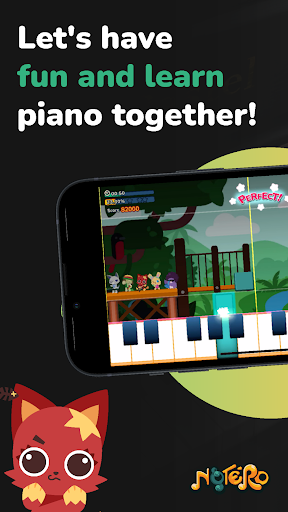
Notero Melody brings the magical Foreste Adventure right to your fingertips, inviting young learners and families to a musical journey amidst a lush jungle backdrop. This first version focuses on the enchanting Foreste theme, featuring 30 world-famous nursery rhymes and classical melodies designed to inspire, educate, and entertain.
Dive into a World of Music
- Classic Songs Reimagined: Enjoy a curated selection of 30 beloved nursery rhymes and classical pieces, each beautifully adapted to integrate seamlessly with the Foreste theme’s vibrant, jungle-inspired music background.
- Engaging for All Ages: Whether you're introducing a young child to the joys of music or revisiting cherished melodies, Notero Melody offers a delightful experience for everyone.
Discover Timeless Classics Reborn
- Familiar Favorites: Delight in classics like "Twinkle Twinkle Little Star," "Mary Had a Little Lamb," and Beethoven's "Ode to Joy," all artistically woven into the heart of the Foreste.
- Musical Exploration: From the playful "Itsy Bitsy Spider" to the joyous melodies of "Jingle Bells" and the soothing notes of "Brahms' Lullaby," each song is an invitation to explore and learn.
Learn, Play, and Grow
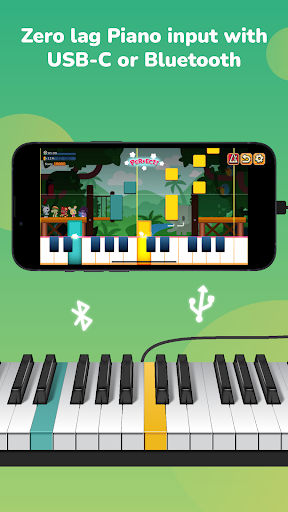
- Interactive Gameplay: Engage with music like never before! Tap along on a touchscreen or connect a MIDI piano to navigate through each song. Our user-friendly interface makes learning accessible and fun.
- From Learners to Maestros: Watch as beginners blossom into confident musicians. Notero Melody tracks progress, providing encouragement and challenges suitable for every skill level.
Tailored Educational Journeys
- From Novice to Expert: Notero Melody's curriculum is designed to cater to learners at different stages of their musical journey. Whether it's a beginner getting comfortable with single notes or an intermediate student delving into chord structures and basslines, there's something for everyone.
- Achieve & Celebrate: Track progress through the app's intuitive interface, celebrating each milestone from mastering hand coordination to interpreting complex notations and rhythms.
Features That Enrich the Experience
- Jungle-Themed Adventures: Venture through the Foreste, where each note brings the animated jungle landscape to life, enriching the learning experience with every song.
- Designed for Everyone: Carefully categorized songs ensure a smooth learning curve, catering to varying levels of musical proficiency.
- Immersive Visuals & Sounds: Dive deep into the Foreste with stunning visuals and immersive sound effects that echo your musical journey.
- Connect and Play: Compatible with both touchscreens for casual learning and MIDI keyboards for a more traditional feel, offering a comprehensive musical experience.
Join the Notero Community
- Become part of a global community of budding musicians. Share your musical adventures, celebrate progress, and discover the boundless joy of music.
Ready to Explore?
Embark on your musical expedition with Notero Melody: Foreste Adventure. Perfect for families, educators, and anyone eager to explore the world of music, our app promises an unforgettable journey through rhythm, melody, and harmony.
Download Notero Melody now and let the music play!
แสดงเพิ่มเติม

1. ดาวน์โหลดตัวติดตั้ง MEmu และสิ้นสุดการติดตั้ง

2. เริ่ม MEmu จากนั้นเปิด Google Play บนหน้าแรก

3. ค้นหา Notero Melody ใน Google Play
Install
4. ดาวน์โหลดและติดตั้ง Notero Melody
5. เมื่อติดตั้งเสร็จให้คลิกที่ไอคอนเพื่อเริ่มใช้งาน

6. สนุกกับการเล่น Notero Melody บนพีซีด้วย MEmu
MEmu App Player เป็นอีมูเลเตอร์ Android ที่ดีที่สุดและผู้คนกว่า 50 ล้านคนเพลิดเพลินไปกับประสบการณ์การเล่นเกม Android ที่ยอดเยี่ยม เทคโนโลยีการจำลองเสมือนของ MEmu ช่วยให้คุณเล่นเกม Android หลายพันเกมได้อย่างราบรื่นบนพีซีของคุณแม้แต่เกมที่ต้องใช้กราฟิกมากที่สุด
จอใหญ่และกราฟฟิกสวยกว่า; เล่นได้นาน, ไม่ต้องใช้แบตเตอรี่โทรศัพท์หรือเน็ตโทรศัพท์.
ระบบปรับแต่งปุ่มคีย์บอร์ดและเม้าส์ตามที่คุณเลือก
เล่นมากกว่าหนึ่งเกมบน PC ในเวลาเดียวกันด้วยระบบหลายจอหรือ Multi-Instance manager.
Play Notero Melody on PC by following steps: